• Hello MLAers! We've re-enabled auto-approval for accounts. If you are still waiting on account approval, please check this thread for more information.

Quadra 700 OS8.1 and M0437 ethernet transceiver

goi

6502
Hi,

Are there any drivers necessary for using an Apple M0437 AAUI to Rj45 Ethernet Transceiver or do you have an instruction/setup guide for it? Is it just "plug and play"?

The link LED turns on (maybe just meaning there's power) and the activity LED blinks, but I can't connect anywhere (tried both DHCP and fixed IP configuration).

I've cleaned the contacts but haven't tried to "straighten" them up, although it seems that bad electric contacts are a common problem with these AAUI port transceivers.

Thanks in advance for your help.

Regards,

 
By default, the ethernet software should have been installed for the built-in ethernet. Make sure you have the Apple Ethernet extensions in the Extensions folder.

Also, what are you trying to do? Connect to the internet with TCP? Connect to an AppleTalk network? We also need to know your settings in the TCP/IP control panel, etc.

 
Last edited by a moderator:
I’m trying to connect to my home router and NAS above all.

I have the TCP/IP control panel set to DHCP/automatic configuration. I’ve also tried with static IP, but my router can’t even detect the mac address of the transceiver ... or is it defined by the Quadra’s AAUI port? This is where I’m starting to think that there’s a physical connection problem with the AAUI port.

 
I can’t speak to your specific situation, but I’ve used my Q700 with System 7 (stock install) and two different third-party adapters and there was no special software needed. Not hotpluggable, though. If I boot without first plugging it in, the Ethernet extension will be Xed out.

 
I can’t speak to your specific situation, but I’ve used my Q700 with System 7 (stock install) and two different third-party adapters and there was no special software needed. Not hotpluggable, though. If I boot without first plugging it in, the Ethernet extension will be Xed out.
How can I check if an extension is enabled or not? Via the Extensions Manager control panel, if they're off/unchecked it means they didn't start at boot time? 

 
The MAC address should be defined by the Ethernet card itself, not the transceiver.  Personally, I've always had plug and play luck with my transceivers, so so long as the Ethernet driver is properly installed you should be fine.  The MAC address on the router will only appear if the machine is actually sending traffic, so it might be worth first looking at the packet received / error counter on the interface.

 
Off/unchecked means they're disabled.  Extensions that can't load generally display their own icon during startup with an X through it to mark an error condition.
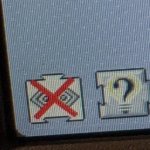
The first icon, 2 hands with some sheets in between, has a red X on it, but so it does when booting Basilisk and there the ethernet connection works fine.

 
The MAC address should be defined by the Ethernet card itself, not the transceiver.  Personally, I've always had plug and play luck with my transceivers, so so long as the Ethernet driver is properly installed you should be fine.  The MAC address on the router will only appear if the machine is actually sending traffic, so it might be worth first looking at the packet received / error counter on the interface.
On the Quadra? I suspect the transceiver gets power and there's certainly activity on the network, but the plug isn't making a good contact. Is there any way to check if the transceiver was properly detected by the built in ethernet?

 
On the Quadra
I meant on the router - I don't know what router you've got, but if you can get a list of MAC addresses per port you should be able to see a received packet and receive error counter.  On mine (a Mikrotik) it's literally next to the traffic graphs for the interface, but YMMV.  I am wondering if it's something as simple as a Tx pin being bent or something?  I have a vague memory that 10BaseT will cheerfully work unidirectionally if one of the pairs of wires is broken - so your adapter would see incoming frames but not be able to send any, which would account for the symptoms you're seeing.

But lots of other things would account for them as well, unfortunately.

Is there any way to check if the transceiver was properly detected by the built in ethernet? 
You're heading out of my expertise area here and I'll have to let someone else answer this one.  I mostly sit on the switch/router side of the wire :-)

 
As I had suggested before, make sure that the Ethernet extensions are in the extensions folder. Take screen shots if you have to and post them here. Without those nothing will work

 
My Quadra 700, running 7.6.1 and has Open Transport installed plus ethernet, appletalk control panel ethernet is active - no problems at all.

Cheers

AP

 
The first icon, 2 hands with some sheets in between, has a red X on it, but so it does when booting Basilisk and there the ethernet connection works fine.
The “<···>” one?

IMG_20200406_205047_MP (1).jpg

I did some testing. If I connect the machine to a router before booting, then the Ethernet extension loads fine. If I leave anything unconnected (machine to transceiver, transceiver to cable, or cable to router) then I get the red X as shown above. The extension is definitely a prerequisite, but the X won’t help narrow down the problem much.

I’m also on 7.6.

 
The “<···>” one?

View attachment 32502

I did some testing. If I connect the machine to a router before booting, then the Ethernet extension loads fine. If I leave anything unconnected (machine to transceiver, transceiver to cable, or cable to router) then I get the red X as shown above. The extension is definitely a prerequisite, but the X won’t help narrow down the problem much.

I’m also on 7.6.
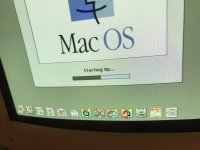
No, it's a different icon. I'm on 8.1. I'll try to catch them on a photo, but why isn't this information saved in a log of some sort?!

I've booted with Basilisk a copy of the image I've dd'ed to the sdcard and the Ethernet extension is there and I can connect to the network without a problem.

I'll inspect the hardware connections in more detail and pay attention to the boot screen/extension loading. 

 
I meant on the router - I don't know what router you've got, but if you can get a list of MAC addresses per port you should be able to see a received packet and receive error counter.  On mine (a Mikrotik) it's literally next to the traffic graphs for the interface, but YMMV.  I am wondering if it's something as simple as a Tx pin being bent or something?  I have a vague memory that 10BaseT will cheerfully work unidirectionally if one of the pairs of wires is broken - so your adapter would see incoming frames but not be able to send any, which would account for the symptoms you're seeing.

But lots of other things would account for them as well, unfortunately.

You're heading out of my expertise area here and I'll have to let someone else answer this one.  I mostly sit on the switch/router side of the wire :-)
I'll have a look at that too, but I have a consumer/gamer router, so I'm not sure I'll find that level of detail (ROG Rapture GT-AC5300 ).

 
Have you tried simply switching TCP/IP from Ethernet to Modem, closing, then switching back from Modem to Ethernet? Sometimes the prefs get screwy.

 
So in OS 8, you should have the Apple Enet extension installed (the one with the X in your photo). You may have some

sort of other network extension installed that is unknowingly disabling the Apple one.

BD7C0F12-A978-493D-9AD8-99F2625F7BDC.jpeg

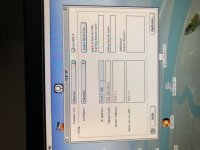
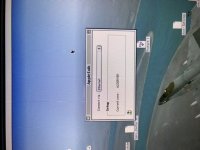
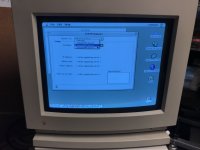
Also, you should be able to see and select “Ethernet” as choices in the TCP/IP control panel as well as the AppleTalk control panel. If you don’t see these choices, then there is likely a software issue, although it does not rule out a hardware one.

(Sorry for the turned pics, this forum software doesn’t like iPhone pics)

8EC0D8E7-0002-4860-8BE1-DC5869FC2B9D.jpeg

861CC09A-B35C-4FCD-B32B-4E423F448E8A.jpeg
 

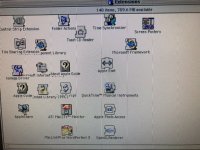
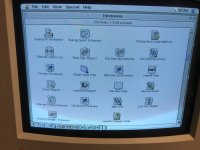
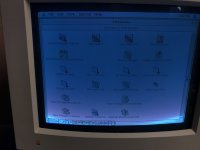
Seeing a list of your extensions from the Extensions Manager would be very helpful.

 
Last edited by a moderator:
So in OS 8, you should have the Apple Enet extension installed (the one with the X in your photo). You may have some

sort of other network extension installed that is unknowingly disabling the Apple one.

View attachment 32506

Also, you should be able to see and select “Ethernet” as choices in the TCP/IP control panel as well as the AppleTalk control panel. If you don’t see these choices, then there is likely a software issue, although it does not rule out a hardware one.

(Sorry for the turned pics, this forum software doesn’t like iPhone pics)

View attachment 32507

View attachment 32508
 

Seeing a list of your extensions from the Extensions Manager would be very helpful.
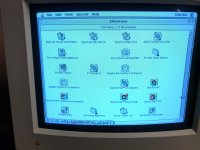
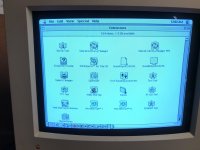
Still no luck. Did a full install of OS 8.1 with all options I could find enabled. Extensions in the attached screenshots.

Thanks in dadvance.

IMG_0044.jpg

IMG_0056.jpg

IMG_0051.jpg

IMG_0052.jpg

IMG_0053.jpg

IMG_0054.jpg

 
Back
Top