
-
 Hello Guest! We're hosting a challenge to welcome vintage Intel macs to the MLA during the month of July! See this thread for more information.
 -
We've made some quality of life improvements to the Trading Post. More info here.
You are using an out of date browser. It may not display this or other websites correctly.
You should upgrade or use an alternative browser.
You should upgrade or use an alternative browser.
Quadra 700 OS8.1 and M0437 ethernet transceiver
- Thread starter goi
- Start date



So it shouldn't be necessary to acquire an IP or for the router to detect its Mac address. This isn't happening.
So you know of any software that does some diagnostics to the network port? I'll try TattleTech, but I'm guessing it only retrieves the info provided by the OS.
I'm also reading the relevant bits on http://www.applefool.com/se30/
So you know of any software that does some diagnostics to the network port? I'll try TattleTech, but I'm guessing it only retrieves the info provided by the OS.
I'm also reading the relevant bits on http://www.applefool.com/se30/
AppleTalk is not necessary to do DHCP, no. If AppleTalk is turned on, that is sufficient to get the router to detect its MAC address if the hardware/driver is working, even if IP is not enabled or working. So this might be a way to check whether this is an IP problem or an Ethernet problem, turn on AppleTalk and see if your router sees any frames coming in.
There is very little in the way of diagnostics. This is one of the infuriating things about classic MacOS.
There is very little in the way of diagnostics. This is one of the infuriating things about classic MacOS.
Last edited by a moderator:
I am thinking the adapter is faulty?
Do you have another one?
Cheers
AP
Do you have another one?
Cheers
AP
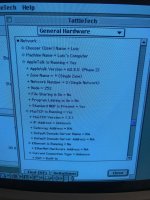

Hi. I get an error saying that Ethernet is unavailable.AppleTalk is probably on one of the serial ports, then. What happens when you try to switch AppleTalk to Ethernet?
TechTool Pro 3.0.6 and MacTest Pro software tests pass for the network controller and network ROM, however it says that no compatible network card was found, so "no tests performed". It does seem to detect the Sonic network chip (or just mentions it because it knows it's running on a Quadra700?). Anyone has any experience with these tools (available from macintoshrepository and macintoshgarden) and/or could try them on their Quadra 700 with working built-in ethernet to compare?
Btw, are there any schematics around I could use to try some board level diagnostics and repair? Maybe it's possible to detect a bad Sonic chip. I usually work with more recent hardware/schematics! ))
))
Thanks in advance.
Regards,
--
Luis
Btw, are there any schematics around I could use to try some board level diagnostics and repair? Maybe it's possible to detect a bad Sonic chip. I usually work with more recent hardware/schematics!
))Thanks in advance.
Regards,
--
Luis
I still didn't manage to make Ethernet work on OS 8.1. Tried a SCSI2SD card image with AS/X but I can't manage to boot from it. Meanwhile I've managed to plug the Performa's SCSI CD drive to the Quadra, so I might eventually try an AS/X or Debian installation from CD. @johnklos can you please provide me with a link to the NetBSD installation (that you know for sure it will work on a Quadra 700)?
Thanks.
Thanks.

The mac68k page is here:
http://wiki.netbsd.org/ports/mac68k/
You should only need the Booter:
https://cdn.netbsd.org/pub/NetBSD/NetBSD-9.0/mac68k/installation/misc/Booter2.0.0.sea
and an installation kernel:
https://cdn.netbsd.org/pub/NetBSD/NetBSD-9.0/mac68k/installation/instkernel/netbsd-INSTALL.gz
When it boots, if it doesn't scroll by too quickly, you can see the network card getting recognized. Once booted, exit the installer and just run `ifconfig -a` to see what the device name of your network card is. Supposing it's `sn0`, then run `dmesg | grep sn0` to get the full kernel messages for it. You can then configure it and test networking from there. If you're not sure how, let me know.
http://wiki.netbsd.org/ports/mac68k/
You should only need the Booter:
https://cdn.netbsd.org/pub/NetBSD/NetBSD-9.0/mac68k/installation/misc/Booter2.0.0.sea
and an installation kernel:
https://cdn.netbsd.org/pub/NetBSD/NetBSD-9.0/mac68k/installation/instkernel/netbsd-INSTALL.gz
When it boots, if it doesn't scroll by too quickly, you can see the network card getting recognized. Once booted, exit the installer and just run `ifconfig -a` to see what the device name of your network card is. Supposing it's `sn0`, then run `dmesg | grep sn0` to get the full kernel messages for it. You can then configure it and test networking from there. If you're not sure how, let me know.
Query: After setting up all those TCP/IP options, did you open a TCP/IP application like a web browser or FTP client? The Classic Mac OS TCP client didn't come configured out of the box to try to get an IP on startup until, if I'm remembering correctly, "pretty late on".
I've forgotten whether or not this is enabled by default in 8.1, so it might be worth doing.
You can change the TCP/IP control panel to advanced or administrator mode and then go if i remember correctly (my apologies, I'm not at a machine where I can look) go to preferences and tell it (I forgot what the text is, I'm sorry) to enable tcp/ip before anything asks for it specifically.
This will use a little bit of resources, probably, but depending on your configuration or your overall intent, won't matter.
Also, if I remember correctly, if you are using an IP-based AppleShare server (like hypotehtically vtools or whatever) you shouldn't have to have AppleTalk enabled. AppleTalk would need to be if you wanted to share files from an 8.1 machine (appleshare over ip wasn't added to the base/client OS until sometime in the 9 era, or with the ppc-only appleshare ip 5 or 6 server product) or use your 8.1 machine to connect to something running 8.6 (again I don't remember the exact cutoff for when IP file sharing was added, I don't know if it was 9.0/9.1/9.2)) or older's personal file sharing. (so, I guess it is needed for a lot of AFP scenarios, but, like, you can get away without if your using osx server, appleshare-ip, netatalk2, or you're not using appleshare at all, like if you're using ftp/hotline/web/whatever.)
I've forgotten whether or not this is enabled by default in 8.1, so it might be worth doing.
You can change the TCP/IP control panel to advanced or administrator mode and then go if i remember correctly (my apologies, I'm not at a machine where I can look) go to preferences and tell it (I forgot what the text is, I'm sorry) to enable tcp/ip before anything asks for it specifically.
This will use a little bit of resources, probably, but depending on your configuration or your overall intent, won't matter.
Also, if I remember correctly, if you are using an IP-based AppleShare server (like hypotehtically vtools or whatever) you shouldn't have to have AppleTalk enabled. AppleTalk would need to be if you wanted to share files from an 8.1 machine (appleshare over ip wasn't added to the base/client OS until sometime in the 9 era, or with the ppc-only appleshare ip 5 or 6 server product) or use your 8.1 machine to connect to something running 8.6 (again I don't remember the exact cutoff for when IP file sharing was added, I don't know if it was 9.0/9.1/9.2)) or older's personal file sharing. (so, I guess it is needed for a lot of AFP scenarios, but, like, you can get away without if your using osx server, appleshare-ip, netatalk2, or you're not using appleshare at all, like if you're using ftp/hotline/web/whatever.)
Still no luck, but I think we're making some progress ...The mac68k page is here:
http://wiki.netbsd.org/ports/mac68k/
You should only need the Booter:
https://cdn.netbsd.org/pub/NetBSD/NetBSD-9.0/mac68k/installation/misc/Booter2.0.0.sea
and an installation kernel:
https://cdn.netbsd.org/pub/NetBSD/NetBSD-9.0/mac68k/installation/instkernel/netbsd-INSTALL.gz
When it boots, if it doesn't scroll by too quickly, you can see the network card getting recognized. Once booted, exit the installer and just run `ifconfig -a` to see what the device name of your network card is. Supposing it's `sn0`, then run `dmesg | grep sn0` to get the full kernel messages for it. You can then configure it and test networking from there. If you're not sure how, let me know.
To launch Booter, I did have to troubleshoot the "not enough free memory" error I was getting (10MB did the trick).
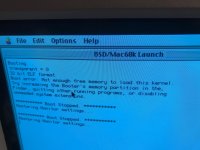
As you can see, the network card is indeed recognized ...
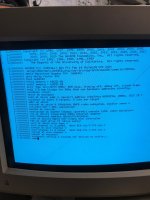
But it hangs after printing "adb0" (I guess 20 minutes should be enough to pass from that point onwards, no?
I've started Booter with all the default settings, except using the kernel install file you've mentioned instead of a BSD device.
Thanks in advance.
Luis
How can I set the TCP control panel in advanced/administrator mode?Query: After setting up all those TCP/IP options, did you open a TCP/IP application like a web browser or FTP client? The Classic Mac OS TCP client didn't come configured out of the box to try to get an IP on startup until, if I'm remembering correctly, "pretty late on".
I've forgotten whether or not this is enabled by default in 8.1, so it might be worth doing.
You can change the TCP/IP control panel to advanced or administrator mode and then go if i remember correctly (my apologies, I'm not at a machine where I can look) go to preferences and tell it (I forgot what the text is, I'm sorry) to enable tcp/ip before anything asks for it specifically.
This will use a little bit of resources, probably, but depending on your configuration or your overall intent, won't matter.
Also, if I remember correctly, if you are using an IP-based AppleShare server (like hypotehtically vtools or whatever) you shouldn't have to have AppleTalk enabled. AppleTalk would need to be if you wanted to share files from an 8.1 machine (appleshare over ip wasn't added to the base/client OS until sometime in the 9 era, or with the ppc-only appleshare ip 5 or 6 server product) or use your 8.1 machine to connect to something running 8.6 (again I don't remember the exact cutoff for when IP file sharing was added, I don't know if it was 9.0/9.1/9.2)) or older's personal file sharing. (so, I guess it is needed for a lot of AFP scenarios, but, like, you can get away without if your using osx server, appleshare-ip, netatalk2, or you're not using appleshare at all, like if you're using ftp/hotline/web/whatever.)
Anyway, I've always started Netscape and IE to check for connectivity since the control panel may wrongly show that no IP was assigned yet.
My goal is to fetch files from my Synology NAS (where I've set an Appleshare share and that I'm accessing without problems from BasiliskII - OS 8.1 - and also from QEMU - OS 9.2.2) without having to open up the Quadra to remove the SD card and copy them over (for which I also have to use an OSX 10.5 virtual machine). I've actually been using the LaserWriter 300 in the last weeks while my Pixma was waiting for a new printhead. I had to convert PDFs down to v1.2 (to PostScript Level 2 on Acrobat 9, and back to PDF, 1.2, on Acrobat 4 ) to be able to print them via Acrobat 3.0 on the Quadra ... everytime copying the files to the SD card. Lots of work, I know, but it was the only printer available at home and in the end it did a pretty good job for a 25yo printer!
Try the SBC kernel - it may be hanging because of the SCSI:
https://cdn.netbsd.org/pub/NetBSD/NetBSD-9.0/mac68k/installation/instkernel/netbsd-INSTALLSBC.gz
To get the TCP/IP control panel in to administrator mode, open it, then select "User Mode..." under "Edit", then select Administration.
https://cdn.netbsd.org/pub/NetBSD/NetBSD-9.0/mac68k/installation/instkernel/netbsd-INSTALLSBC.gz
To get the TCP/IP control panel in to administrator mode, open it, then select "User Mode..." under "Edit", then select Administration.
Similar threads

- Replies
- 19
- Views
- 2K

- Replies
- 10
- Views
- 3K

- Replies
- 5
- Views
- 687

- Replies
- 18
- Views
- 16K
- Replies
- 8
- Views
- 3K