• Hello MLAers! We've re-enabled auto-approval for accounts. If you are still waiting on account approval, please check this thread for more information.

Proper way to GROUND when discharging CRT of compact mac?

I know there are numerous discussion on the topic of discharging CRTs for compact Macs.  however, I have found conflicting information regardin the propwer grounding LOCATION.    On a Mac 512Ke, is it OK to ground the discharge wire to the ground (same as chassis) of the computer?    I think I read in one thread that this could fry the logic board which is also grounded to the chassis.  I'm not sure if it was refering to this particular Mac model though.

Another thread mentioned grounding to the 'grounded connection' of an electrical wall socket, which seems a safer bet to me -- but one needs to be sure that the electrical plate is wired correctly at the wall.

Another method I have tried is to disconnect the Mac from the wall while at full brightness, but I see no guarentee that this would effectively discharge the monitor.

Any advice?

 
Last edited by a moderator:
I have done it this way in my 512 and Plus:

Easy first step: "disconnect the Mac from the wall while at full brightness"

And then as a followup: "ground the discharge wire to the ground (same as chassis) of the computer"

I am still alive :)

And never been zapped either. knock on wood for next time. :p

 
Ya, you could use a wall outlet, etc. But its really about balancing out the electrons. Grounding to the metal frame is the recommend method by Apple.

 
I read just now that one must discharge to the grounding lug only. Which may not be the same as the frame from what I can tell. Anyway, I will follow the process of discharging.

 
Do you normally hear a ZAP when you followup with the ground discharge ?  (considering that you first  disconnected at full brightness..)

I have done it this way in my 512 and Plus:

Easy first step: "disconnect the Mac from the wall while at full brightness"

And then as a followup: "ground the discharge wire to the ground (same as chassis) of the computer"

I am still alive :)

And never been zapped either. knock on wood for next time. :p
 
Yeah, I took the motherboard out already. I need to discharge the CRT to get everything out and remove the front plastic faceplate for de yellowing

 
As long as you don't stick your tongue up under the red suction-cup looking thing on the back, you should be fine. 

To be perfectly sure, you could find the metal pipe that brings water into your home and ground to that.  It will definitely be "to earth."

Get a socket tester and see if your outlets are grounded properly.  It'd be good to know anyway.

 
Funny... I hear you say that, but I also hear numerous stories from people that have gotten SHOCKED....  and I'm pretty sure they weren't screwing around with the anode! 

As long as you don't stick your tongue up under the red suction-cup looking thing on the back, you should be fine.
 
Funny... I hear you say that, but I also hear numerous stories from people that have gotten SHOCKED....  and I'm pretty sure they weren't screwing around with the anode! 
The only time I've been shocked while working on a compact Mac was in the process of grounding the anode.  When I've just left it alone, I've been fine.   The shock is startling, but unless you have some condition that makes you especially vulnerable, it's not dangerous.   Then again, I've been electrocuted many times by wall current without learning better, so maybe I'm just amperage tolerant.

 
How did you manage to shock yourself grounding the anode?!  Were you doing something wrong?  Seems like a safe procedure if you have a properly built 'tool', ground one side correctly, and and poke correctly on the anode.  Please explain?

The only time I've been shocked while working on a compact Mac was in the process of grounding the anode.  When I've just left it alone, I've been fine.   The shock is startling, but unless you have some condition that makes you especially vulnerable, it's not dangerous.   Then again, I've been electrocuted many times by wall current without learning better, so maybe I'm just amperage tolerant.
 
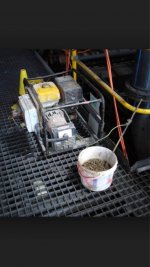
Took me a minute to figure out what that photo was… "ground". Very nice. I'm sure that setup worked great and was totally safe!

 
Well just for completeness, I wanted to point out what I have learned after successfully taking apart the CRT:

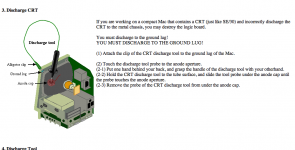
1)  You must GROUND the discharge tool to the GROUNDING LUG ON THE CORNER OF THE MONITOR.   Do NOT ground to the chassis at any other place... it can (and likely WILL) kill your logic board.  This is true on early Macs as far as I can tell... grounding points are different.

2) I did the 'max brightness and pull the chord' procedure.

3) I also let the Mac sit for about a week

4)  I attempted to discharge the CRT after a week passed, and there was absolutely no sign of remaining charge on the tube.

Net, I conclude that the combination of PULL THE CORD plus Waiting 1 week is sufficient on ealry Macs.  I will (and would advice) to discharge the CRT regardless to be 100% sure.

 
It drives me insane how many misconceptions there are to discharging a CRT and I've heard a lot of them. The brightness setting does not matter when discharging the anode because when the power is off, that whole circuit is dead anyways. You can wait a week if you want but believe me there's a much better alternative. Here, have a guide.

discharge.jpg.9491892e7e9bcc8710ecb2ae8af05944.jpg


Last edited by a moderator:

Back
Top