• Hello MLAers! We've re-enabled auto-approval for accounts. If you are still waiting on account approval, please check this thread for more information.

Processor slot loose bad contact CPU

bengi3

6502
I have an heavily upgraded Power Macintosh 7600 (https://www.ispezioneperugia.it/mac/68k/Power_Macintosh_7600.html), it has served for many years as my daily machine (from 1996 to 2003, up to Mac OS X via XPostFacto) and was then replaced by a G5 in 2003. After a few years in storage I decided to fire it up to sadly discover that the processor slot is somehow damaged and the Mac boots only if I push the processor card laterally: I tried several cards, from the original 604 to the newest Sonnet G4 but no luck. I think that some pins do not make contact. I have bought a replacement logic board and it now works flawlessly, but would like to see if the connector pins of the bad logic can be fixed by pulling them back. Is it feasible?
 
Last edited:
The sagging of these cards causes wear on the slot and connector itself; that CPU slot connector is likely not obtained easily unless from a donor board. Yes, you could probably ease the pins out slightly more checking the connector under high magnification. Further cleaning might solve the problem, the old using an eraser on the CPU edge connector to clean the pins might also help.
 
Is it feasible?
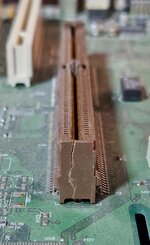
I'm not sure if you have the same issue, but I recently picked up a 7300 that arrived damaged. It too would not boot. On close inspection, I discovered this :

20230429_104502.jpg

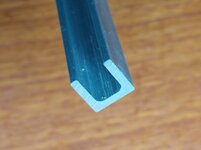
Using a small C-clamp I was able to squeeze the connector together and the 7300 booted right up and ran fine. I haven't sorted out a permanent fix yet, but plan to hunt down some aluminum channel - hopefully with the right internal dimension.🤞

Good luck with yours.
 
I'm not sure if you have the same issue, but I recently picked up a 7300 that arrived damaged. It too would not boot. On close inspection, I discovered this :

View attachment 55890

Using a small C-clamp I was able to squeeze the connector together and the 7300 booted right up and ran fine. I haven't sorted out a permanent fix yet, but plan to hunt down some aluminum channel - hopefully with the right internal dimension.🤞

Good luck with yours.
@mg.man

It might be enough to put some glue (possibly a little solvent) in the break and clamp it, rebond the original part. If you use solvent it should be pretty strong, just use minimal amounts to avoid miss-shaping it.
 
It might be enough to put some glue (possibly a little solvent) in the break and clamp it
Maybe. I do have some plastic cement for modeling that I've used elsewhere. When taking the above pic I spotted the central "key" is also starting to split. 😑 That's going to be a trickier one to sort out.
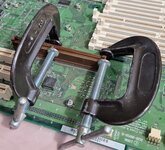
There's no urgency on this, tho... I bought the PM for the DOS card (and cable) that were with it - and those survived just fine. So I'm calling a win! 😀
 
above pic I spotted the central "key" is also starting to split
They break as often as not, is partially missing in one of my machines. That might not be too much of a worry. Similar fix, small drop of plastic cement / solvent might help reinforce it.

Someone must have really hung off your processor card!
 
Someone must have really hung off your processor card!
I think it was the rough handling by the parcel company, the lid was ajar and the plastic "flap" over the expansion / CPU area was all broken up. It was probably dropped on the side or something. The drives were also loose - floppy retaining plastics shattered, CD rails broken, etc... it obviously took a beating - despite the packing / padding being reasonable. Oh well, as I said, I was "buying" the DOS card / cable - which survived. The mobo works when braced, as does the CPU, RAM, PSU, HD, etc...
 
Just seeing if this actually worked
Believe it or not... haven't had a chance to test yet. 😞 Life threw some serious curveballs which put Mac-time on hold for most of May/June. Just getting back to a few projects - including this - that were back-burnered.
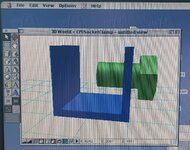
Visibly, the repair went well - just need to drop a CPU in and check it out proper. I do have something in mind... recently picked up a dual 200Mhz 604 that I need to check out... 😀
 
Cool. Let me know. I am also taking some measurements and seeing if something like the 3d-printed ROM clips developed by @PotatoFi to reinforce the SE/30 ROM slot might work for this application as well.
 
if something like the 3d-printed ROM clips ... reinforce the ... slot might work
Yeah, I've been thinking along these lines for the longer-term. Will let you know how the testing goes. (that said, I expect it will work since I'd previously used a smaller clamp to confirm the instability was down to the splitting connector)
 
I'd suggest mini G-clamps perhaps.

If you buy a section of Channel section Aluminium, then drill and tap a hole, and put screws through. one at each end. To limit damage to the plastic, a small metal cup over the end of the screw would help.

The clamp force would be much better than a plastic clip.

Hum... do I have FreeCAD installed...
 
Back
Top