• Hello MLAers! We've re-enabled auto-approval for accounts. If you are still waiting on account approval, please check this thread for more information.

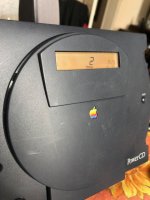
PowerCD repair

bibilit

68030
One of my PowerCD was not working and just showing the "ERR" fault code.

Was not able to see anything obvious inside, but was confident the problem was in the motor area (was unable to hear the motor spin)

To cut a long story short, the spinning motor was unable to spin.

the disk is just drop in the PowerCD, not pushed like any other CD-Rom, so probably someone tried this method, jamming it for good.

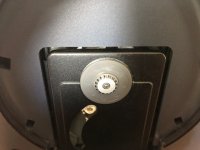
lifting a little the center grey disk solved the issue.

Second time i see this problem.

Working great.
 

IMG_2036.jpg

IMG_2034.jpg

IMG_2035.jpg

 
Thanks  bibilit - one of my future repair jobs is a PowerCD, it refuses to spin any media as the spindle feels "rough" when rotating it around.  I assumed I'd have to take it apart for repair, but your issue sounds similar - did you just lift the grey part up with your fingers (was the PowerCD disassembled?).

 
 did you just lift the grey part up with your fingers (was the PowerCD disassembled?).
Was dissassembled first to troubleshoot (the motor is a DC 5.9 volt unit, so tried with an external 6 volt PSU to confirm my hunch) then use a small screwdriver to lift the grey part slowly, but you probably can  try with removing anything.

 
Another PowerCD working! Thanks to the advice of @bibilit :)

The grey disk/motor spindle on mine had seized or someone pushed it in firmly when trying to put a CD in.  This resulted in a spindle with lots of friction that the CD motor couldn't spin freely to read a CD, the CD refused to move.

As my PowerCD was pretty rough I took it apart, it dismantles fairly easily.  Be aware of there are three cables to disconnect along the way (which are fairly hard to yank out); and the lens laser --> PCB ribbon cable is very short and fragile.

With the unit apart, you get get better access to the lens and grey disk, and there is also a cut away of metal allowing you to get a very fine screwdriver in (not really visible with just the tray open).  I lubricated penetrating oil around the front and back of the grey disk/motor, left it be for a while then gently shuffled the the flat screwdriver head under the disk, and heard a satisfying "pop" as it came out a fraction of a mm.  The grey disk/spindle could now be moved smoothly.

Packed it all up, and it fired up an audio CD straight away :)   I'd never seen this unit working, so it was great to fix something vintage and Apple without it taking days and finding other issues along the way!  

JB

 
Last edited by a moderator:
It's a great piece of tech - I'm getting around the intricacies of the drive and a few quirks with the driver installed on a PowerBook 540C running OS 8.1.

Burnt data CDs surprisingly mount - slowly - while burnt audio CDs refuse to play under Mac OS yet play tracks perfectly in "standalone" mode when the computer is off.  I burnt the audio CD in iTunes 12.9 and it thinks it's a data CD, I'll perhaps need to burn audio CDs on old authoring software that doesn't add fancy things to the burn.

Once again, thanks!

 
Back
Top