• Hello MLAers! We've re-enabled auto-approval for accounts. If you are still waiting on account approval, please check this thread for more information.

Powerbook 3400c Battery Rebuild

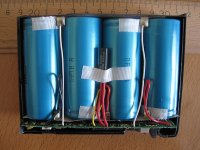
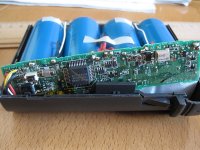
I've cut out the board and made a note of where the wires came from.  There were 4x 26650 lithium cells.  As I can't tab or solder them myself and I don't think the holders I've found will work well, I'm looking into potentially just breaking apart a ready-made battery and stealing the cells.  It looks like it will be cheaper.  However, I don't actually know how the intelligent circuitry works.

So before I move on anything, does anyone have thoughts on replacing 4x 26650 batteries with 8 different cells?

(http://www.amazon.com/gp/product/B00OCLBL60/)

The 4-cell batteries I've found all are rated too low, and they aren't comparatively very cheap either.  A 4-cell roughly 2000mAh battery runs roughly $25.  An 8-cell rated at more than twice that is a little less expensive.  If I recall properly Apple's was rated either at 3300mAh or 3800mAh.

 
Last edited by a moderator:
Mouser actually has the holders for just under $6 (534-1109) though they are backordered.  I think for the 3400c battery I'm going to go that route with these:  http://www.ebay.com/itm/271550140673.  That'll bring the total cost to just about $30.

For the Kanga battery I will likely take the salvage route.

 
Last edited by a moderator:
All this 3400c talk made me want to pull out mine, and it has its original battery. It is still holding a charge for over an hour of runtime. 

 
Got about an hour and 10 minutes on its original battery before it died. And it didnt really die, the Energy power management kicked in and put it to sleep. 

has a 1997 date code, I think I need to frame this battery or something. haha. 

 
Last edited by a moderator:
Yeah, I have a Lombard battery like that. Odd thing was that it never worked for most of its existence, and it just somehow randomly started working when I accidentally put Tiger on the Lombard it belongs to.

Then it got at least 2 hours of runtime.

That was all a few years ago, however; I have no clue if the thing is still any good (it may not be, but who knows?)

c

 
I had a lombard like that as well, but I ended up getting rid of it. I came into a second one which causes the machine to crash if I put its battery in it, needless to say its dead. 

 
There are software components to the battery's efficiency and longevity; though I don't know that they apply to your two batteries.  Maybe I'm misremembering.  The link I originally posted is to best practices for charging/discharging.  I remember reading an Apple forum discussion about software issues.  It may even have been an archived Apple page.

 
Last edited by a moderator:
Oh, I meant on the efficiency/persistence, not the crashing on insert - I missed that part of the post.  And I couldn't find anything directly on point to it.

 
Last edited by a moderator:
Yea, and it even stops it from powering up sometimes. it will chime and stay black screen, or not chime at all. Or repeatedly chime. 

So i tossed it. it was garbage anyway. 

 
That exact symptom occurred with my bootlegged battery and the 5300 this morning: chime off of the battery and then nothing else.  I forget if I tried to soft reboot.

Maybe the circuitry was damaged in yours - shrug.

 
Last edited by a moderator:
One for the road... the battery holders are too long. So either I'll just use their tabs or cut them down to plastic bats and glue the tabs on. Elegant.

 
Last edited by a moderator:
The tabs themselves are too big... taped it together and it recognized and started to charge. It gave off a weird smell which was likely the tape so I broke it up and will regroup tomorrow. Not sure what to do... revisit some type of glue?

 
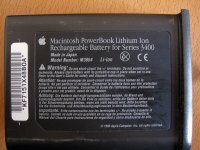
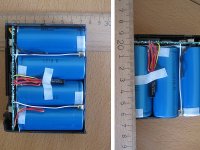
Here some more pictures which I shot, when the PB 3400c battery fell down. - Yes the battery is still ok.  :)

(dimensions in centimeters)

PowerBook 3400c Li-Ion Battery M3654_1.jpg

PowerBook 3400c Li-Ion Battery M3654_2.jpg

PowerBook 3400c Li-Ion Battery M3654_3.jpg

PowerBook 3400c Li-Ion Battery M3654_4.jpg

PowerBook 3400c Li-Ion Battery M3654_5.jpg

 
Last edited by a moderator:
raoulduke....

What I love about building your own battery replacements is that the older the device, the higher mAh your new one will be.

I just found a PRAM replacement battery for my Powerbook A1095 M9422LL/A.  The original was 140mAh, and the drop in replacement is 200mAh. Yes!

jack


I've cut out the board and made a note of where the wires came from. There were 4x 26650 lithium cells. As I can't tab or solder them myself and I don't think the holders I've found will work well, I'm looking into potentially just breaking apart a ready-made battery and stealing the cells. It looks like it will be cheaper. However, I don't actually know how the intelligent circuitry works.

So before I move on anything, does anyone have thoughts on replacing 4x 26650 batteries with 8 different cells?

(http://www.amazon.com/gp/product/B00OCLBL60/)

The 4-cell batteries I've found all are rated too low, and they aren't comparatively very cheap either. A 4-cell roughly 2000mAh battery runs roughly $25. An 8-cell rated at more than twice that is a little less expensive. If I recall properly Apple's was rated either at 3300mAh or 3800mAh.
Does ANYBODY have a pinout/wiring diagram for the 3400c battery? I'd like to try rebuilding one. My current battery works with 4 LED's when you press the check button on the side, but i am SURE it WILL FAIL at some point in the not-too-distant-future. I've looked everywhere. The = and - symbols on the pack do not seem to be correct, but since someone here has already taken one apart, it seems strange that nobody has posted a pinout, wiring diagram, hand-drawn schematic, etc... Need help please!
 
Back
Top