• Hello MLAers! We've re-enabled auto-approval for accounts. If you are still waiting on account approval, please check this thread for more information.

PowerBook 140 Display Blue

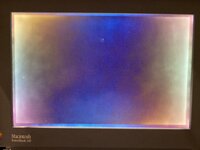
I just got given a PowerBook 140, and it seems to work other than the display.

It is in pieces for standoff replacements, but is put together enough to test. I hear chime and drive activity, but the display stays blue regardless of contrast slider. Brightness is only on or off, no dimming at all, so that may be relevant. There seems to be some cap goo on the display board, so that may also be a contributing factor.

This is my first passive matrix PowerBook and I'm not really sure how to proceed other than buying new capacitors, which I plan to do.

I have all of the necessary equipment for replacing the capacitors.


TLDR: My screen is blue, I hear the boot chime ,caps might have leaked, what should I do?
 
It’s the caps. Replace them and if you’re lucky the screen will work perfectly again. Be warned though that cap leakage can easily get inside of and damage the ribbons going from the display board to the glass panel itself. Pictures would be helpful in assessing the damage. But yes, replace those caps!
 
I'll provide some pictures later today, It didn't look like too much leakage, but hopefully its not inside the cables. Only 3 or 4 out of 11 seemed to be leaking, but I would imagine that all are long dead.

Edit: I am missing one of the hinge cover pieces, do you know if they have 3d printable replacements for them?
 
Not that I know of, my 180c is missing one of them too.

Also in case you didn’t know, there are no electrolytic caps on the motherboard. There are probably one or two through hole caps on the inverter board that would be good to change as well.
 
Oh, ok. I will have to look into making a file for that sometime or other.
Thanks for telling me about the logic board, I wasn't sure if it was the same case as my 170 that also only has tantalums.
I don't remember seeing caps on the inverter board, but I will check that later today as well.
 
Just checked the inverter board and found some
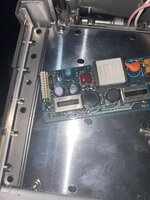
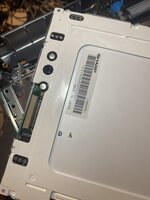
More caps. Pics of screen caps also attached
 

Attachments

  • 32A9EF96-EBA7-498D-8DFC-4F672F128604.jpeg
    32A9EF96-EBA7-498D-8DFC-4F672F128604.jpeg
    1.8 MB · Views: 21
  • image.jpg
    image.jpg
    1.7 MB · Views: 18
The purple one is a solid polymer cap - it can’t leak and it likely won’t fail either. I can’t see the pads of the LCD caps because the plastic bit is installed but I’ll bet they’ve leaked quite a bit.
 
Always interesting to see how different cameras pick up that blank screen. Old polarizer film can be wacky can’t it! Yeah, get those caps changed and it should come back barring any additional issues. My PowerBook 145 did (same screen). I’ve still gotta change that inverter board cap on my 145.
 
Well it stopped chiming so that’s not great. I put my 170 cpu board onto the main motherboard of the 140 and it worked, so that narrows it down. No idea what happened.
 
Sounds like you should stop messing with it until you’ve got the caps changed in the LCD. Will just cause further trouble.
 
Sounds like you should stop messing with it until you’ve got the caps changed in the LCD. Will just cause further
I do have a powerbook 170 that works for testing if needed
Have an oscilloscope coming soon to do some troubleshooting, should get it the same time as the capacitors.
If I cant fix it, I may be able to get replacement parts online, maybe I will make it 25Mhz instead of 16.
 
Sounds like you should stop messing with it until you’ve got the caps changed in the LCD. Will just cause further trouble.
I’m finally ready to continue troubleshooting. Screen has been recapped and I have an oscilloscope now. I heard from a friend that the reset signal may be held low but I have no idea how to check that. Any ideas on where to start with the oscilloscope?
 
Same symptoms after recap? Give the entire display board a thorough cleaning and make sure the cable is seated properly. Check it for any tears as well.
Edit: Ah, forgot that the powerbook quit working. Transplant the entire top housing (display, interconnect, inverter, keyboard, case, etc) to your powerbook 170 base. Then you can test the screen itself.
 
Same symptoms after recap? Give the entire display board a thorough cleaning and make sure the cable is seated properly. Check it for any tears as well.
Edit: Ah, forgot that the powerbook quit working. Transplant the entire top housing (display, interconnect, inverter, keyboard, case, etc) to your powerbook 170 base. Then you can test the screen itself.
Screen works good. Also picked up a working 145B that I can test with if needed as well.
 
Back
Top