I'm having trouble solving a sad Mac error with one of my PB100s. It was running fine, but I decided to clean the logic board, CPU card, RAM card, and bottom case because the person I purchased it from on eBay apparently had a cat and I'm allergic to cats (there were cat hairs in the laptop). The boards also did need cleaning. I disassembled the laptop and washed each board in mildly soapy water with a toothbrush, then tap water, and then a final rinse in distilled water. I used paper towels to remove most of the water and I left them to dry for several days. When I put it back together I got a sad Mac error:
0000000E
0000FF00
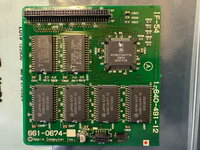
A search online seemed to indicate a bus failure related to the CPU card. Indeed, when I swap the CPU card with another one from a working PB100, the sad Mac error does not happen. I inspected the CPU card and didn't see any obvious problems (picture attached).
I read online that the sad Mac code indicates bus failure between the CPU card and the PSRAM chips U306/U307. I am not an engineer and I am confused by the PB100 schematic that is available online, so I decided to map which pins from the CPU connect to pins on those PSRAM chips. I downloaded pin diagrams for the PSRAM (HM658512A) and for the MC68HC000 CPU. I used my good CPU card and mapped out the pins with a multimeter. But it turns out that all of the pins between the CPU and U306/U307 map the same for the good card and the bad card.
In particular, I mapped CPU D0-D7 (pins 5, 4, 3, 2, 1, 68, 67, 66) to U306/U307 I/O0-I/O7 (pins 13, 14, 15, 17, 18, 19, 20, 21).
I read online that someone else had this same sad Mac code with a PB100 and it was their U306 Vcc (pin 32), so for good measure I reflowed pins 30-32 on both of the PSRAM chips. I also saw 2 pins on the CPU that seemed a little dodgy (pins 21 22), so I reflowed those and now they look nice (better than in the picture below). But these procedures did not fix the failing CPU card.
Maybe I'm way off base? I'm a novice at this. What should I try next? Should I test connections with the other PSRAM chips on the card? I don't have a heating platform, so I'm trying to avoid just removing the PSRAM chips, cleaning under them, then reinstalling them. What is the best next step? Any thoughts are greatly appreciated!
Here is the failing card.
0000000E
0000FF00
A search online seemed to indicate a bus failure related to the CPU card. Indeed, when I swap the CPU card with another one from a working PB100, the sad Mac error does not happen. I inspected the CPU card and didn't see any obvious problems (picture attached).
I read online that the sad Mac code indicates bus failure between the CPU card and the PSRAM chips U306/U307. I am not an engineer and I am confused by the PB100 schematic that is available online, so I decided to map which pins from the CPU connect to pins on those PSRAM chips. I downloaded pin diagrams for the PSRAM (HM658512A) and for the MC68HC000 CPU. I used my good CPU card and mapped out the pins with a multimeter. But it turns out that all of the pins between the CPU and U306/U307 map the same for the good card and the bad card.
In particular, I mapped CPU D0-D7 (pins 5, 4, 3, 2, 1, 68, 67, 66) to U306/U307 I/O0-I/O7 (pins 13, 14, 15, 17, 18, 19, 20, 21).
I read online that someone else had this same sad Mac code with a PB100 and it was their U306 Vcc (pin 32), so for good measure I reflowed pins 30-32 on both of the PSRAM chips. I also saw 2 pins on the CPU that seemed a little dodgy (pins 21 22), so I reflowed those and now they look nice (better than in the picture below). But these procedures did not fix the failing CPU card.
Maybe I'm way off base? I'm a novice at this. What should I try next? Should I test connections with the other PSRAM chips on the card? I don't have a heating platform, so I'm trying to avoid just removing the PSRAM chips, cleaning under them, then reinstalling them. What is the best next step? Any thoughts are greatly appreciated!
Here is the failing card.