Power Mac G4 MDD and the USB 2.0 chip

Dandu

6502
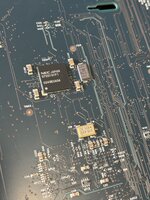
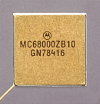
I have a question: the Power Mac G4 MDDs include a USB 2.0 chip (NEC D720101F1), even though Apple marketed the machines as USB 1.1 only — possibly to highlight FireWire instead.

I have a motherboard (without anything else) that allowed me to confirm that it really is a USB 2.0 chip. But I was wondering: has anyone ever managed to actually use USB 2.0 on these machines? I found some old threads showing that third-party drivers more or less enabled USB 2.0 back in 2003, but I couldn’t find anything after that.

Did Apple ever enable USB 2.0 in Tiger or Leopard? Is it a hardware limitation? Does anyone know?
 
My memory may be wrong, but as I recall when they officially announced USB 2 support with the later MDDs (the FW800?) that enabled USB2 support on the original MDDs that had the correct chipset. What OS is your MDD running?
 
This is quite interesting. Sort of implied Apple held off on USB 2.0 support to avoid stealing Firewire’s thunder. Seems silly in hindsight.

@Durosity I thought the PowerMac G5 was the first model to support USB 2.0 officially.
 
NEC µPD720101 datasheet is available here.

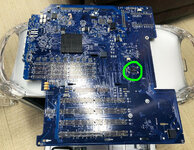
Looks like the chip is on the underside of the board – I'm surprised having it so far away from the ports would be at all optimal.

mdd-usb2.jpg

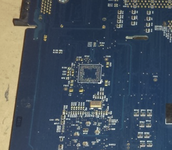
The FW400 logic board appears to have an unpopulated BGA footprint in that location, so could likely accept a USB 2.0 chip. I don't understand why they populated it for the FW800 board if they're not using USB 2.0 since presumably the northbridge (was it still Uni-North on these?) has USB built in.

Screenshot 2026-05-26 at 14.32.58.png
 
Last edited:
If anyone wants to try, I've attached the driver that 'CreateMac' (the Korean site that claimed they got USB 2.0 working) originally hosted, thanks to the Internet Archive.

Double clicking the image file fails with an error saying that it's corrupt on my M1 Macbook Pro. Reading some forum posts from back in 2004 some people were complaining about the same error. Maybe it can be repaired?
 

Attachments

The FW400 logic board appears to have an unpopulated BGA footprint in that location, so could likely accept a USB 2.0 chip. I don't understand why they populated it for the FW800 board if they're not using USB 2.0 since presumably the northbridge (was it still Uni-North on these?) has USB built in.
For what it's worth, I thought USB was in the southbridge, KeyLargo.
 
If anyone wants to try, I've attached the driver that 'CreateMac' (the Korean site that claimed they got USB 2.0 working) originally hosted, thanks to the Internet Archive.

Double clicking the image file fails with an error saying that it's corrupt on my M1 Macbook Pro. Reading some forum posts from back in 2004 some people were complaining about the same error. Maybe it can be repaired?
The image can indeed be repaired, my ADC tool works. Here's the repaired image (uncompressed HFS partition image), it contains a .pkg that installs two kexts, OMI_EHCI.kext and OMI_USBHub.kext.
 

Attachments

The image can indeed be repaired, my ADC tool works. Here's the repaired image (uncompressed HFS partition image), it contains a .pkg that installs two kexts, OMI_EHCI.kext and OMI_USBHub.kext.
Nicely done.

Looks like the same installer that's available here. I think theirs is corrupted too!
 
I have a question: the Power Mac G4 MDDs include a USB 2.0 chip (NEC D720101F1), even though Apple marketed the machines as USB 1.1 only — possibly to highlight FireWire instead.

I have a motherboard (without anything else) that allowed me to confirm that it really is a USB 2.0 chip. But I was wondering: has anyone ever managed to actually use USB 2.0 on these machines? I found some old threads showing that third-party drivers more or less enabled USB 2.0 back in 2003, but I couldn’t find anything after that.

Did Apple ever enable USB 2.0 in Tiger or Leopard? Is it a hardware limitation? Does anyone know?

if you downgrade the BootROM on a Firewire 800 MDD to a Firewire 400 MDD, then it just sees the NEC USB 2.0 chipset as yet another generic USB 2.0 NEC PCI device on the bus and USB 2.0 speeds are enabled :)

this would imply there might be something in the device tree of the FW800 machine causing OS X to artificially not load the USB 2.0 drivers

it would be cool to see if USB 2.0 could be enabled without the need of a boot ROM downgrade
 
if you downgrade the BootROM on a Firewire 800 MDD to a Firewire 400 MDD, then it just sees the NEC USB 2.0 chipset as yet another generic USB 2.0 NEC PCI device on the bus and USB 2.0 speeds are enabled :)

this would imply there might be something in the device tree of the FW800 machine causing OS X to artificially not load the USB 2.0 drivers

it would be cool to see if USB 2.0 could be enabled without the need of a boot ROM downgrade

Any other side effects of downgrading?

Because if not, it almost seems like a no-brainer as you gain OS9 support.
 
Looks like the same installer that's available here. I think theirs is corrupted too!
That one says 3.0 instead of 3.1. It unstuffs into a .img file that is actually a MacBinary .bin file. Decoding the MacBinary gives a functional disk image complete with file type/creator and resource fork. I couldn't open the disk image in Leopard so I used DiskCopy in Mac OS 9. The disk image contains a .pkg file. The .pkg file contains older versions of the previously mentioned 3.1 kexts.

version 3.1 of the OMI_EHCI.kext has corrections and additions to the info.plist file compared to version 3.0.

Both version 3.1 kexts have code changes compared to the older kexts. I don't know what the changes are.

I wonder why Apple's EHCI kexts are not sufficient? For both Tiger and Leopard, com.apple.driver.AppleUSBEHCI has a AppleUSBEHCI personality and there's also a AppleUSBEHCI_OMI personality but I don't know what it does or why it exists with the AppleUSBEHCI personality.

OMI = Orange Micro Inc?

The AppleUSBEHCI_OMI personality uses class IOService so it doesn't do anything. I suppose if the AppleUSBEHCI class specified by the AppleUSBEHCI personality doesn't attach to the EHCI device then the IOService class specified by the AppleUSBEHCI_OMI personality will.

The com_orangemicro_iokit_OMI_EHCI class from com.orangemicro.iokit.OMI_EHCI will override the AppleUSBEHCI_OMI personality if it sets the IOProbeScore > 10 in its code (since it doesn't include IOProbeScore in the Info.plist)?
 
Back
Top