Outbound Laptop repair/reverse engineering

Yeah 8 modules, I tried both 1MB and 4MB modules in the RAM disk slots, as well as none at all, the behavior is always the same.
I would open the control panel if the mouse worked. I think the EEPROMs are version 1.2.1, I can't remember if I updated them.

I also accidentally discovered that if you just give it 1MB of RAM at 0x600000 it will gladly make a 1MB RAM disk out of that, so I'll have to see exactly how that works, I would have thought it would be doing some sort of bank switching.

That is interesting - I expected the same. Especially as they supposedly support up to 16MB in the ramdisk. How are you giving it RAM, poking bytes with microbug? Supposedly there's a modified version of macsbug, but i doubt that will ever materialize...

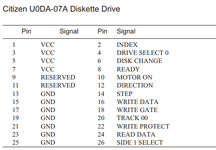
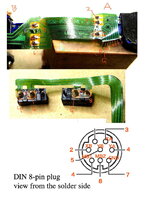
Keeping forgetting your mouse is nonfunctional. Something that might be interesting to test wrt your mouse issues is if click works. In the boot position it'll at least click on the apple menu. You could also test this by sticking a jumper in the mouse port according to the pinout above.
 
How are you giving it RAM, poking bytes with microbug? Supposedly there's a modified version of macsbug, but i doubt that will ever materialize...
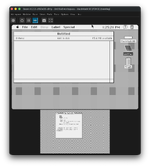
Just in an emulator. I think I got the RAM disk working in it now, looks like there's just a few registers for controlling the address lines on the RAM.

Screenshot 2026-01-08 at 1.23.01 PM.png
 
You're using an emulator to roughly fake up the docked outbound + se/plus address map then? Clever, I like it!
I've not done much probing of the address map other than identifying some IDE registers.

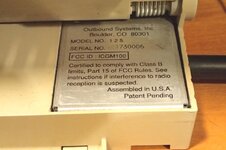
Incidentally, the shut-off-when-base-closed function is done by another reed switch buried in the power module, so you can take your NMI magnet and place it on top of the serial sticker for a hard shutdown. Or drop the NMI magnet.... guess how I figured that out.
 
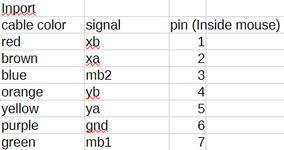
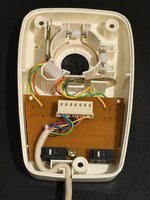
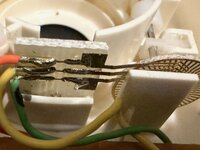
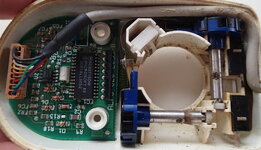
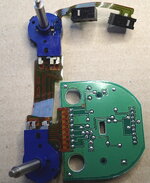
Confirmed the mouse pinout and theory about some InPort mice being mechanical. InPort Mouse with FCC ID C3K5K59937 marked Made in USA has mechanical encoders. To adapt it I went with stealing the end off a serial cable and splicing it; unfortunately the only DIY connector kits for mini-din 8 won't fit. I could have replaced the entire mouse cable but all the serial cables I've found were not particularly pliable, it'd not be a nice cable for mousing about.

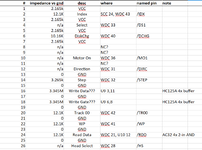
Here's the pinout for the InPort cable. Note that pin numbers are for the connector inside the mouse, not on the DIN side.
2026-01-14 14_23_14-pinouts.ods — LibreOffice Calc.png
And the same pinout for the connector on the Outbound Keyboard side as previously posted.
mouse pinout.png
NOTE: There's a chance I might have accidentally transposed YA/YB XA/XB in these diagrams. If you find movement direction is inverted, simply swap A and B for the affected direction.

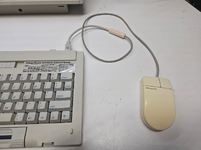
The result: not the most pretty, but functional.
1768422315558.png

The mouse respects sensitivity settings; I found Fast to be the most comfortable for me. Interesting that the apple control panel works at all for this given it's all running through the infrared connection, perhaps Outbound is injecting movements into the Apple driver rather than doing their own thing and manipulating the globals. Or it's tied into the isopoint driver and they just read the PRAM values the apple control panel sets.
 

Attachments

  • 20260114_094643.jpg
    20260114_094643.jpg
    1.1 MB · Views: 12
Last edited:
AC Adapter is a 19v AC adapter with an obvious rectifier in the power module. It probably could be powered with an appropriate DC adapter. Not sure I'm brave enough to chance it, though.

I actually didn't even know it was AC, I've only ever powered off DC so I can confirm 100% it works. Always used the standard 19V PC Laptop Adapters that basically every Acer brand, HP, Clevo, etc used.
 
I actually didn't even know it was AC, I've only ever powered off DC so I can confirm 100% it works. Always used the standard 19V PC Laptop Adapters that basically every Acer brand, HP, Clevo, etc used.
Good to know. Probably would be a good idea to put a fuse on it - I don't recall seeing one inside the Outbound's power module.

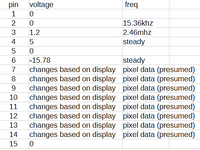
Took a second to probe the presumed video port on the outbound. As expected, it's very much not VGA and if you plugged a VGA monitor in it's going to short the -16v line to ground. Don't do that!

1769125689012.png

It appears to be 8 bits of pixel data plus a couple of clock signals. My assumption is this is fairly raw data read out from the VRAM inside the outbound - probably 2.46mhz is the rate at which bytes are read from the VRAM and I would assume 15.36khz has some relation to the horizontal frequency. As I recall passive matrix screens are all sorts of strange to drive and rather than providing a more conventional video signal out (requiring additional complexity in the outbound) they instead decided to provide raw data out and sort it out in the optional external monitor if/when one was used.

Still no luck with the external floppy. Per a comment from @techknight I've screwed up the alignment of the heads on top likely issues with the heads themselves (might have cracked one). I'm trying to adapt some other drives but no joy at the moment.

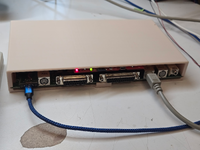
In the interim, I've taken a spare mac classic logic board and have it running headless in a 3D printed enclosure. It's got System 6, AppleShare Server 2.0.1, and Timbuktu with the contents of the common "MacPack" image as the share. It's a handy little USB-C powered localtalk server consuming about 5 watts @ 5v. Take about 15 minutes to boot as Appleshare checking ~20k files on a 2GB HDD takes a while.

1769126456076.png1769126465299.png
 
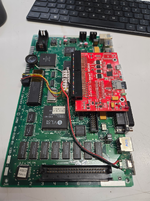
The video signal is basically the same as the one from the Macintosh Portable (aside from the different pinout) though it also supplies HSYNC and also runs at more like 76Hz rather than 61Hz it seems. For my video decoder setup at least I don't even have to change the code, just the pinout.
 
Actually now that I go back to look at my code, I did have to tweak it since it's a DSTN display output and scans both halves of the screen in each clock.
 
Back
Top