Outbound Laptop repair/reverse engineering

Yeah 8 modules, I tried both 1MB and 4MB modules in the RAM disk slots, as well as none at all, the behavior is always the same.
I would open the control panel if the mouse worked. I think the EEPROMs are version 1.2.1, I can't remember if I updated them.

I also accidentally discovered that if you just give it 1MB of RAM at 0x600000 it will gladly make a 1MB RAM disk out of that, so I'll have to see exactly how that works, I would have thought it would be doing some sort of bank switching.

That is interesting - I expected the same. Especially as they supposedly support up to 16MB in the ramdisk. How are you giving it RAM, poking bytes with microbug? Supposedly there's a modified version of macsbug, but i doubt that will ever materialize...

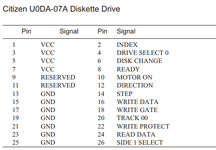
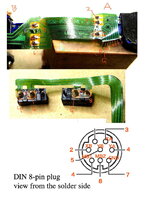
Keeping forgetting your mouse is nonfunctional. Something that might be interesting to test wrt your mouse issues is if click works. In the boot position it'll at least click on the apple menu. You could also test this by sticking a jumper in the mouse port according to the pinout above.
 
How are you giving it RAM, poking bytes with microbug? Supposedly there's a modified version of macsbug, but i doubt that will ever materialize...
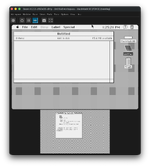
Just in an emulator. I think I got the RAM disk working in it now, looks like there's just a few registers for controlling the address lines on the RAM.

Screenshot 2026-01-08 at 1.23.01 PM.png
 
You're using an emulator to roughly fake up the docked outbound + se/plus address map then? Clever, I like it!
I've not done much probing of the address map other than identifying some IDE registers.

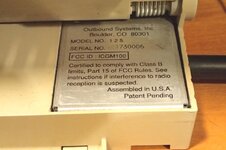
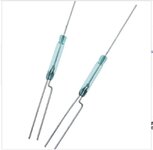
Incidentally, the shut-off-when-base-closed function is done by another reed switch buried in the power module, so you can take your NMI magnet and place it on top of the serial sticker for a hard shutdown. Or drop the NMI magnet.... guess how I figured that out.
 
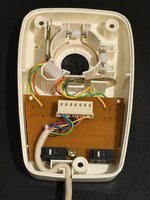
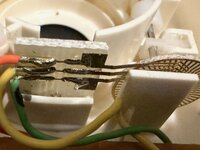
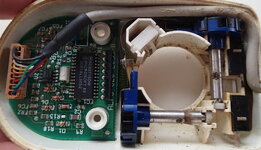
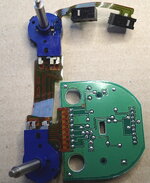
Confirmed the mouse pinout and theory about some InPort mice being mechanical. InPort Mouse with FCC ID C3K5K59937 marked Made in USA has mechanical encoders. To adapt it I went with stealing the end off a serial cable and splicing it; unfortunately the only DIY connector kits for mini-din 8 won't fit. I could have replaced the entire mouse cable but all the serial cables I've found were not particularly pliable, it'd not be a nice cable for mousing about.

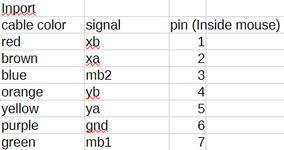
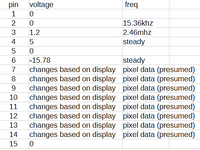
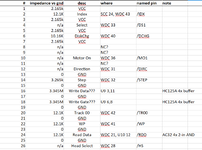
Here's the pinout for the InPort cable. Note that pin numbers are for the connector inside the mouse, not on the DIN side.
2026-01-14 14_23_14-pinouts.ods — LibreOffice Calc.png
And the same pinout for the connector on the Outbound Keyboard side as previously posted.
mouse pinout.png
NOTE: There's a chance I might have accidentally transposed YA/YB XA/XB in these diagrams. If you find movement direction is inverted, simply swap A and B for the affected direction.

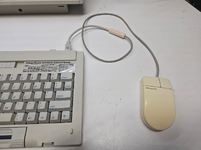
The result: not the most pretty, but functional.
1768422315558.png

The mouse respects sensitivity settings; I found Fast to be the most comfortable for me. Interesting that the apple control panel works at all for this given it's all running through the infrared connection, perhaps Outbound is injecting movements into the Apple driver rather than doing their own thing and manipulating the globals. Or it's tied into the isopoint driver and they just read the PRAM values the apple control panel sets.
 

Attachments

  • 20260114_094643.jpg
    20260114_094643.jpg
    1.1 MB · Views: 2
Last edited:
Back
Top