• Hello MLAers! We've re-enabled auto-approval for accounts. If you are still waiting on account approval, please check this thread for more information.

Oscilloscope 101 - Probing the bus for activity

uniserver

68LC040
I have a dead LC-1 board and a LC-III.

Also, I have an oscilloscope, I think its an TEK one in the garage,

I would like to start this thread to help people that never used one, to maybe get a couple pointers

Its been years and years since i'v touched one.

In a NO Bong / No Videro situation, obviously you want to recap, first thing.

However if that doesn't help, then ...

I remember reading in another thread that you first check the bus lines for activity,

can someone provide some pictures or some posts to help with this?

Thank you very much ahead of time.

 
A scope is unlikely to tell the novice much, it will show you what is there, but unless it's a DSO that can capture and hold a waveform, looking at a digital line will just look like a bunch of noise.

A multimeter is a more appropriate tool for the job. Check the power supply voltages, check the reset line on the CPU, if that all looks good, *then* is a good time to pull out the scope and have a look at the clock generator.

 
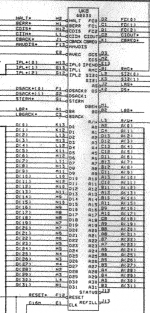
Thanks for the info, i am having issues finding pinouts, but I did come across this:

Screen shot 2013-01-10 at 1.15.13 AM.png

Pinout's are not exactly clear, and the drawing of the 68030 CPU is not square, Looks more like the 68000, oh well.

 
In schematic drawings, it's common for representations of parts to be laid out logically rather than to mimic the physical layout of the part. For example all the data bus pins might be grouped together in order, all the address bus pins in another group, the power and ground pins in another group, etc while on the physical chip they may be laid out completely differently. If the schematic had the pins laid out to match the physical parts, the wiring would be a rats nest that would be a nightmare to follow. This also allows for a single schematic symbol to represent multiple different package types for the IC. The schematic is a visual representation of how the circuit is wired up together, while the pin numbers are provided so you can find the physical pin on the chip that corresponds to the schematic.

 
Back
Top