Follow along with the video below to see how to install our site as a web app on your home screen.
Note: This feature may not be available in some browsers.
Hello MLAers! We've re-enabled auto-approval for accounts. If you are still waiting on account approval, please check this thread for more information.
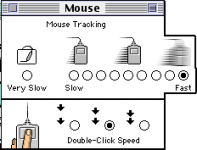
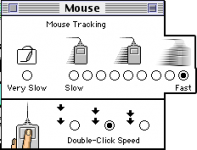
I have it all the way up, however, it feels like it should go a little faster. I have to move the pro mouse all the way across the mousepad to move the cursor all the way across the 832x624 screen. Is there any known tweak or hack for this setting? }
You using the ball or optical mouse? If your using the ball mouse, clean clean clean the rollers and ball. Then take it apart and clean the decade of hair inside wrapped around rods and such.
I'm using the optical mouse (It's the M5769). When I use it on the Macbook, it's settings allow it enough speed to move around a larger distance on the screen with a smaller distance physically. Just seems it doesn't move fast enough on the older machine :-/
Strange, got mine loaded with 8.6 and I can't seem to create you issue. Did you try an adb mouse yet? Or a ball mouse. The optical mouse is way newer so never know unless you try.
It's all good thanks for trying. I have a puck mouse on the way so we'll see how that goes. It's awkward because if I want to move the mouse from trash to the apple menu, When my mouse hits the top of the mouse pad, I actually have to lift it up and scoot back a bit to finish the trip. Does the same with a mighty mouse too, but I imagine the circuitry is very similar. I have to search for the teardrop mouse but hopefully the puck will do the trick.

Victory! The puck mouse made all the difference... I just don't get why the "Pro" mouse is really the "Slow" mouse... Oh well, it works on the G4 and that's what it came with so it's going right back to it!
This site uses cookies to help personalise content, tailor your experience and to keep you logged in if you register.
By continuing to use this site, you are consenting to our use of cookies.