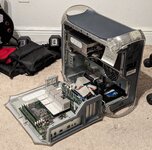
I've been tinkering with a Gigabit Ethernet G4 and making preparations to swap a Quicksilver CPU into it. It's already got a modern PSU to replace a dead one along with a custom built ATX adapter and a Radeon 9000 Pro from a late MDD with more mods on the way. Thing is, I want my CPU clock speed to be reported correctly when I do, and that won't happen if I just change the jumper settings on the back of the motherboard to go from a 100MHz bus to a 120 or 133MHz bus. While testing, my motherboard was set to a 120MHz bus, and at a 6.5x multiplier on a natively 867MHz CPU, it reports as 650MHz even though it should be running at 780MHz.
I saw in another thread discussing overclocking a Quicksilver's system bus to 150MHz, mentioned here, that there's an OpenFirmware variable you can change to tell the OS that the system bus is a different speed. People used to think this was a softwaare overclock but it's not, it's just changing the reporting of the bus speed. Thing is, I can't find any information on how to actually set that variable and none of the ones when [printenv] is run seem to suggest that's what they do.
Does anyone know how to do this? It'd help your girl out a lot.
I saw in another thread discussing overclocking a Quicksilver's system bus to 150MHz, mentioned here, that there's an OpenFirmware variable you can change to tell the OS that the system bus is a different speed. People used to think this was a softwaare overclock but it's not, it's just changing the reporting of the bus speed. Thing is, I can't find any information on how to actually set that variable and none of the ones when [printenv] is run seem to suggest that's what they do.
Does anyone know how to do this? It'd help your girl out a lot.