• Hello MLAers! We've re-enabled auto-approval for accounts. If you are still waiting on account approval, please check this thread for more information.

Nick's finds

nickpunt

6502
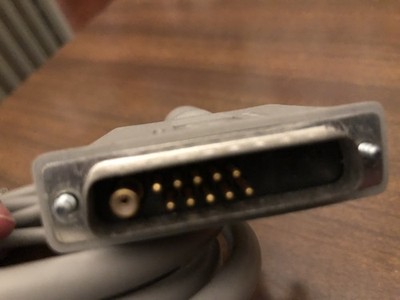
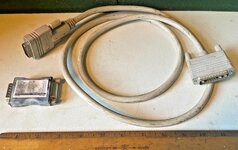
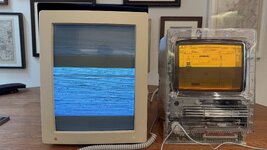
Just acquired a Macintosh Portrait Display that was going to be recycled, and made a leap of faith picking up a RasterOps 13W3 -> DA15 cable hoping that would suffice. Turns out everything works, I think. Without the cable plugged in it showed no picture, but once plugged in I got the garbled sign of life.

Next step is figuring out what configuration of video cards and software can output 640 x 870 @ 75hz. This was an attempt from an Xceed Color 30 sans any driver / control panel software. This thread suggests MonitorXceed 2.0 and Monitors System 7.0/7.1 should do the trick.

Very excited about this, I love the Portrait Display's odd shape and crisp b&w, it pairs well with an SE/30 side by side! Tho probably better next to a B&W one not the amber guy here :)
 

Attachments

  • IMG_4853.JPG
    IMG_4853.JPG
    1.3 MB · Views: 56
Nice monitor.
A friend of mine had one of those many years ago.
He used it with a IIsi at a print shop.
He was doing layouts with Quarkxpress.
 
Love those things! If you want an official cable, this one looks correct to me, though depending on where in the world you are the shipping might be too much. Ends fairly soon, though!


(The Portrait Display only needs the one coax connector)
 
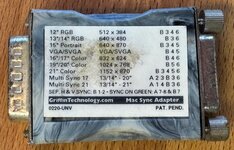
Ah I think the RasterOps cable I got works (FYI for anyone in the future trying to determine if a RasterOps DA15 <> 13W3 cable works with Portrait Display), as the main issue with 13w3 is just making sure you're not getting the Sun version which is wired differently. This cable also included a Griffin Mac Sync adapter, and the picture is coming through so I strongly suspect it's Mac-specific. Took a gamble on this one, was about $60 cheaper than the real thing!
 

Attachments

  • IMG_4801 (1).jpeg
    IMG_4801 (1).jpeg
    247.1 KB · Views: 38
  • s-l1600.jpg
    s-l1600.jpg
    322 KB · Views: 42
Welp spent all evening on it, couldn’t figure it out. I guess didn’t have the right combo of software/drivers to get it to work, so I’m going to sell it locally in SF Bay Area.
 
FYI: Sun also used a 13W3 cable that was not pin compatible with Apple's 13W3. So even with an switch adapter, it won't work.
 
Love that amber SE/30. I dug up your old thread about it, I never realized those were so easily swappable.

Those white phosphor screens are the absolute weakest element of the compact macs. I feel vaguely uncomfortable the moment the screen fades in, PTSD from the awful headaches I used to give myself staring at them as a kid for hours on end.

I have a 3151 DisplayStation with a gold phosphor that is incredibly easy on the eyes. Armed with this knowledge I'm going to go take it apart and see if I can figure out what phosphor it's using so I can look for a 9" variant to swap into my Classic.

Thanks for sharing!
 
I picked up @nickpunt's monitor today and confirmed the same results as he saw. Connected it to an 8*24 card which is known to support the portrait display and still I'm unable to get proper sync. A standard cable for the portrait display doesn't require an adapter. But the fact that this particular RasterOps cable requires the griffin adapter (it's a DB15 to DB15 adapter) means it's still possible it's the cable that's the issue. If not, something's gone bad with the display. Will have to debug this when I get some time.
 
Back
Top