


After swapping out the 11 caps on the screen with tantalum equivalents, and the 2 on the inverted board with electrolytic/polymer replacements, the screen on my newly acquired PB 160 has come back to life! Huzzah!
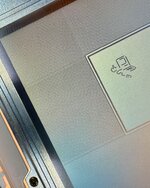
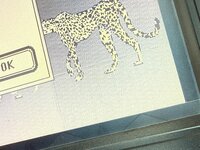
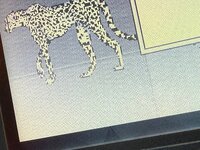
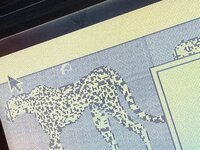
It does however still exhibit quite a bit of smearing/shadowing/ghosting (not sure the correct term), most visible from the edges/corners of any finder windows or dialogue boxes (see pics). Is this level of artifacts normal for this era of passive matrix LCD, or is there some level of disfunction still present? Honestly it's been so long since I've used a portable of this vintage that I can't remember if this is just how the passive matrix screens always looked.
Also, the brightness slider does not act like a slider at all, but more of a backlight on/off switch. From 0-10% the backlight is off, then from 10-100% it's on at constant brightness. No dimming whatsoever. I was a bit concerned but then I found this thread where others have said this is normal for early 1xx series powerbooks? That's a bit surprising because I thought I remembered my PB 150 in college having some level of actual variable dimming, but again, it's been a really long time.
TIA!
It does however still exhibit quite a bit of smearing/shadowing/ghosting (not sure the correct term), most visible from the edges/corners of any finder windows or dialogue boxes (see pics). Is this level of artifacts normal for this era of passive matrix LCD, or is there some level of disfunction still present? Honestly it's been so long since I've used a portable of this vintage that I can't remember if this is just how the passive matrix screens always looked.
Also, the brightness slider does not act like a slider at all, but more of a backlight on/off switch. From 0-10% the backlight is off, then from 10-100% it's on at constant brightness. No dimming whatsoever. I was a bit concerned but then I found this thread where others have said this is normal for early 1xx series powerbooks? That's a bit surprising because I thought I remembered my PB 150 in college having some level of actual variable dimming, but again, it's been a really long time.
TIA!
Attachments
Last edited:








