• Hello Guest! We're hosting a challenge to welcome vintage Intel macs to the MLA during the month of July! See this thread for more information.

New theory on the cause of the infamous Tunnel Vision problem - Testers needed!

I have a PB 180 that showed relatively mild tunnel vision when I got it: Left side only, Apple symbol and lower left corner turned pretty dark, the left screen edge for maybe 15 px turned somewhat dark. I turned the metal prongs on the reverse side (where the screen was dark) and lifted the screen off the board a bit, keeping it up with tooth picks. The thought was that I wanted a gap between the board and the screen so that hot air could go between the screen and the board, and any water had a place to evaporate. I then placed the screen in the oven, about 70°C, 4 h. Now the left side shows only very mild darkening after 20 mins, only noticeable when you know what you're looking for. I may bake it again using the same method.
This is the first time that I saw baking have any effect. I tried a similar method (without lifting the screen off the board) with a PB 540 and another PB 180 screen - to no effect. I may try again. (Unfortunately the 540's power supply seems to have died, I'm no longer able to turn the machine on.)
 
I have a PB 180 that showed relatively mild tunnel vision when I got it: Left side only, Apple symbol and lower left corner turned pretty dark, the left screen edge for maybe 15 px turned somewhat dark. I turned the metal prongs on the reverse side (where the screen was dark) and lifted the screen off the board a bit, keeping it up with tooth picks. The thought was that I wanted a gap between the board and the screen so that hot air could go between the screen and the board, and any water had a place to evaporate. I then placed the screen in the oven, about 70°C, 4 h. Now the left side shows only very mild darkening after 20 mins, only noticeable when you know what you're looking for. I may bake it again using the same method.
This is the first time that I saw baking have any effect. I tried a similar method (without lifting the screen off the board) with a PB 540 and another PB 180 screen - to no effect. I may try again. (Unfortunately the 540's power supply seems to have died, I'm no longer able to turn the machine on.)
The pins inside the 540 may need to be bent back out. Also, the 540 psu definitely needs recapping as well. Just bought another 540c and its power supply reaked of fish smell
 
Just doing some research... I did notice that almost in all pics I've seen where there's been improvement, the outermost edges are nearly perfect, while the areas inside the edges show only incremental improvement. Given that the going theory has to do with layer adhesion and trapped moisture, could it be that the edges re-adhere faster, thus trapping some moisture just inside the edges?

If that theory hold water, I wonder if it would be possible to heat the LCD from the center and work your way outwards. Say, with a heat gun and a thermo-couple to control the temperature.
 
Just doing some research... I did notice that almost in all pics I've seen where there's been improvement, the outermost edges are nearly perfect, while the areas inside the edges show only incremental improvement.
That’s why I thought mine regressed. See the photos of right after the oven, versus around a year later:

IMG_0133.jpeg
IMG_6641.jpeg
Note how the tunnel vision overall actually has improved further. But in the initial photo, the edges are perfect while now they’re tunneling. Not sure why that would be.
 
I wonder if baking seals the edges initially (due to the metal bracket etc), trapping the remaining moisture, then later they come apart and allow some of the trapped stuff to escape out while it's diffusing between the layers. Hence the improvement over time. If that's the case, repeated bakes a few months apart might be much more effective than repeated bakes back-to-back. Of course, this is all complete conjecture.
 
Last edited:
Given that the going theory has to do with layer adhesion and trapped moisture, could it be that the edges re-adhere faster, thus trapping some moisture just inside the edges?
No. It has nothing to do with adhesion. If the layers were to separate you'd have a permanently damaged display. They don't, can't and won't re-bond. This (probably) has to do with moisture dispersed in the liquid medium.
If that theory hold water, I wonder if it would be possible to heat the LCD from the center and work your way outwards. Say, with a heat gun and a thermo-couple to control the temperature.
Heat alone will do nothing - it is simply an aid to draw out moisture. Heating the center would probably cause other kinds of damage. It has to be uniform. A heatgun+thermocouple is a guaranteed method to cook a panel.
 
Sorry for bumping an old thread, but I've got a double failure going on with a PB 180. Sadly the device itself is currently nonworking.
Thank you for clarifying this - since I made my original post a few years ago, I have seen several examples of these screens developing vinegar syndrome, so I was definitely wrong in my earlier statement. It does seem to be less common as compared to other display types, but it absolutely can happen.
 
Hi!

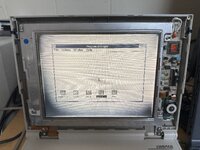
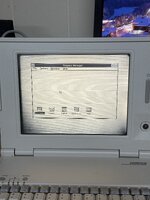
I'm currently struggling with the display of my Macintosh Portable M5120 (non-backlit model). Unfortunately, it has developed severe tunnel vision over time.
Here's what I've done and what I've observed:
I baked the display twice in an oven while precisely controlling the temperature. The first attempt was at 90–95C for 8 hours, and the second was at 98–104C. As a result, the screen became less dark and the blackening became more uniform, but unfortunately the main problem remained: after about 20 minutes, the display becomes so dark that almost nothing can be seen.
I then investigated whether this could be an electrical problem.

The Hosiden HLR1010-10-1101 is an active-matrix TFT LCD, so this display has several common bias voltages similar to those found in modern LCDs. Here's what I've discovered:
  • The positive pixel voltage is always 5.1 V (the power rail supplied by the Macintosh).
  • The "neutral" point shifts as the contrast is adjusted. This voltage is available at test point T7.
  • The positive and negative pixel voltages are symmetrical with respect to the "neutral" point.
  • VR1 and VR2 adjust the contrast (the neutral point) for the minimum and maximum contrast settings, respectively.
  • VR3 adjusts VCOM (the voltage on VC BAR). Someone appears to have adjusted it previously, as the factory silicone seal was partially damaged. When returned to its factory position, VCOM is always 1.6 V below the "neutral" point. This offset is adjusted by VR3.
  • VGH is approximately +12.1 V.
  • VGL is approximately -9.5 V.
  • For black pixels, the pixel voltage alternates between the positive and negative voltages on every column. For white pixels, the voltage remains at the "neutral" level. VCOM itself is not inverted and remains constant.
My first approach was to adjust VCOM to minimize flicker using a vertical striped test pattern. This worked initially, but the panel's operating point gradually drifted during use. The further I increased VCOM (moving it farther away from the "neutral" point), the faster this drift occurred.

At the maximum practical VCOM setting, the display produced a clean, crisp image with virtually no ghosting or burn-in. However, after switching the display off, the screen became unevenly black and only slowly returned to its normal state. Once fully relaxed, powering the display back on with that VCOM setting caused the screen to appear almost completely black. So this is clearly not the correct adjustment.

I then tried setting VCOM as close as possible to the neutral point. When the panel is not yet showing signs of tunnel vision, this setting appears to slow down the buildup of the effect as much as possible. After many experiments, I've come to the tentative conclusion that the factory adjustment (VCOM = T7 − 1.6 V) is probably the optimal setting.

My current theory is that either the TFT transistors have developed excessive leakage, or some form of charge accumulation is occurring within the liquid crystal material itself. When the display was new, polarization occurred much more slowly, within 24 houts as listed in Portable CDEV warning.

What I currently suspect is that if VCOM were inverted on every frame (similar to how the pixel voltages are inverted), this polarization might not occur. I'm planning to draw the VCOM supply schematic and investigate whether implementing frame-by-frame VCOM inversion would be feasible.

If anyone has any thoughts or experience with this issue, I'd really appreciate hearing your opinions.

 
Back
Top