• Hello Guest! We're hosting a challenge to welcome vintage Intel macs to the MLA during the month of July! See this thread for more information.
  • We've made some quality of life improvements to the Trading Post. More info here.

New Markdown notebook application for System 6

teemaw

6502
Hello everyone,

Firstly, a disclaimer: LLMs were used in the production of this software, mostly for boilerplate/plumbing but also to ideate/generate decision tables for some engineering decisions. If you don't like this, I totally understand, sorry for wasting your time.

Anyway, I came across Action Retro's latest video on YouTube yesterday and was inspired to finally package up the live Markdown "wikibase" (think Obsidian) notebook application I've been sitting on and slowly polishing up.

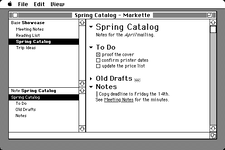
Here's an example screenshot:
1783394923241.png

A quick rundown of some features:
  • Live Markdown rendering
  • Folding section headings
  • Sections outline
  • Wikilinks between notes
  • Saves files as plain TEXT
  • Handles large (8MB) files (if you have the memory)
I found toolbox's TE too limiting for the features/behavior, and performance I wanted so under the hood it's using a custom text processing engine with QuickDraw. I only have an SE/30 (which it performs well on) so I've been relying on Mini vMac at 1x speed to simulate Markette's performance on 68000s. Hopefully its performance is ok on real hardware. It runs fine with 512K of memory on System 6 if your notes are less than ~100K (there's ~200K constant-sized space + max heap usage of ~2x the currently open note size). You can check its memory usage from the About dialog. If you are working with files that are larger (100K should be ~20,000 words), it may behoove you to run this on a 68030 anyway, as searching and jumping around will get slower the larger the note is.

You can grab it for free and see more info here: https://markette.cc

I'm also toying with the idea of producing some boxed physical 800K disks, will share more about this later if there is enough interest.

Thanks for reading :)
 
This looks super cool! I was just thinking about what kind of software to put on a 6.0.8-based "workstation" computer (eg a IIcx or IIci running Wingz, WordPerfect, SuperPaint, etc.), going to add it in next time I have it set up!
 
Nice to see new apps coming. Why is there no print option in your app same as with Action Retro's.
I would be happy if it si possibility to localize this apps.

* edit: Your app is definitely more polished and has more resources.
 
Last edited:
This looks super cool! I was just thinking about what kind of software to put on a 6.0.8-based "workstation" computer (eg a IIcx or IIci running Wingz, WordPerfect, SuperPaint, etc.), going to add it in next time I have it set up!
Thank you! Happy to hear you're going to try it out. Would love to hear what you think after you have a go.

Nice to see new apps coming. Why is there no print option in your app same as with Action Retro's.
I would be happy if it si possibility to localize this apps.

* edit: Your app is definitely more polished and has more resources.
That's a good question, I didn't really think about printing while building this. I don't typically print notes but I could definitely see it being useful. That said, I don't actually have a printer to test with, maybe that will change soon...
 
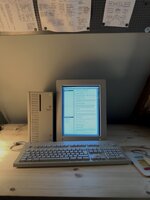
This is Rad As Hell on a portrait display! Haven't had the chance to do actual work with it yet, but seems great so far 😆

Quadra 650 (in a Q700 case) running System 7.1
 

Attachments

  • IMG_0156.jpeg
    IMG_0156.jpeg
    598.8 KB · Views: 26
This is Rad As Hell on a portrait display! Haven't had the chance to do actual work with it yet, but seems great so far 😆

Quadra 650 (in a Q700 case) running System 7.1
Looks great! Very cool to see it on a portrait display. Hope it works well for you with actual work :)

How does it handle Markdown footnote syntax?
Good question! Right now it does not handle footnote syntax at all. It's high on my list of priorities though. Did you have anything in mind for how you would want it to be handled?
 
All right! I've had a good half hour to do some "work" with Markette this afternoon (writing up a campaign setting for my D&D group 😄) and here's some notes!

First up - this rules! The featureset is really well balanced and I can easily "zone in" and focus on getting the stuff down. I especially love the [[ link ]] feature, and that I can declare a term as a link before actually setting up a new note, then come back to it later. Awesome!

I really like that I can mess around in the Finder with folders etc. to reorganize a base, since sometimes that's just a more practical way to move things around. I also really like that this is ultimately just plaintext files, so my info doesn't get "trapped" in some cryptic format like Filemaker 2 or something 😄

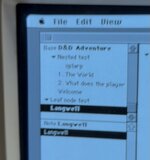
It would be useful to manually reorder the Notes in a folder so they don't show up alphabetically - currently I'm prefixing them with numbers but its a bit hacky 😅 (see attached pic for example hack)

Also for next version - a Style menu! I think the default fonts are well chosen, but it would be rad to bring in Espy Sans. Plus a toggle option for white text on black background! (invert)

This is already a super useful app for me, looking forward to this fall when I can get settled in and geek out with it!

(also thank you for making international payments easy by supporting Apple Pay)

Edit: If there is plans for a Print feature, maybe it then also makes sense to have a "view the whole Base with all Notes in-lined" option if you want to read the whole thing, since this is kind of what a Print feature would need to do anyway? You'd presubably need to walk through and load all the files in all the Base subfolders though 😆
 

Attachments

  • IMG_0171.jpeg
    IMG_0171.jpeg
    120.4 KB · Views: 6
Last edited:
This is Rad As Hell on a portrait display! Haven't had the chance to do actual work with it yet, but seems great so far 😆

Quadra 650 (in a Q700 case) running System 7.1
Oh snap. Looking forward to trying it! Still on my backburner to do something similar.
 
Last edited:
Back
Top