• Hello MLAers! We've re-enabled auto-approval for accounts. If you are still waiting on account approval, please check this thread for more information.

Network and station number in Appletalk control panel

On some of my systems, some of the time, the Appletalk control panel shows Zone (if available), network and station numbers and offers the option of specifying the latter two. Other times, it simply tells me the zone is not known while displaying nothing about network and station. Can anyone help me make sense of this? The local TCP/IP network has an older netatalk server; a separate tashrouter machine serves a small localtalk network.

 
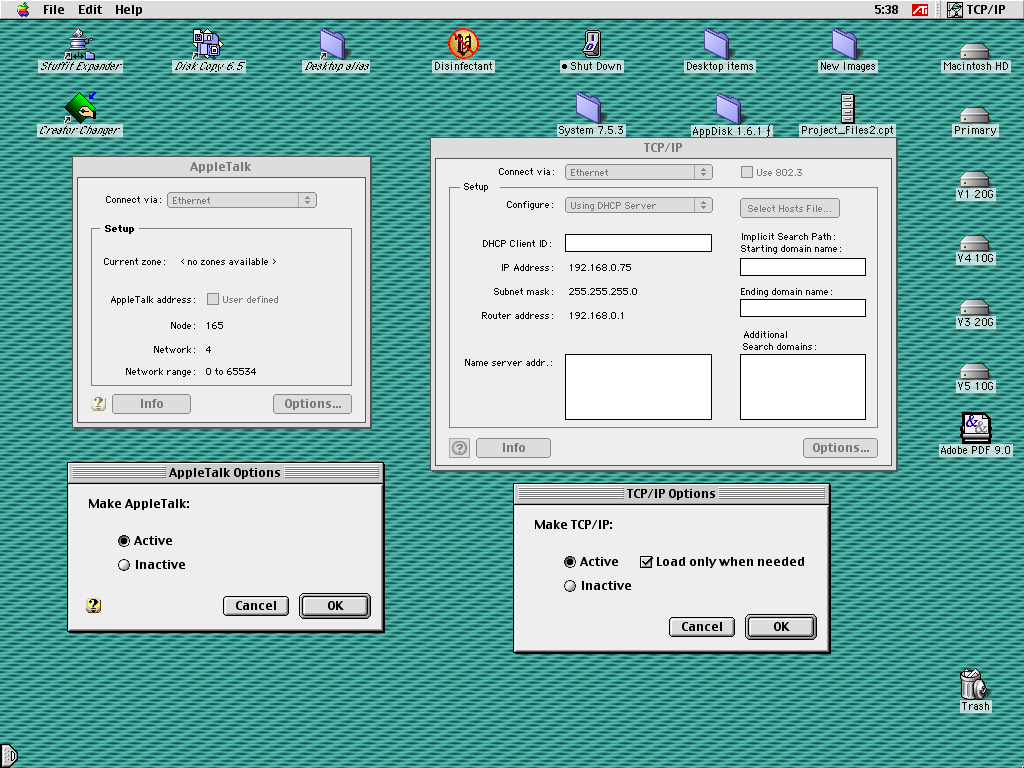
What you're seeing is likely just the network number and the node number assignments. Usually, these are automatically assigned and you don't normally need to do anything.

n5b49afb.png


Does it look anything like the left control panel? You probably won't have any zones unless you have an AppleTalk router or set up some zones with atalkd.
 
I have an Appletalk router (tashrouter) as mentioned in my original post. There is a single zone. I am not seeing the dialog in your screen shot. That is what I'd like to see, but I'm only getting `Current zone: <no zones available>`. The other four line items don't appear.
 
The screenshot above is what you will see on an Ethernet connection without a router defining zones or a network range. How is the machine connected, Ethernet or LocalTalk? What router is seeding the network with zone information?
 
The answer was just too simple... There are three possible display modes and it defaults to "Basic", which does not show station or net numbers. Sheesh.... Sorry for the noise!
 
It may be a simple answer but it’s not an obvious setting and just about everyone gets tripped up on it.
This will help someone else in the same situation.
 
ya Basic just clips out all that information, Advanced shows you what you see above, and Admin mode just does Advanced but requires a password.

You normally don't need to mess with any of that, since usually there's only one "zone", which is just "*" meaning "anything". But if you had zones, there'd be a drop down for that.

The AppleTalk addressing stuff is for when you want to manually set your node (aka machine identifier) similar to 192.168.0.101, the network number is kind of like of 192.168.0.101, and the network range is like ... how do I say this: Look in subnets 192.168.0.x through 192.168.253.x.

Additional information is linked below, under "More about AppleTalk zones", and the related sections below that, such as with Apple Internet Router which like other routers, can fiddle with that stuff. The normal person, with just a few home machines linked together, doesn't need to bother with any of that stuff.
 
I'm troubleshooting network problems and definitely needed to understand what net and station number were effective.
 
Back
Top