
Ah maybe I misunderstand how this works, apologies if this is the case. There is already an RS-422 31.25 kbaud differential serial signal available, and I only have to add a modem/printer port to the board, to be able to connect a classic mac MIDI interface? If so, I'll get to testing this ASAP!I am not quite understanding why you write "if it would work". It simply does. It has been implemented and just works exactly as it would on a real Mac.

-
 Hello Guest! We're hosting a challenge to welcome vintage Intel macs to the MLA during the month of July! See this thread for more information.
 -
We've made some quality of life improvements to the Trading Post. More info here.
You are using an out of date browser. It may not display this or other websites correctly.
You should upgrade or use an alternative browser.
You should upgrade or use an alternative browser.
NanoMac, a candy bar sized FPGA Mac Plus / PlusToo
- Thread starter MIST
- Start date

MIDI will work on my MØBius RP2040/RP2350 based emulator.<snip> up until this point there is no reliable way to get MIDI working via any form of emulation, and the only option is actual hardware<snip>
@MIST : I thought there was a difference. On a real Mac, you need an external clock signal (Hsk?) at 1MHz or 0.5MHz and the SCC configured to let HSk drive serial clock in order to achieve 31.25MHz. Note: erm, one major reason why that frequency was chosen was because in the early 1980s the M6850 ACIA was cheap, simple and popular, and could be easily configured with a 1MHz clock giving 31.25k baud.Ah maybe I misunderstand how this works, apologies if this is the case. There is already an RS-422 31.25 kbaud differential serial signal available, and I only have to add a modem/printer port to the board, to be able to connect a classic mac MIDI interface? If so, I'll get to testing this ASAP!
However, NanoMac supports 31.25kHz directly without the need for HSk. Hence the confusion: you wouldn't connect a classic Mac MIDI interface; you just need the optos.
Hence, you can run classic Mac MIDI applications on NanoMac and MIDi data is transferred correctly; you might not be able to use any classic Mac MIDI interface if it expects to drive the HSk. Or does NanoMac now respond to HSk to drive the baud rate?

Question about MIDI: Does the serial clock have anything to do with the timing of audio and such?
I think the time it takes to send a note command is much shorter than the time it takes to play the note.
Therefore, the serial output is usually idle? And the timing is done by the host using its own clock for when to send the commands?
Therefore, the serial clock doesn't matter as long as it's fast enough and both sides agree on the rate?
The only reason for an external clock is to eliminate the requirement for a phase-locked loop to retrieve the clock?
If my guess is wrong, then the serial port would need to be sending bytes constantly to make sure every clock has a bit (start, stop, or data bit) and any under-run would be a problem.
I think the time it takes to send a note command is much shorter than the time it takes to play the note.
Therefore, the serial output is usually idle? And the timing is done by the host using its own clock for when to send the commands?
Therefore, the serial clock doesn't matter as long as it's fast enough and both sides agree on the rate?
The only reason for an external clock is to eliminate the requirement for a phase-locked loop to retrieve the clock?
If my guess is wrong, then the serial port would need to be sending bytes constantly to make sure every clock has a bit (start, stop, or data bit) and any under-run would be a problem.

No. Any classic Mac needs the external clock in order to be able to generate the required MIDI bit rate of 31250 bit/s accurately enough.
The NanoMac now simply includes this external clock. This external clock does not interfere with the regular rs232 bitrates as it's only used by midi software.
My hardware already had the physical midi ports as it's intended to be used as an Atari ST. Thus, the NanoMac now has the Mac's serial interfaces + the external clock + physical din midi ports. As a result it can e.g. run cubase just fine and directly drive regular midi gear.
The NanoMac now simply includes this external clock. This external clock does not interfere with the regular rs232 bitrates as it's only used by midi software.
My hardware already had the physical midi ports as it's intended to be used as an Atari ST. Thus, the NanoMac now has the Mac's serial interfaces + the external clock + physical din midi ports. As a result it can e.g. run cubase just fine and directly drive regular midi gear.
Correct. The songs Timing has nothing to do with the bit rate. The external clock is needed to generate the standard 31250 but/s midi bit rate. But the playback speed is generated by other timers inside the Mac.
The fact that this is actual hardware and not just Emulation means that it's running at a very precise and constant speed which is essential for midi playback. Any emulator running on a PC may pause a few milliseconds here and there as e.g. the underlying PC may run it's own tasks. This would result in an imperfect midi playback speed. That does not happen with FPGAs.
The fact that this is actual hardware and not just Emulation means that it's running at a very precise and constant speed which is essential for midi playback. Any emulator running on a PC may pause a few milliseconds here and there as e.g. the underlying PC may run it's own tasks. This would result in an imperfect midi playback speed. That does not happen with FPGAs.
I was aware that MIDI i/o worked FPGA based for Atari, Amiga and AO486 cores, and after reading the responses to my post from 2020 it seemed that the same approach should work for Mac, but nobody had attempted it, I guess because not many videogames use MIDI on Mac. So it is with a really great pleasure that I'm reading your comments on the now working MIDI i/o. This is an incredible help for me and other Mac MIDI music enthusiasts, and I'm eternally grateful! I can't wait to try this out, in my studio but also on stage! THANK YOU!!Correct. The songs Timing has nothing to do with the bit rate. The external clock is needed to generate the standard 31250 but/s midi bit rate. But the playback speed is generated by other timers inside the Mac.
The fact that this is actual hardware and not just Emulation means that it's running at a very precise and constant speed which is essential for midi playback. Any emulator running on a PC may pause a few milliseconds here and there as e.g. the underlying PC may run it's own tasks. This would result in an imperfect midi playback speed. That does not happen with FPGAs.
After a lot of digging I had understood that basically all software emulation attempts at solid MIDI functionality was pointless, but I'm also very curious to try MØBius! Have you tested MIDI clock jitter? How does it compare to the original hardware? I'd be happy to perform some of these tests too and share them here.MIDI will work on my MØBius RP2040/RP2350 based emulator.
@MIST : I thought there was a difference. On a real Mac, you need an external clock signal (Hsk?) at 1MHz or 0.5MHz and the SCC configured to let HSk drive serial clock in order to achieve 31.25MHz. Note: erm, one major reason why that frequency was chosen was because in the early 1980s the M6850 ACIA was cheap, simple and popular, and could be easily configured with a 1MHz clock giving 31.25k baud.
However, NanoMac supports 31.25kHz directly without the need for HSk. Hence the confusion: you wouldn't connect a classic Mac MIDI interface; you just need the optos.
Hence, you can run classic Mac MIDI applications on NanoMac and MIDi data is transferred correctly; you might not be able to use any classic Mac MIDI interface if it expects to drive the HSk. Or does NanoMac now respond to HSk to drive the baud rate?
Thanks! The main reason I'm sure MØBius will work with MIDI is that it dedicates a whole core to continually running the CPU, so it's never timesliced. The second core is for background processing for peripherals and hardware. My intention for Serial data is to map SCC configurations directly to RP2040 serial port registers, including HSk (it would redirect the serial clock from the HSk, if necessary via a PIO). So, MIDI clock messages output to MØBius would be processed within a few microseconds and similarly, if a Mac MØBius sent a MIDi clock message it would come out of a serial port immediately. Consider:After a lot of digging I had understood that basically all software emulation attempts at solid MIDI functionality was pointless, but I'm also very curious to try MØBius! Have you tested MIDI clock jitter? How does it compare to the original hardware? I'd be happy to perform some of these tests too and share them here.
Code:
µs    MØBius                 SCC.tx  Serial GPIO
         ;A0^SCC tx buffer
0        move.b #0xf8,(a0)  ready
1.5      ;...more code.     0xf8         __        ____________
290      ;...more code.     ready          \______/            \__/
Conversely, some 68000 code which waits for the SCC.rx buffer to be full and then continues processing will deterministically be able to handle it within about 5µs (except for any 68000 interrupt processing, like a real Mac).
It's still going to be a while before MØBius is runnable. The CPU emulation is <8kB of Cortex M0+ assembler though, I know that much, so it'll fit in half the RP2040's 16kB cache. MØBius makes no attempt to be cycle-accurate, but it will run all instructions at least as fast as a real M68000 on a Mac, so the move.b #0xf8,(a0) might take as little as 1µs.
What software do you use? Do you have a disk image with a typical setup of yours? I do have a few synthesizers and can give your setup a try. There's still the possibility that some software won't work as intended, since I still may have parts of the hardware wrong or incomplete.This is an incredible help for me and other Mac MIDI music enthusiasts, and I'm eternally grateful! I can't wait to try this out, in my studio but also on stage!
Do you use Cubase? That's the only MIDI software for Mac that I have tested, yet. What else might need testing?
One interesting part is that Cubase on the Atari came with a dongle while the Mac version doesn't seem to have had one, did it? For the Atari, a bunch of unreliable cracks existed. But in the meantime the dongles have been analyzed and are simply implemented in the FPGA as well. So this now works reliably, and I do know that the MiST has been used as an Atari on stage. I'd love to see the NanoMac to be used that way as well.
However, you'll need some hardware. There was one person on Ebay who seemed to be selling the hardware, although that particular version had a bug in the MIDI IN circuit, as I found out once a musician complained.
The software I use is called "M" by Intelligent Music. It's an "intelligent" algorithmic sequencer with the intention to blur the line between composition and improvisation. I've been using it for many years now, including on tour using MiST and MiSTer. The best and original version is for Mac, though it's been ported to Amiga and Atari ST (There's even a PC port for DOS, though after lots of searches I've never been able to find it). The Mac version is more developed and extensive, I ran this on a Powerbook Duo 230 at first, and now my main system for shows is a PPC port of "M" running on an ibook G3. I can definitely prepare a disk image with some prepared session files, which should work upon opening, without setting anything up. The software is intended as an interactive MIDI instrument, so it's a different approach from Cubase, which is more like a recording system. "M" can be controlled via two MIDI control changes, that I can pre-define and save in the prepared file, as well as with real-time keyboard input, making it a bit like an arpeggiator. This way it should work instantly to test MIDI input as wel as output without setting anything up. It can also output MIDI clock, and I'd love to make some measurements to test the jitter amount compared to original hardware. I know the jitter of the Atari ST is actually quite different when comparing FPGA to real hardware, where the MiSTer is actually way tighter than the orignal ST. The ST is already pretty tight, but I found it interesting to hear there's still a difference.What software do you use? Do you have a disk image with a typical setup of yours? I do have a few synthesizers and can give your setup a try. There's still the possibility that some software won't work as intended, since I still may have parts of the hardware wrong or incomplete.
Do you use Cubase? That's the only MIDI software for Mac that I have tested, yet. What else might need testing?
One interesting part is that Cubase on the Atari came with a dongle while the Mac version doesn't seem to have had one, did it? For the Atari, a bunch of unreliable cracks existed. But in the meantime the dongles have been analyzed and are simply implemented in the FPGA as well. So this now works reliably, and I do know that the MiST has been used as an Atari on stage. I'd love to see the NanoMac to be used that way as well.
However, you'll need some hardware. There was one person on Ebay who seemed to be selling the hardware, although that particular version had a bug in the MIDI IN circuit, as I found out once a musician complained.
I'd say if Cubase works, "M" should also work, but for the ST core this is strangely not the case. the ST port of "M" is actually the only software that doesn't seem to work at all on FPGA, while everything else I've tried does work really well, strangely (And I've tested over 100 MIDI tools on that platform).
And yes I've tested the Cubase dongle emulator as well on FPGA and works great! I love using the IPS in Cubase, a brilliant and super unique approach to MIDI, where pre-recorded phrases can be repurposed based on your keyboard input, blurring the line between what's live and what's recorded.
I bought an empty Mac Plus case, and an LCD made for the Plus, and I've been planning to turn this into an FPGA mac for shows without vulnerable parts, though without MIDI on the FPGA it was an unfinished project, so now I can finally finish it. Considering the size of the NanoMac and the amount of empty space in the case, it may even be possible to fit multiple Nanomacs inside to distrubute compute over multiple MIDI tools (like Opcode's MAX for example) or to set up a backup NanoMac in case of an issue during a performance without bringing a second machine ...
I've prepared a zip with .dsk floppy image with "M" and a test project. When clicking the play button after starting it up, it should send out 1/4 notes at 120 bpm on channels 1, 2, 3 and 4. It also sends MIDI clock out of the modem port, and keyboard input from any channel should transpose the notes. MIDI CC 1 and 2 on any midi channel should control "Note Order" and "Transposition" (they have 6 memory slots, which can be moved using those control change numbers). It comes with the required MIDI extensions, and once those are added it should work directly when opening the file without setting anything up. Very curious if this works. Thanks so much for testing this out!What software do you use? Do you have a disk image with a typical setup of yours? I do have a few synthesizers and can give your setup a try. There's still the possibility that some software won't work as intended, since I still may have parts of the hardware wrong or incomplete.
Do you use Cubase? That's the only MIDI software for Mac that I have tested, yet. What else might need testing?
One interesting part is that Cubase on the Atari came with a dongle while the Mac version doesn't seem to have had one, did it? For the Atari, a bunch of unreliable cracks existed. But in the meantime the dongles have been analyzed and are simply implemented in the FPGA as well. So this now works reliably, and I do know that the MiST has been used as an Atari on stage. I'd love to see the NanoMac to be used that way as well.
However, you'll need some hardware. There was one person on Ebay who seemed to be selling the hardware, although that particular version had a bug in the MIDI IN circuit, as I found out once a musician complained.
Attachments
Hmm ... I don't hear anything. But I do see the TX LED blink. So something is being sent. Perhaps at the wrong bitrate. I see nothing to configure MIDI clock ... I need to investigate this a little further ...
Edit: Ok, I _do_ see settings. They simply weren't reacting while playback was active.
It's set to 1Mhz which should be fine. But I still don't hear anything. This needs investigation ...
Edit: Ok, I _do_ see settings. They simply weren't reacting while playback was active.
It's set to 1Mhz which should be fine. But I still don't hear anything. This needs investigation ...
Last edited:
I've connected the logic analyzer and even though the cheap SAM2695 based synth I've connected doesn't make any sound, it seems to me the MIDI messages are fine. When running your MIDI_IN_OUT_TEST I immediately see a byte $FA being sent at 31250 bit/s which seems to be the MIDI "System Realtime: start" message. Further down I see frequent $F8 which are seemingly "System Realtime: timing clock" messages. And then there are a bunch of more complex messages now and then. I am no MIDI expert at all. But technically, this seems to make sense.
What _should_ happen if I connect a synth to your test?
This is e.g. how the trace looks:
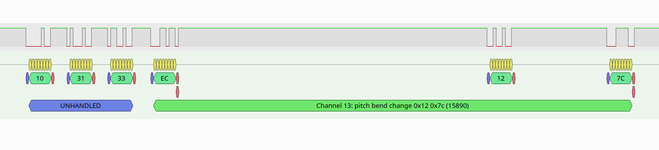
Edit: This trace actually does not look right. There are frame errors e.g. at the end of the EC byte.
What _should_ happen if I connect a synth to your test?
This is e.g. how the trace looks:
Edit: This trace actually does not look right. There are frame errors e.g. at the end of the EC byte.
Last edited:
This is a byte as being sent by M immediately after system reset:
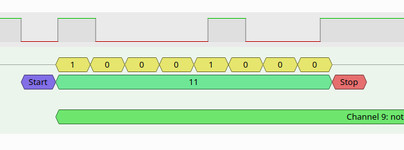
You see that the signal changes at the top row don't exactly match the expected timing, shown by the changes between 0 and 1 in the second row. The top row would be a bitrate of ~29000bit/s instead of the 31250 MIDI uses.
And this is how it looks when cubase is running:
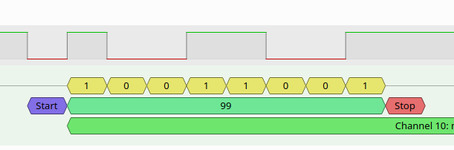
Here the changes are correct and happen exactly at the right moment. And if I run M after Cubase it looks like this:
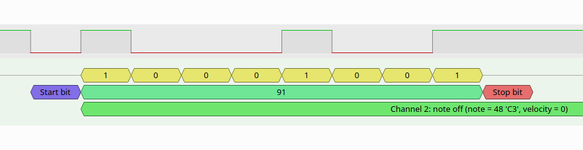
Here the timing is still correct.
It seems that there's something in my NanoMig that M doesn't initialize and its default state after reset is not what M expects. Cubase then adjusts this and afterwards M also works. Interesting ...
You see that the signal changes at the top row don't exactly match the expected timing, shown by the changes between 0 and 1 in the second row. The top row would be a bitrate of ~29000bit/s instead of the 31250 MIDI uses.
And this is how it looks when cubase is running:
Here the changes are correct and happen exactly at the right moment. And if I run M after Cubase it looks like this:
Here the timing is still correct.
It seems that there's something in my NanoMig that M doesn't initialize and its default state after reset is not what M expects. Cubase then adjusts this and afterwards M also works. Interesting ...
I've connected the logic analyzer and even though the cheap SAM2695 based synth I've connected doesn't make any sound, it seems to me the MIDI messages are fine. When running your MIDI_IN_OUT_TEST I immediately see a byte $FA being sent at 31250 bit/s which seems to be the MIDI "System Realtime: start" message. Further down I see frequent $F8 which are seemingly "System Realtime: timing clock" messages. And then there's a bunch of more complex messages every now and then. I am no MIDI expert at all. But technically this seems to make sense.
What _should_ happen if I connect a synth to your test?
This is e.g. how the trace looks:
View attachment 91237
Hmmm interesting, I'm not sure why this happens, but it may have to do with how Cubase interacts with the MIDI driver. Not sure if they use the same driver? Here's what Claude had to say on the matter, not sure if this makes sense: "The MIDI issue is caused by the FPGA's incorrect default baud rate initialization - it starts up at approximately 29,000 bps instead of the required 31,250 bps MIDI standard. This timing error causes multi-byte MIDI messages (like Note On/Off) to fail because the second and third bytes arrive outside the receiver's timeout window, while single-byte real-time messages still work. Cubase functions because it either has more tolerant timing windows or somehow reconfigures the FPGA to the correct baud rate during startup - evidenced by the fact that running other MIDI software after Cubase works perfectly with proper 31,250 bps timing. The fix is to correct the FPGA's MIDI UART initialization to start with the proper 31,250 bps baud rate from power-on, eliminating the need for Cubase to act as an inadvertent "timing fixer."This is a byte as being sent by M immediately after system reset:
View attachment 91239
You see that the signal changes at the top row don't exactly match the expected timing, shown by the changes between 0 and 1 in the second row. The top row would be a bitrate of ~29000bit/s instead of the 31250 MIDI uses.
And this is how it looks when cubase is running:
View attachment 91240
Here the changes are correct and happen exactly at the right moment. And if I run M after Cubase it looks like this:
View attachment 91241
Here the timing is still correct.
It seems that there's something in my NanoMig that M doesn't initialize and its default state after reset is not what M expects. Cubase then adjusts this and afterwards M also works. Interesting ...
I found some possibly useful info on the Apple MIDI Manager here (along with a list of other applications that use this method for MIDI i/o).This is a byte as being sent by M immediately after system reset:
View attachment 91239
You see that the signal changes at the top row don't exactly match the expected timing, shown by the changes between 0 and 1 in the second row. The top row would be a bitrate of ~29000bit/s instead of the 31250 MIDI uses.
And this is how it looks when cubase is running:
View attachment 91240
Here the changes are correct and happen exactly at the right moment. And if I run M after Cubase it looks like this:
View attachment 91241
Here the timing is still correct.
It seems that there's something in my NanoMig that M doesn't initialize and its default state after reset is not what M expects. Cubase then adjusts this and afterwards M also works. Interesting ...
MIDI and the Macintosh - Part II - TidBITS
by Shekhar Govind -- govind@utxvm.cc.utexas.eduTechnical editing by Craig O'Donnell -- dadadata@world.std.com and Nick Rothwell -- cassiel@cassiel.demon.co.uk MIDI Software for the Mac: Application Software -- For simple purposes, MIDI application software can be considered to have two main...
 tidbits.com
From my understanding, an early Mac relies on an external 2MHz, 1MHz or 512kHz clock for the correct timing. That's why early versions of Cubase have a MIDI Interface dialog which allows you to select the timing.<snip> 29,000 bps instead of the required 31,250 bps <snip> FPGA to the correct baud rate during startup <snip> The fix is to correct the FPGA's MIDI UART initialization
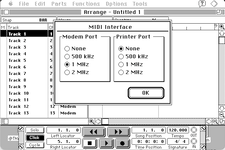
(Cubase Lite)
An external clock drives the HSk pin which drives the clock for the SCC and it's set to operate at 1/8, 1/16 or 1/32 of the clock rate, giving you an exact 31250 baud.
Yes, sure. The 1Mhz clock is implemented and Cubase is using it. Otherwise, Cubase would not work properly. Initially my core lacked the 1Mhz clock and thus Cubase wouldn't work. This ha been discussed in another thread here.
The interesting thing is that M would not use that external clock by itself. So the nearest bitrate it can achieve using the internal 3.686Mhz clock is 3686000/128 = 28796. This is exactly what we are seeing. Cubase switches to the 1Mhz clock and then uses a 1000000/32=31250 setting. Afterwards M also uses it.
The odd part is that M does not use the /128 dividers anymore. Either it does not touch the bitrate settings at all and thus continues to use whatever Cubase has set or it recognizes that the 1Mhz clock has been activated and then uses the appropriate divider for 1Mhz.
M actually has the same setting for 500kHz/1Mhz and 2Mhz as Cubase. But it doesn't seem to honor them ... although it doesn't fully ignore them as changing between 500kHz, 1Mhz and 2Mhz does change the resulting bitrate between 57600bit/s, 28800/bit/s and 14400 bits/s.
Furthermore, there is a "External Clock" setting in the Options menu of M which somewhat sounds like it's meant for exactly this purpose. But it doesn't seem to do anything. Maybe it's expecting some kind of different hardware?
How much experience do you have with MIDI on the classic mac in general and M in particular? What exact hardware does it expect to be connected, and how does it use it? What is the purpose of the "External Clock" option? It seems to me that this isn't a problem with my implementation, but rather a lack of understanding how M is to be configured and used. Is it expecting other software or some kind of driver to setup things?
The interesting thing is that M would not use that external clock by itself. So the nearest bitrate it can achieve using the internal 3.686Mhz clock is 3686000/128 = 28796. This is exactly what we are seeing. Cubase switches to the 1Mhz clock and then uses a 1000000/32=31250 setting. Afterwards M also uses it.
The odd part is that M does not use the /128 dividers anymore. Either it does not touch the bitrate settings at all and thus continues to use whatever Cubase has set or it recognizes that the 1Mhz clock has been activated and then uses the appropriate divider for 1Mhz.
M actually has the same setting for 500kHz/1Mhz and 2Mhz as Cubase. But it doesn't seem to honor them ... although it doesn't fully ignore them as changing between 500kHz, 1Mhz and 2Mhz does change the resulting bitrate between 57600bit/s, 28800/bit/s and 14400 bits/s.
Furthermore, there is a "External Clock" setting in the Options menu of M which somewhat sounds like it's meant for exactly this purpose. But it doesn't seem to do anything. Maybe it's expecting some kind of different hardware?
How much experience do you have with MIDI on the classic mac in general and M in particular? What exact hardware does it expect to be connected, and how does it use it? What is the purpose of the "External Clock" option? It seems to me that this isn't a problem with my implementation, but rather a lack of understanding how M is to be configured and used. Is it expecting other software or some kind of driver to setup things?
Similar threads


- Replies
- 24
- Views
- 4K
