• Hello MLAers! We've re-enabled auto-approval for accounts. If you are still waiting on account approval, please check this thread for more information.

NanoMac, a candy bar sized FPGA Mac Plus / PlusToo

MIST

6502
After ten years, I have started to spend some time again on the PlusToo FPGA Mac Plus. This is now based on the Tang Nano 20k family and allows for a quite small and also somewhat cheap setup.
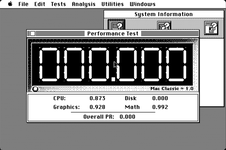
speedometer.png

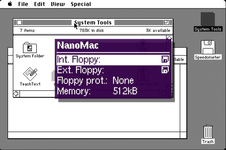
This time I am trying to do this as close to the original as possible. And e.g. Speedometer already delivers values which are IMHO quite close to what a real Mac Plus would do. The current state can be found at https://github.com/harbaum/nanomac and there's also an image of the hardware which is about the size of a candy bar and comes with HDMI video, USB host for keyboard and mouse and a micro SD card slot to store disk images. The system is controlled using an on-screen-display:
nanomac_osd.png

The CPU core that's now being used is a cycle exact reimplementation of the 68k. So it should actually run at exactly the correct speed. But I think I am a tad too fast, still. This probably means that I give the CPU some memory cycles it sholdn't get. Is there info on the exact memory usage of a Mac Plus? I am currently giving all unused video cycles to the CPU except one cycle per scanline which I used for refresh.

So my first question to you guys is:
What does a real Mac Plus do? Does it reserve cycles for memory refresh? If yes, how many? And does it allow the CPU to use all unused cycles during the video phase for the CPU? What exact Speedometer numbers should a MacPlus report?

Secondly, I am currently working to redirect floppy disk writes to the SD card. I have learned that Mac OS does a single write to the third sector of a disk during boot. This is something I can capture in simulation and which allowed me to implement major parts of the write handling. The current setup e.g. allows me to create new files using TeachText. But Speedometer fails to run the disk test and complains that it's unable to create the test file. Afterward, MacOS claims that "minor defects" on the disk need repair. So my floppy disk write implementation obviously still has flaws. Unfortunately, the simulation setup runs very slow (about 1/100 real speed) and is non-interactive (no mouse, no keyboard).

Thus, my second question:
Is there a ways to trigger a more complex floppy disk write during a non-interactive system start? Is there e.g. a BASIC interpreter I can auto start on boot running some program I can preserve? Or another scripting language that can be auto started? Anything that would write a larger file to disk all by itself just by booting?
 
What I just found is Retro68k. It builds, and I can compile the "Hello World" demo, which in turn fits (very tightly) onto a minimal system30 800k disk image. I can then set the Hello World as Startup and tadaaa ... the disk boots directly into this hello world. With a little luck, I might be able to squeeze some file creation code into this. As a result, this would give me the "boot into floppy disk writing without interaction".

Is there a way to remove the finder from such a disk? The finder itself claims it's locked and cannot be removed. And where are those accessories and the like? I don't need them, and removing them could also give me some disk space back.
 
What I just found is Retro68k. It builds, and I can compile the "Hello World" demo, which in turn fits (very tightly) onto a minimal system30 800k disk image. I can then set the Hello World as Startup and tadaaa ... the disk boots directly into this hello world. With a little luck, I might be able to squeeze some file creation code into this. As a result, this would give me the "boot into floppy disk writing without interaction".

Is there a way to remove the finder from such a disk? The finder itself claims it's locked and cannot be removed. And where are those accessories and the like? I don't need them, and removing them could also give me some disk space back.
You can replace the Finder with an alternate app with the type and creator codes changed to FNDR and MACS. There are mini finder solutions out here that still contain launch/shutdown capabilities but no general file manager, or you can do a wholesale replace if you don't mind not being able to shut down when finished (nothing that needs to be written back to disk).

The desk accessories, fonts, etc. reside in the System file. You can use Font/DA Mover to remove them, or ResEdit (which can allow you to trim out other unneeded resources as well, such as extra alert sounds, profiles for non-Plus Macs, etc.).

What you can't do is mess with the System and Finder files that are currently in use. The good news is that for pre-Multifinder systems, if a disk has an application and a functional system folder, when you run the application, it will automatically switch to use the System and File files on the same disk, so you can switch Finder and System without even rebooting the device. One of the benefits of the INIT resources being stored within the System file on early systems :)

[edit] Oh, and congrats on the project! This looks really neat!

I don't have the answers to your timing questions, but I do remember discussing this with Paul Pratt years back when he was trying to get Mini vMac to be cycle exact; it's possible his notes have some details that could be useful here.
 
Thanks a lot. That's a bunch of helpful information. The finder gave me the option to install a mini finder. I'll try that and remove the full blown finder. And I should play with resedit it seems ...

Thanks again. We'll see if the NanoMac will find it's users just like the Atari ST and Amiga versions also did.

I just enjoy working on these old machines and it's quite interesting to learn how the Mac has the simple design like the Atari ST but strips down the basic functions like an Amiga. The Atari and the Mac e.g. share the same simple and static CPU/video/memory cycles. And the Mac and the Amiga share the same stripped down floppy controller concept.
 
Really excited to see this!
I've been interest in the pico mac but a mac plus would be a lot more capable. Will be even more excited if it results in improvements to the MacPlus core for the MiSTer down the line!
 
That filament is great. Add one of those 4inch mini crts from Ali and build a mini plus with a real CRT ...
 
Small update: The NanoMac v1.0 now properly supports floppy disk writing. As a result, it's actually pretty usable as a Mac Plus with up to 4MB RAM and two floppy drives.

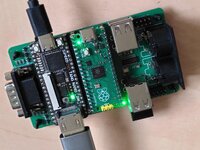
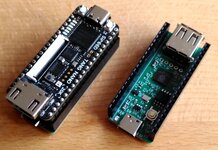
There are plenty of options for the hardware. This e.g. is a board with separate Pi Pico and a built-in USB hub. The MIDI and digital joystick ports are not supported by NanoMac, yet. The smaller variant comes with a rp2040 built-in and doesn't need a separate pico.

nanomac.jpeg1751012487596.jpeg

Since this is hardware and not just emulation, it should actually be possible to replace an entire logic board with this. Exposing video and sync signals to be wired to the analog board is probably quite trivial. The Tang Nanlo comes with a small audio amp and should be able to drive the original speaker. Connecting the original keyboard and floppy drive is probably some more work but sure doable.
 
Last edited:
Major parts of the iwm already exist inside the PlusToo core. And like on the Amiga, major parts of the encoding/decoding are done in software.

I actually don't expect it to be too much work to add the missing parts to an extent that a physical floppy disk can be read. It might even be possible to use a regular constant speed PC drive and read its data into a buffer to replay that at the expected speed to the Mac. I am basically doing that part already as I read SD card data into a buffer and encode and replay it on the fly so the Mac receives the expected gcr encoded track data.

These fpga cores are much closer to real hardware than emulators and especially mini vmac which takes a bunch of shortcuts to avoid implementing floppy or scsi related details.
 
Major parts of the iwm already exist inside the PlusToo core. And like on the Amiga, major parts of the encoding/decoding are done in software.

I actually don't expect it to be too much work to add the missing parts to an extent that a physical floppy disk can be read. It might even be possible to use a regular constant speed PC drive and read its data into a buffer to replay that at the expected speed to the Mac. I am basically doing that part already as I read SD card data into a buffer and encode and replay it on the fly so the Mac receives the expected gcr encoded track data.

These fpga cores are much closer to real hardware than emulators and especially mini vmac which takes a bunch of shortcuts to avoid implementing floppy or scsi related details.
Yeah; Mini vMac, BII and SS all use essentially the same shortcuts for data I/O. MAME, PCE and Snow are the ones to look at if you're trying to reference reasonable emulated IWM/SCSI timings.
 
The latest release includes SCSI support and is e.g. able to use the MacPack.

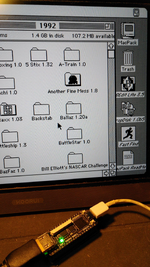
The result actually becomes pretty entertaining, as this now boots directly into OS 7.5 and basically allows you to just run any of the classic games that were released for the Mac Plus. I was e.g. very surprised to find Oxyd in this collection, a game which i fondly remember from my own Atari ST past.

1752086493807.png
 
Latest feature: Wi-Fi redirected to the Mac's modem serial port. See https://68kmla.org/bb/index.php?threads/new-mac-bbs-captains-quarters-ii.37877/page-5#post-567604

index.php


Next will be the option to route serial to the physical MIDI that some of our boards have. That should allow Cubase to actually connect to a real MIDI device ... if MIDI on the Mac Plus works through the modem serial port ... does it?
 
Amazing to see the incredible progress with this project! MIDI works via either the modem or printer port, and having working MIDI on this core would be a very important step, not just for my own work, but for the field of creative macintosh software preservation as a whole, as up until this point there is no reliable way to get MIDI working via any form of emulation, and the only option is actual hardware. If MIDI works, this means that hundreds of pioneering music software will be preserved. I work as a researcher in this field of cultural heritage preservation, and I would be eternally grateful for this system to work with MIDI. I actually posted a request for this some years back, and while there seemed to be some progress, working MIDI never arrived. Please keep us posted on this, and I would be able and love to test this out, with all the 68k MIDI gear I've collected over the years. Also if I can help by providing more details on how MIDI worked on these macs, I would be very happy to!

 
I am not quite understanding why you write "if it would work". It simply does. It has been implemented and just works exactly as it would on a real Mac.
 
Back
Top