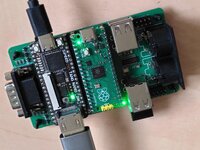
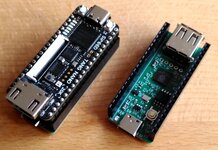
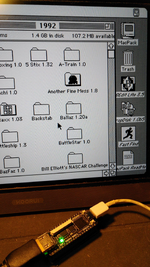
After ten years, I have started to spend some time again on the PlusToo FPGA Mac Plus. This is now based on the Tang Nano 20k family and allows for a quite small and also somewhat cheap setup.
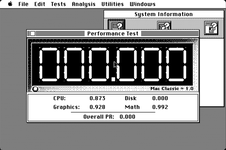
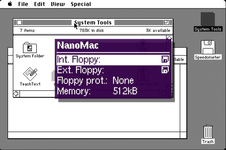
This time I am trying to do this as close to the original as possible. And e.g. Speedometer already delivers values which are IMHO quite close to what a real Mac Plus would do. The current state can be found at https://github.com/harbaum/nanomac and there's also an image of the hardware which is about the size of a candy bar and comes with HDMI video, USB host for keyboard and mouse and a micro SD card slot to store disk images. The system is controlled using an on-screen-display:
The CPU core that's now being used is a cycle exact reimplementation of the 68k. So it should actually run at exactly the correct speed. But I think I am a tad too fast, still. This probably means that I give the CPU some memory cycles it sholdn't get. Is there info on the exact memory usage of a Mac Plus? I am currently giving all unused video cycles to the CPU except one cycle per scanline which I used for refresh.
So my first question to you guys is:
What does a real Mac Plus do? Does it reserve cycles for memory refresh? If yes, how many? And does it allow the CPU to use all unused cycles during the video phase for the CPU? What exact Speedometer numbers should a MacPlus report?
Secondly, I am currently working to redirect floppy disk writes to the SD card. I have learned that Mac OS does a single write to the third sector of a disk during boot. This is something I can capture in simulation and which allowed me to implement major parts of the write handling. The current setup e.g. allows me to create new files using TeachText. But Speedometer fails to run the disk test and complains that it's unable to create the test file. Afterward, MacOS claims that "minor defects" on the disk need repair. So my floppy disk write implementation obviously still has flaws. Unfortunately, the simulation setup runs very slow (about 1/100 real speed) and is non-interactive (no mouse, no keyboard).
Thus, my second question:
Is there a ways to trigger a more complex floppy disk write during a non-interactive system start? Is there e.g. a BASIC interpreter I can auto start on boot running some program I can preserve? Or another scripting language that can be auto started? Anything that would write a larger file to disk all by itself just by booting?
This time I am trying to do this as close to the original as possible. And e.g. Speedometer already delivers values which are IMHO quite close to what a real Mac Plus would do. The current state can be found at https://github.com/harbaum/nanomac and there's also an image of the hardware which is about the size of a candy bar and comes with HDMI video, USB host for keyboard and mouse and a micro SD card slot to store disk images. The system is controlled using an on-screen-display:
The CPU core that's now being used is a cycle exact reimplementation of the 68k. So it should actually run at exactly the correct speed. But I think I am a tad too fast, still. This probably means that I give the CPU some memory cycles it sholdn't get. Is there info on the exact memory usage of a Mac Plus? I am currently giving all unused video cycles to the CPU except one cycle per scanline which I used for refresh.
So my first question to you guys is:
What does a real Mac Plus do? Does it reserve cycles for memory refresh? If yes, how many? And does it allow the CPU to use all unused cycles during the video phase for the CPU? What exact Speedometer numbers should a MacPlus report?
Secondly, I am currently working to redirect floppy disk writes to the SD card. I have learned that Mac OS does a single write to the third sector of a disk during boot. This is something I can capture in simulation and which allowed me to implement major parts of the write handling. The current setup e.g. allows me to create new files using TeachText. But Speedometer fails to run the disk test and complains that it's unable to create the test file. Afterward, MacOS claims that "minor defects" on the disk need repair. So my floppy disk write implementation obviously still has flaws. Unfortunately, the simulation setup runs very slow (about 1/100 real speed) and is non-interactive (no mouse, no keyboard).
Thus, my second question:
Is there a ways to trigger a more complex floppy disk write during a non-interactive system start? Is there e.g. a BASIC interpreter I can auto start on boot running some program I can preserve? Or another scripting language that can be auto started? Anything that would write a larger file to disk all by itself just by booting?