MODTracker audio replay on early 68k macs

Bumping this. I am going to port the ProTracker replayer to 68000 Macs one day, I just need to set up a development environment that compiles C code (for loader/GUI) and assembles assembly code (replayer/mixer), linking together the two into a single executable. Any suggestions for a dev setup for this purpose on System 6?
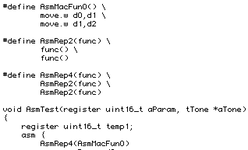
I played with Retro68 for the work I did on MODTracker, but frankly I'd choose THINK C 5 as it's a much cleaner, direct development environment. It works under System 6 and you can do inline assembly pretty well. You can write your VBL (replayer/mixer) task to work in inline assembly. Assembly stuff can see the 'C' symbols and vice versa. THINKC can do Object Orientation with a subset of C++ features including virtual methods and has a well respected Class Library (TCL) for writing OOP-based apps.
 
OK, so THINK C 5 it is, but I need an assembler as well. I don't want to inline the whole mixer and replayer, and I want both of those to be in 100% assembler for minimal overhead.
 
OK, so THINK C 5 it is, but I need an assembler as well. I don't want to inline the whole mixer and replayer, and I want both of those to be in 100% assembler for minimal overhead.
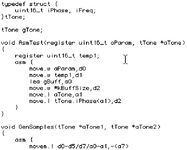
I understand. Maybe MDS could help there. But inline assembler is a very nice old-style inline assembler, where you just do stuff like _asm { and then type lines of assembly until you want to stop with } . It's not like GNU inline assembler. It sets up a stack frame, which costs a couple of instructions.

1779897106743.png
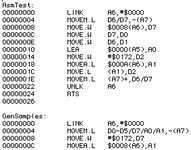
Which compiles to when you choose Source: Disassemble:
1779897193144.png
-cheers from Julz
 
If it matters at all, as a non-programmer, I discovered that the AI coding agents will actually produce useable code for THINK C. I tried for many, many hours to get it to do anything for CodeWarrior with zero success. I think it's because the code it steals for THINK C is, by necessity, clean and concise as it must adhere to specific standards. CodeWarrior is more loosey goosey and forgiving of mixing styles and standards, so the code the AI steals and regurgitates is really sloppy.

I'm only saying this incase you use it as a tool for a tiny bit of troubleshooting or for commenting code and/or libraries to better understand what's going on. It's also the only thing of (relative) value I feel I could contribute.
 
MPW has a powerful 68K assembler that supports macros and such.

Can you link object files generated from that into Think C? I did that with Think Pascal.

Attached are some projects I implemented in Think Pascal and 68K Assembly from "Zen of Graphics Programming" by Michael Abrash (First Edition © 1995). The code in the book is C and i386 assembly.

The 68K assembly files have extension .a. I think they are formatted in MPW with Geneva 9 pt font, tab space 4.
An MPW worksheet named "Compile" has commands for compiling the assembly files (to generate object files) and doing other stuff in MPW such as searches. The compile commands should probably be converted to an MPW MakeFile (with dependency lists, etc.). In this worksheet form, you select a command to execute, and press enter - similar to BBEdit.app worksheets in modern macOS.
The files use classic Mac OS carriage return line endings. If you add them to a GitHub repository, you'll want a script to convert to and from Unix linefeed line endings and to add the MPW or Think file type and creator codes.
 

Attachments

Thanks! That’s indeed nice and clean. No need for a separate assembler after all. Does it support the REPT directive for repeating a block of asm code?
I guess you could use the C pre-processor? Define the block of code in a macro, then define a rept macro to repeat another macro a number of times with some kind of recursive #ifdef trickery? Finally, have a AsmRept(n, macroName) in the asm block?

@8bitbubsy , [ @joevt ], if you're familiar with MPW, it's more of a heavy-weight, more sophisticated development environment, which perhaps is worth looking at. It's not really like a VS / THINK / Xcode / CodeWarrior / Eclipse type environment though. Steeper learning curve, but more rewarding if you're committed enough.
 
So you'll port the Amiga code to the slower Mac _and_ add a software mixer? Sounds cool. When do you expect to have some working demo?
 
So you'll port the Amiga code to the slower Mac _and_ add a software mixer? Sounds cool. When do you expect to have some working demo?
Yes. I already made a 4ch 16-bit software-mixer for 7MHz 68000 Amigas using the original PT replayer, so I know it works. It mixed at around the same rate as the Mac version will use (22kHz).

Not sure when I'll have something to show off, I'll need to set up some stuff on my Macintosh Classic first, then find the motivation.
And I also need to take into account that I may get stuck getting it to be fast enough. I know there are some limitations on 68k Macs as the available CPU time is not really 100%.
 
Last edited:
Yes. I already made a 4ch 16-bit software-mixer for 7MHz 68000 Amigas using the original PT replayer, so I know it works. It mixed at around the same rate as the Mac version will use (22kHz).

Not sure when I'll have something to show off, I'll need to set up some stuff on my Macintosh Classic first, then find the motivation.
And I also need to take into account that I may get stuck getting it to be fast enough. I know there are some limitations on 68k Macs as the available CPU time is not really 100%.
Original 68K Macs up to a Mac Plus, have about 6.5MHz of effective performance, because the video hardware fetches a word every 8 cycles when copying the actual frame buffer. Thus 4*(512/16)*342*60.15=2633126.4 are taken/ second. In theory, this leaves only 4866873.6cycles /second, but obviously a lot of 68000 instructions have internal cycles so it's a bit better than that.

The Mac SE and Mac Classic are a bit better because they fetche 32-bits every 16 cycles (1/4 potential memory fetch cycles). Thus 2633126.4/2=1316563.2 are taken/second, leaving 6.2M cycle/s available for the CPU. Having written that the Mac Plus has 6.5MHz of CPU, that can't quite be right, because it implies the SE has: 6.2M/4.9M*6.5MHz=8.2MHz, which is impossible. Hmmm.
 
Yeah, I'm worried it may not be fast enough on a 68k compact Mac, which would be a huge letdown, but I'll give it a try first before I conclude with anything at all. Though I'm only going to support Macintosh SE or newer, as I need all the CPU time I can get.

I have some things in mind to hopefully make it fast enough, like making sure all sample loops are at least 512 bytes long by unrolling the loop N time(s) where needed during module load. Also to calculate the max amount of output samples one can mix during a frame before reaching the end of the sample data (or its loop end point), so that there is no need to test for loop/end boundaries inside the actual inner mixing loop, which would be SLOW. And unrolling the inner mixing loop too, obviously!
 
OK scratch that, I will try to support Mac Plus too, though I have a feeling that if it's fast enough on a SE, it may occasionally hiccup on a Plus.
 
OK scratch that, I will try to support Mac Plus too, though I have a feeling that if it's fast enough on a SE, it may occasionally hiccup on a Plus.
I see you started contributing from near the beginning, there are quite a few posts which discuss optimising basic playback performance. I'm not sure exactly how familiar you are with Mac audio and all the posts in this thread. So at the risk of condescension,

I guess you know that a compact Mac plays a single 370b, 8-bit sampled audio buffer from a fixed location in RAM relative to the video frame buffer, on every frame, which you can hook with a VBL (Vertical Blanking Line) interrupt.

So, the technique here was to generate one frame's worth of audio in a separate buffer and then copy it to the hardware buffer at the beginning of the next VBL, then while it's being played by the audio we have time to generate the next frame.

For example:


Discusses how quickly we can do this, a routine taking 0.629ms (7.5MHz) or 0.726ms (effective 6.5MHz). At 60.15Hz, we have 16.63ms per frame, so that's about 3.78% of CPU gone for this.

This post discusses a central loop for audio generation, 2 tracks at a time:

It would take up 4461806.7cycles/second, about 69% of CPU at an effective 6.5MHz. This, I think is enough to be fairly sure you can do it on a Mac Plus.

Much of your comments revolve around getting rid of the simulated 50Hz scheduling period and just working with the true sample rate and Mac VBL frequencies. I agree, since making them conform complicated audio generation, which means it made it less efficient.

One of my discussion points early on (i.e. my first comment above) is that sample generation doesn't really have to take place at the beginning of the hardware buffer, because firstly, from a user's viewpoint, we just hear a continual stream of samples: if the audio generation wrote from sample 185 (the middle) of the HW buffer to the end and back to the beginning, then to sample 184 it would sound the same if you could be sure that the audio generation never overtook the hardware playback. And this has the advantage of giving the audio software a bit more latency, but also frees up that 0.629ms from having to copy from your generated audio buffer to the hardware buffer.

e.g Let's say audio generation takes 65% of CPU and we start writing audio at sample 185, while the HW is at sample 0. When we've done sample 369 (the last one, counting from 0), the HW is at (370-185)*0.65=Sample 120. We start back at sample 0 at this point, but the HW is ahead, so we're not overwriting it. When we've done the next 120 samples, the HW has done another 120*.65=78, so it's at sample 198, 13 samples into the audio we've just been generating. We have another 185-120=65 samples to do and when we have finished, we've written sample 184 and the HW is at sample 240 or 241.

We now have some time to calculate playback and effect and when we leave the VBL, handle some UI (slowly). On the next VBL interrupt, again we start generating samples and writing them from hw buffer sample 185.

This is just an example assuming 65% of CPU. If we were much faster than that, we'd overtake the hw playback, so we'd have to start at an earlier sample to prevent that.

 
Ah nice. So if I understand it right I can use MOVEP.L (A0)+,D0 to store four high-bytes from my 16-bit mixing buffer to D0, then do MOVE.L D0,(A1)+ (where A1 points to the 8-bit audio buffer)? That's for sure a great optimization.

Also yeah, I'll have to figure out how and at which point during a frame to write to the output audio buffer. It sounds complicated, and I may need some help when that time comes. First I need to get it all ported over.
 
Last edited:
MOVEP.L (A0)+,D0
I don't think MOVEP.L supports post increment addressing mode.
Also, 68K assembly instructions have source as the first parameter, and destination as the second.
You would probably have an unrolled loop like in the examples given in earlier posts. Do several moves in a row then an add instruction to increment A0 by 8 times the number of moves. Then a branch.

https://68kmla.org/bb/threads/modtracker-audio-replay-on-early-68k-macs.50519/post-568559
https://www.plutiedev.com/movep
 
Ah nice. So if I understand it right I can use MOVEP.L (A0)+,D0 to store four high-bytes from my 16-bit mixing buffer to D0, then do MOVE.L D0,(A1)+ (where A1 points to the 8-bit audio buffer)? That's for sure a great optimization.
Close. The actual code snippet did it the other way around:

Code:
    move.l (a0)+,d0
    movep.l d0,0(a1)

It moved 4 bytes from an 8-bit mixing buffer to 4 consecutive alternate bytes in the hardware audio buffer. You can't use the (an)+ addressing mode, because only disp(an) is supported for movep. Of course, this can be made faster:

Code:
    move.l (a0)+,d0 ;12c,
    movep.l d0,0(a1) ;we now have 44.9us free.
    movem.l d0/d1/d2/d3/d4/d5/d6/d7,-(a7) ;about 9.6us (72c)
    movem.l (a0)+,d0/d1/d2/d3/d4/d5/d6/d7 ;another 9.6us.(72c)
    movep.l d0,8(a1)
    movep.l d1,16(a1)
    ;etc
    movep.l d7,64(a1) ;Total: (24*8+72)=264c vs 288c. for 32samples.
    ;Need to do this another 10 times (another 320 samples). 14 samples left.
    ;that's 12
    movem.l (a0)+,d0/d1/d2 ;12 samples (32c)
    ;another 3x movep.l (24c*3=72c)
    move.w (a0)+,d0
    movep.w d0,736(a1)

This version takes 36+264*11+32+72+8+16=3068 cycles or 0.41ms instead of 0.629ms.
Also yeah, I'll have to figure out how and at which point during a frame to write to the output audio buffer. It sounds complicated, and I may need some help when that time comes. First I need to get it all ported over.
OK, sure.
 
Back
Top