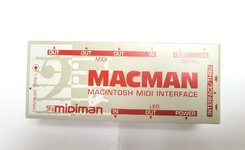
Hi all, have been trying to get this MIDI interface working with a Mac Classic and a variety of MIDI software (Cubase 2.5, Trax 2.0, Music Mouse, etc.) but am not having any success at all.
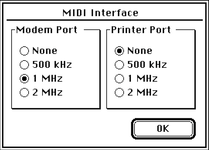
It's the larger version with the three MIDI out ports and the serial passthrough. I haven't got the original serial cable it shipped with, but as far as I can tell from other posts it only needs a standard printer/modem crossover cable which I have got. No matter what software I try, or port settings, no MIDI data is received or transmitted and the LEDs never illuminate. I've tried it with ther optional external power supply which made no difference to the MIDI functionality (or lack of), but the power LED and input LED did light when sending it MIDI data from a keyboard.
I have tested the serial ports on the Mac, both with Snooper + the loopback plugs; as well as with Peace of Mind 3.0 which can test them using a crossover cable plugged between the modem and printer ports. All of these test fine, including with the MIDI interface in the middle and set to bypass.
Don't really know where to look now as far as testing goes - I presume the Mac's serial ports are OK going on the above, but I could pull the logic board and check it over. For what it's worth I have previously recapped it - leakage was fairly minor and was cleaned up, and the battery had long been removed before it had a chance to explode. I also checked inside the MIDI interface, the switch is making all of its connections properly, no cold solder joints on connectors or anything obviously wrong. Thanks for reading
It's the larger version with the three MIDI out ports and the serial passthrough. I haven't got the original serial cable it shipped with, but as far as I can tell from other posts it only needs a standard printer/modem crossover cable which I have got. No matter what software I try, or port settings, no MIDI data is received or transmitted and the LEDs never illuminate. I've tried it with ther optional external power supply which made no difference to the MIDI functionality (or lack of), but the power LED and input LED did light when sending it MIDI data from a keyboard.
I have tested the serial ports on the Mac, both with Snooper + the loopback plugs; as well as with Peace of Mind 3.0 which can test them using a crossover cable plugged between the modem and printer ports. All of these test fine, including with the MIDI interface in the middle and set to bypass.
Don't really know where to look now as far as testing goes - I presume the Mac's serial ports are OK going on the above, but I could pull the logic board and check it over. For what it's worth I have previously recapped it - leakage was fairly minor and was cleaned up, and the battery had long been removed before it had a chance to explode. I also checked inside the MIDI interface, the switch is making all of its connections properly, no cold solder joints on connectors or anything obviously wrong. Thanks for reading