• Hello MLAers! We've re-enabled auto-approval for accounts. If you are still waiting on account approval, please check this thread for more information.

MicroMac, a Macintosh for under £5

Cute, but ultimately kind of a dead end. The Pi Pico 2 that's out now probably has enough extra oomph to just run Mini vMac.
 
what is PICO

I just restored an se/30 for someone and replaced the original sony PSU with this tiny PICO board he sent me , as a kit , that plugged straight into the analog board, replacing the entire sony PSU with an external 12 volt power supply - this PICO thing took the 12 volt , and made a 5 volt and -12 volt and fed it into the analog board - thing works perfect even with a diimo 030 accelerator installed
 
https://axio.ms//projects/2024/06/16/MicroMac.html
Just discovered this, am kind of surprised that no one (including it's creator) has mentioned it here.
Cute, but ultimately kind of a dead end. The Pi Pico 2 that's out now probably has enough extra oomph to just run Mini vMac.
Neither of them would be fast enough to emulate a Mac using Mini VMac. The author of that Micro Mac uses a 68000 emulator written in 'C', which is probably as fast as them, perhaps faster and he had to overclock the RP2040 PICO to about 250MHz.

From the blogpost:
One problem though: it totally sucked. It was suuuuper slow. I added a 1Hz dump of instruction count, and it was doing about 300 KIPS... I didn’t say I wasn’t gonna cheat: let’s run that Pico at 250MHz instead of 125MHz. Okay better, but not 2x better. From memory, only about 30% better. Damn, no free lunch today.

He had to apply a whole bunch of other tricks, including running parts of the emulator in RAM and eventually got up to 1.4MIPS.

But I am working on a Cortex M0+ (as on the RP2040) based 68000 emulator, in assembler which I already know will achieve at least the same performance of an original Mac, at 125MHz. And the basic reason is that it will fit entirely in the RP2040's 16kB XIP Flash cache. The worst instructions, which are move.w rs,rd instructions will be a bit faster (a few %), but more complex instructions will be increasingly faster, as the decoding overhead goes down. So, ALU, JMP, JSR instructions are faster and instructions that read memory addresses are increasingly faster.

And I already have the RP2040's successor, a PICO 2, running at 150MHz. It has 524kB of RAM (520kB, but you can use the USB endpoint RAM too). This means it can emulate a proper 512kB Fat Mac from 1985!

There's a thread here, discussing the emulator above:


There's a thread here, discussing the RP2350:


I've managed to get Blinky to run, so I'm 99% of the way there already ;-) !

My emulator will work, as is, on the RP2040, but would enable the mythical 256kB Mac to be emulated. The MicroMac article actually references my 68KMLA article from the end of December 2023 on the subject:


Finally, oddly enough, the MicroMac blog post claims that MacPaint won't run in 128kB, but this isn't correct - proof below.
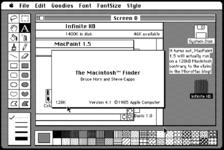
1724053365564.png
Try it yourself, by running the Infinite Mac 128kB Mac emulator (which is a JS conversion of mini VMac); double-clicking on the Infinite HD; navigating to MacPaint 1.5 and opening it:


Although it says Version 4.1 of the Finder, that's a quirk of the version numbering system Apple were using. It's really System 2.0 as per the link.

 
Last edited:
This is rather fun

Cute, but ultimately kind of a dead end.

Well, the hardware was built using a roadside-find VGA cable because the author didn't want to waste a good one. I don't think they're under any illusion about the long-term fate of this particular project :-)
 
This is rather fun

Well, the hardware was built using a roadside-find VGA cable because the author didn't want to waste a good one. I don't think they're under any illusion about the long-term fate of this particular project :)
Well, surely on that kind of basis, the entire purpose of the 68KMLA is a dead-end, because 68K, PPC and now even Intel Macs are obsolete. But is that really the best way to look at things? IIRC at the UK, 68KMLA meet-up I discussed developing a PICO-based Mac 128kB, so if I'd done that and numerous other people have emulated a ZX Spectrum C64 or probably even an early PC on a PICO and thought it worthwhile, even if it's never going to be commercial megabucks, then it's likely someone will take up this project and make it more viable?

And of course, the PICO-2 with 524kB of RAM is significantly more viable as a Mac emulator. And of course, emulating a Mac is a great, first 68K computer to emulate, precisely because its hardware is rudimentary compared with even an Atari-ST (though a QL comes close).
 
Try it yourself, by running the Infinite Mac 128kB Mac emulator (which is a JS conversion of mini VMac); double-clicking on the Infinite HD; navigating to MacPaint 1.5 and opening it:

I can do that even faster in MAME (and emulate a 256K Mac, if I understood why you'd want to). But I thought it was well known that MacPaint works on a 128. Susan Kare created the entire B&W Mac aesthetic with it, after all.

The Mac is rudimentary to emulate only if you cheat. Otherwise the IWM will have you thinking waaaay too much about the physics of rotating media, but it's worth it when copy-protected .WOZ and .MOOF dumps work.
 
Hi @Arbee
I can do that even faster in MAME
I normally use Mini VMac myself, though I'm a bit particular to the PCE emulator, because it's a much better design.
(and emulate a 256K Mac, if I understood why you'd want to).
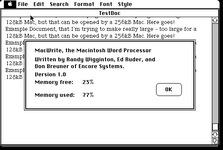
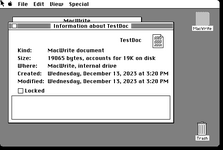
Really? My original thread on the 256kB Mac turned out to be WRONG! Anyone could tell if they looked at the screenshots. Here they are again:

1724184295796.png
and
1724184336033.png
Obviously, a 19K document can't take up 77% of the memory on a 256kB Mac. I had made a dumb mistake, which should certainly be on the "What did you screw up today?" topic. I misread Memory free as Memory used and vice versa, so I thought that the 19K document only took up 23% of the spare RAM.

So what's the actual method? I think I've done most of the work, because I modified my miniVMac to accept a 256kB memory size (I added a 256kB command-line option and made it allocate 256kB) and I modified part of the ROM, but my method obviously still lacks something.

There's three reasons for the 256kB Mac:
  1. It never really existed, so in a sense it would be a new Macintosh model.
  2. We have experiences of the 128kB model, which was mostly useless I believe, and the 512kB model, which was the first truly useful Mac IMHO. But what would a 256kB Mac actually be like, i.e. what's the experience? Could you write a dissertation on one? Would the MDS assembler be much more usable - usable enough to write practical programs? Could Lightspeed Pascal 1.0 work on it? Could Switcher support 2 apps OK? Was it powerful enough to design Transparent Aluminum [YouTubeLink] ;-) ?
  3. the reason I think you meant: that it's at the limit of what an RP2040 could achieve.

But I thought it was well known that MacPaint works on a 128. Susan Kare created the entire B&W Mac aesthetic with it, after all.
Yes, I thought everyone knew that MacPaint worked on the original 128kB Mac, but the blog post claimed otherwise. And in fact the source code is in the public domain so there's no excuse. However, Susan Kare didn't use MacPaint to create the look and feel of the original Mac. There's a good interview on that, but basically she started using just paper and pencils, but early on in the development they implemented an Icon editor for the Lisa and I think she did most of the graphic designs on that, including the fonts - though she may have been given an early prototype. The Mac wasn't used for any software development up until maybe after the launch. All that was done on a Lisa and laboriously uploaded via serial to prototype Macs. At least that's what I understand from Folklore.org and the other articles/ books I've read.
The Mac is rudimentary to emulate only if you cheat. Otherwise the IWM will have you thinking waaaay too much about the physics of rotating media, but it's worth it when copy-protected .WOZ and .MOOF dumps work.
I forgot about the Infinite Weird Machine ;-) ! Oh, right so MAME emulates the IWM. I would cheat on the Sony Floppy drive emulator too. The hooks would go straight to a Flash Translation Layer in 'C'. I have some tiny, efficient FTL code which would be good for emulating 1x 400kB + 1x800kB drives (2MB of Flash-1200kB for disks -128kB for ROM & Emulator => 720kB to avoid thrashing the flash during garbage collection).
 
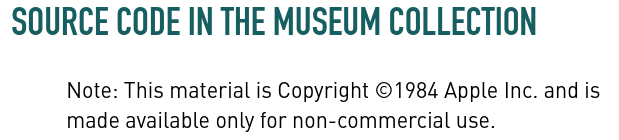
This isn't correct... The CHM has only been able to negotiate fairly restrictive terms for publishing old Apple source code; the Lisa Office System is the same way and may be even more locked down. But you don't have to take my word for it:


1724187966639.png

from here. "Public domain" means no restrictions and so it's worth being careful about that term IMO.
 
If I understood the blog correctly, the problem they ran into with running MacPaint was that they are emulating a Mac 128ke, which is to say, one with the 128k ROM installed instead of the stock 64k ROM. Apparently, the 128k ROM requires a bit more overhead (which makes sense) and it's just enough extra that it doesn't leave enough leftover for MacPaint, but other programs still run just fine.

Cute, but ultimately kind of a dead end. The Pi Pico 2 that's out now probably has enough extra oomph to just run Mini vMac.

Either way, it seems like they were doing it for their own edification.
 
I guess it's kind of neat that it is so small, but why not just get someone's old Mac Mini for crazy cheap and run minivMac at blazing speed?
 
This isn't correct... The CHM has only been able to negotiate fairly restrictive terms for publishing old Apple source code; the Lisa Office System is the same way and may be even more locked down. But you don't have to take my word for it:


View attachment 77179

from here. "Public domain" means no restrictions and so it's worth being careful about that term IMO.
Oh, fair enough, my understanding of "public domain" was colloquial. Thanks for correcting me! I'm expecting to be corrected on what I said about Susan Kare!

https://folklore.org/Joining_Apple_Computer.html?sort=date "I had fun writing the MacPaint bitmap painting program that shipped with every Mac (see MacPaint Evolution). I learned a lot from watching Susan Kare using my early versions. MacPaint showed people how fun and creative a computer with a graphics display and a mouse could be."

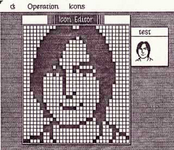
https://folklore.org/Steve,_Icon.html?sort=date "In February 1983, I worked on putting together an icon editor for Susan Kare to use to create icons for the Finder"

1724188841195.png
The Icon editor looks a lot like a Lisa application, but the top-left corner is rounded, which I think was a Mac-only thing. So maybe even for this, Susan Kare had a 1983 Mac.

https://folklore.org/Busy_Being_Born,_Part_2.html?sort=date "Here is a very early version of MacPaint, probably from March 1983, after Bill had been working on it for around one month <snip> This early version uses icons designed by Bill himself, before Susan Kare got a chance to tweak them. <snip> In early 1983, I wrote an icon editor based on Bill Atkinson's "Fat Bits" pixel editing techniques that Susan Kare used to craft most of the early Mac icons <snip> I added a feature called the "Hex Window", that displayed the representation of the current icon in hexadecimal, which is what I needed to add the icons to the Mac ROM source code."

This is also interesting. It means that icons were edited on a Mac in 1983, but they couldn't get them onto a new ROM except by manually copying the hex values.

So, this article explains she started in January 1983, so by then the Mac hardware was pretty much complete. She was given an early Mac. That article links to an interview with Susan Kare which says:

"Kare: Yes. I definitely learned on the job. As when I went to Macintosh, there wasn't really an icon editor, but there was a way to turn pixels on and off. I did some work on paper, but obviously it was much better to see it on the screen, so there was a rudimentary icon editor. First they showed me how I could take the art and figure out the hex equivalent so it could be keyboarded in. Then Andy made a much better icon editor that automatically generated the hex under the icons. That was how I did the first ones. I think I did the fonts that way, going letter by letter, before we had a font editor.

Pang: Were you working on a Lisa?

Kare: No, on a Mac. Always on a Mac. Though my first Mac still had the Twiggy floppy disk drive. The Finder displayed a floppy, and had draggable titles and files."


OK, so the reason I thought she'd used a Lisa was because I thought she'd joined earlier than January 1983, just 1 year before the Mac launched. She was given a Twiggy drive Mac because, well, for her it was more productive, but also because she was the kind of person the Mac was aimed at.

Now I'll make another guess: she most probably used a 128kB Mac, even though the earliest released Mac was designed to take 256kBit chips as well as 64kBit chips. And I'm guessing that because I didn't think the 256kBit chips were available in early 1983, but we do know that by the time of the launch they were available, because the initial Mac demo was done on such a Mac... However... perhaps I'm wrong about that too. Perhaps that Mac was rigged up with 64 x 64kBit chips. It'd be quite tricky to do that: you'd probably want to hack the raw A17 and A18 address lines, because if you hacked into rowA8 and colA8 to select one of the 4 chips, you'd lose rowA8 when colA8 was asserted, but decoding A17, A18 and RAM /CS with a 74LS138 would allow you to select any chip correctly and then the normal circuitry for decoding A16 to A1 would map to rowA7..A0 and colA7..A0.

Apologies for my mistakes!
 
I guess it's kind of neat that it is so small, but why not just get someone's old Mac Mini for crazy cheap and run minivMac at blazing speed?
Oh, you mean a Mac-mini-mini-vMac ;-) ! I think @CircuitBored has 6 you could try it out on ;-) ! I also have a Mac mini G4, which I think would be fast enough to run miniVmac.

I think for some of us taking 68K Macs and pimping them up until they need nitrogen coolants is their kind of fun wizardry, a real sense of achievement. For others, it's about reproducing the original experience of a Mac; for which authenticity, or the sense of authenticity is critical. I think this is a good motivation for running a real 64K ROM/ Fat Mac on a Raspberry PI PICO-2, because the level of complexity and performance isn't outrageously dissimilar. The wizardry there is bringing new, but constrained hardware down to the original machine. I guess that's why Infinite Mac now runs its compact Mac emulators at 1x speed by default (though miniVMac runs at 8x speed).

I've been thinking a bit in the past week about my original experiences of the 512kB Macs we used at UEA (Norwich, UK) in late 1986. We only used MacPaint, MacWrite, MacDraw, MacTerminal and MacPascal on these machines. Later, when everyone seemed to have a copy of System 2, WriteNow started to supersede MacWrite. So looking back, we totally underutilised those computers; though maybe MacPascal pushed it a bit further. But we didn't even try to push them: the sheer level of awe and discovery around GUI-based computers was enough to keep us occupied with working out how things were done. I remember seeing that MacWrite was 65kB on the disk and wondering how someone could write a program that big. It's not like we couldn't have imagined how we might fill 512kB, but that at a practical level it was hard to see what kind of activities would do that. PageMaker, maybe. Particle simulations involving about 50K particles (50K 2-d particles with 16-bit position and velocity vectors would fill 400kB). A very slow, fully interconnected Neural Net (n²/2)x2=512kb => 724 neurones.
 
I think there's also an appeal to a dedicated device that is hard to get with VMs or emulators on a contemporary machine. A setup like this can give a better idea of what using a machine was actually like, even (or perhaps because) it's less convenient. This is a pretty rough version of that, but I'm hopeful this general idea can be refined; at the very least it's a better thing to fit inside those 3D-printed Macs than a full-fat Raspberry Pi.
 
at the very least it's a better thing to fit inside those 3D-printed Macs than a full-fat Raspberry Pi.

Sorry, but I can't imagine why. Could you please explain this reasoning?

I've been using ARM SBCs for emulation since the RPi1 was released and I've appreciated the upgrades with each generation because it allows the emulation, networking, storage, and video output to perform better. The CPU doesn't need to use that power most of the time, but it's there when needed and makes the experience that much better.

Of course, FPGA Mac hardware emulation would be wonderful but ATM there aren't many options. There's a Mac Plus core on MiST/MiSTer which I have used extensively, but it's buggy and there are significant accuracy issues. Sadly there doesn't seem to be anyone with the required skillset and desire to fix that core and/or program cores for other Macs.
 
I've been using ARM SBCs for emulation since the RPi1 was released and I've appreciated the upgrades with each generation because it allows the emulation, networking, storage, and video output to perform better. The CPU doesn't need to use that power most of the time, but it's there when needed and makes the experience that much better.
You certainly need a bare-metal and multi-core emulator to achieve deterministic emulation. On a simple emulator like Mini VMac, for example (though this also applies to the PCE emulator and likely others); main loop execution consists of executing a fixed number of instructions - or if it uses cycle-accurate emulation, a fixed number of cycles; then the emulator waits until the same real-time has elapsed and repeats the next batch of emulated instructions.

And with a super-fast emulator, you then find you need to wait a significant proportion of the time as each execution batch takes up a tiny period of real-time. This can cause problems with software that depends upon fine-grained behaviour. MIDI is a classic example, where batched instruction execution can make the time stamps of incoming MIDI bytes for the previous 16ms appear to be a packed stream of MIDI bytes; while the same happens in reverse on output, the emulator thinks it's outputting MIDI bytes synchronised to real-time, but really they're getting shoved in a packed buffer, which then plays them all at once, with a 16ms gap until the next batch.

An RP2040 and RP2350 are slow enough to emulate 68000 code in close to real-time and more importantly, deterministically. For example, the Cortex M0+ assembler/based emulator I'm working on, runs without any instruction batching and at speeds between just over 1x the speed of a real Mac to perhaps 2x or 3x the speed depending on the types of instructions (more complex instructions ironically are relatively faster, because of the higher proportion of much faster memory read/writes vs decoding). M0Bius is much more like the original Gary Davidian PPC emulator, because it makes no attempt to count cycles, it just runs as fast as it can.

Of course, FPGA Mac hardware emulation would be wonderful but ATM there aren't many options. There's a Mac Plus core on MiST/MiSTer which I have used extensively, but it's buggy and there are significant accuracy issues. Sadly there doesn't seem to be anyone with the required skillset and desire to fix that core and/or program cores for other Macs.
An RP2040 or RP2350 can get much closer to an FPGA style emulation. The PIOs allow for zero-CPU overhead for the 68K emulator CPU and the second core should be able to manage all of the non-CPU hardware emulation.
 
For what it's worth, my thought was more that having a cheap, easy-to-integrate package that boots directly into a Mac emulator is a better solution than running a whole other modern OS to accomplish the same task. I use Basilisk and Sheepshaver on my main Macs a fair bit, but never quite got the point of making a skeuomorphic package that ultimately feels feels like using a bigger machine. Appreciate Snial's more technical points, though--mine amount to an aesthetic preference.
 
I use Basilisk and Sheepshaver on my main Macs a fair bit, but never quite got the point of making a skeuomorphic package that ultimately feels feels like using a bigger machine.

Yeah, for that kind of situation I'd rather just use real retro hardware. A lot of the reason I like using emulators is for things that are hard/expensive to do on the real thing (a Mac II with 6 video cards is the canonical MAME example) and in that situation the feel matters less.
 
For what it's worth, my thought was more that having a cheap, easy-to-integrate package that boots directly into a Mac emulator is a better solution than running a whole other modern OS to accomplish the same task. I use Basilisk and Sheepshaver on my main Macs a fair bit, but never quite got the point of making a skeuomorphic package that ultimately feels feels like using a bigger machine. Appreciate Snial's more technical points, though--mine amount to an aesthetic preference.
I think it's possible to get the PCE emulator to run on bare metal.


I might try and merge parts of this with my M0Bius 68K emulator for the Cortex M0+ (it will work on M33 too).
 
Back
Top