• Hello MLAers! We've re-enabled auto-approval for accounts. If you are still waiting on account approval, please check this thread for more information.

MacTest IIfx 1.0 added to Mac Garden

Iesca

6502
I wouldn't normally post here to announce that I had merely uploaded something to the Garden, but given the type of software and the specificity, I thought I'd let people know that I added a copy of MacTest IIfx to the Garden that I acquired the other day.

Do note that it is an HD floppy and so requires a 1.4MB floppy drive to work. I added it on to the main MacTest II page, so that it was grouped with its brethren, though it should be noted that it is intended to be used only with the IIfx, not the II or IIx (or IIci, IIcx, etc.) The software is Version 1.0; I have no idea if there were later revisions of this particular MacTest.

I do not own a IIfx of my own to try it (a Mac II in a IIfx case doesn't count, sadly), but I know several people on here do, and that it could come in handy with some IIfx specific testing that might be needed.

It's interesting to note that the interface is slightly more modern looking compared to earlier MacTest implementations, I was able to capture a screenshot of it crashing Infinite Mac (haha). It's starting to resemble the later, more general purpose MacTest Pro at this point, although still relatively simple looking.
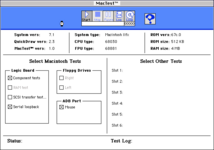
MacTest_IIfx_Version_1.0.png
 
Very cool. Thanks for uploading it. I just downloaded a copy. I will try it on a IIfx this weekend and let you know the results.
 
Well, it was surprisingly more complicated than I expected.

The Macintosh IIfx being tested ran System 7.1 from a MacSD SCSI drive. Also in use were an Interware video card and Kensington Turbo mouse.

I copied the .hqx file over to my IIfx from Basilisk using Tiny Transfer. I then extracted the .img file, also using Tiny Transfer. I then mounted the .img file using Apple's Disk Copy 6.1.2.

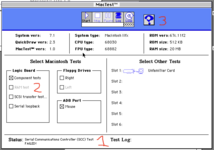
MacTest launched. I disabled the Serial loopback test (no cable) and the Right floppy drive test (no interest).

1. The test failed on the Serial Communication controller. Yet, I had just copied the 2MB file over the serial cable using Tiny Transfer. So, it is unlikely the serial controller is actually faulty.

1726362834697.png

Looking at the image file, I see it includes System 6.0.5. Perhaps Mac Test doesn't work correctly in System 7.1? I spent the next half an hour trying to locate a floppy disk with no bad sectors in order for Disk Copy to copy the .img file to floppy perfectly.

Upon booting from the floppy, I noticed that the RAM test (marked '2' above) became enabled. I believe this is because this test does not work with Multifinder running, as it would be in System 7.1.

Still, the SCC test failed.

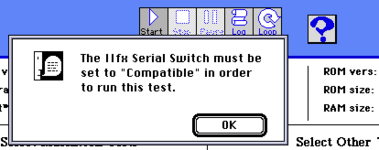
So, I dragged another IIfx out of the basement. Booting into System 7.1 produced the same SCC failure. This IIfx motherboard is pristine. There is no way the SCC is bad in both computers. It can't be a bug either, as the test stops at this point and so a bug would have been caught. Only then did I notice the little question mark button (marked '3' above). Clicking it produces the helpful alert below:

1726363181507.png

What? Why produce a IIfx tester that can't exercise the full bells and whistles of the IIfx?

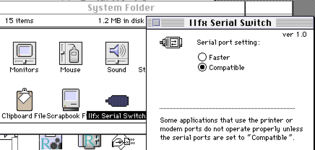
Okay. The IIfx Serial Switch control panel is in the System Folder for the IIfx test software. Set it to compatible and reboot. (Aside: it sets a bit in PRAM. So, the serial port setting will stay that way regardless of the disk you then boot from.)

1726363942999.png

The SCC test still failed running in System 7.1.

This particular IIfx has a bad floppy drive so I switched to Floppy EMU. Rebooted into System 6.0.5. And the test passed!!!

So, the answer is that the serial port must be in compatible mode and the System version is a factor.

The next failure was for the ADB mouse. Mac Test was not fooled by Turbo Mouse. Switching to a period correct Apple mouse allowed the test to succeed. Maybe the Apple mouse responds to some very specific commands?

After that, I was looking away when the Mac suddenly rebooted. It turns out this was the end of the RAM test. The reboot was required to get the memory contents correct again. At that point, Mac Test reloads and says 'All Tests Passed'.

Success

In conclusion, it looks like this is designed to run in System 6.0.5 (or thereabouts), without MultiFinder, with the serial port in Compatible mode, a standard ADB mouse, and from a startup floppy disk (if the RAM test is important to you).

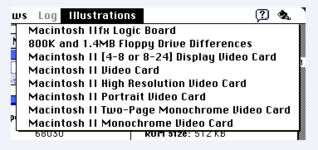
Illustrations

One last note. There is a menu with a number of images.

1726364694030.png

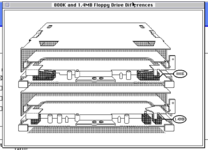
Pretty cool.

1726364819824.png

Thanks for giving me an interesting puzzle for a Saturday night.

- David
 
Wow, thanks for running it through its paces! I figured it would probably need to boot from the disk, but this is very helpful info. I will update the download page with this info.
 
Back
Top