• Hello MLAers! We've re-enabled auto-approval for accounts. If you are still waiting on account approval, please check this thread for more information.

MacSD as MIDI device

I got my MacSD! And I‘ve managed to fit it to my LC475, inside the case, with a BlueSCSI (which I prefer for its CD selection method - I know the MacSD can read CDs, it just doesn’t do it quite as elegantly from my perspective.) But MIDI! That’s the real party trick.

I want to use the MacSD for MIDI and Synthesizer, and I believe that this should be possible and that I can mix it into the Mac’s mono audio. The MacSD is detected by OMS - but then it crashes immediately. Not “I just need time to think”, proper frozen mouse frozen. I’ve tried multiple times, same result every time.

The documentation doesn’t have any example configuration for Midi and Synth - so I’m not sure if I’ve set it up right. I’m a little confused that it doesn’t seem to require a SCSI ID to be provided. Does anyone have a working configuration file for Midi and Synth that I can crib?
 
I had a response partially written, and then realized your ask wasn't quite what I thought it was.

From the FAQ:

  • MIDI Synthesizer
    • 32KHz stereo, 13.75-bit resolution output through CD audio jack
    • Sample-based synthesis
    • Accelerates games by replacing QuickTime Musical Instruments
    • Up to 32-voice polyphony
    • Configurable via INI file and at run time through the terminal interface
    • General MIDI compatible
    • 128 instruments and sound effects, 13 drum kits
    • Three reverb settings
    • Adjustable 3D depth effect
  • MIDI Interface
    • Receives MIDI over SCSI using specialized OMS driver
      • Use the internal or external synthesizer without occupying a serial port
      • Cooperates with AppleTalk and printing
      • Supports OMS 1.2+ and System 7+
      • Indirectly supports QuickTime and Apple MIDI Manager via OMS
    • Receives and sends MIDI over USB
      • Standard USB MIDI device implementation requires no special driver
      • Use a Raspberry Pi as an external synthesizer
    • Receives and sends MIDI over MPU-401/UART
      • Use the internal synthesizer with your PC's SoundBlaster or compatible sound card
      • Add a DIN-type MIDI port to your Mac without external interfaces.
      • Send MIDI from Macintosh applications and games to external tone generators.
So it sounds like there are three options here. The third option isn't really an option, as it's for PCs, not for Macs.

The second option isn't what you're trying to do -- you're not trying to connect external MIDI devices to your LC475.

So that leaves the first option: using the on-board MIDI Synth with your OS, via OMS.

The big question then is, are you using a default copy of OMS, or are you using the specialized OMS driver? Because it sounds like it won't work without the special driver.

The driver is available at https://macsd.com/files.php - the download there contains not only the driver, but everything else (including test MIDI files) to configure MIDI exactly the way you want.

Are you already using these files? If you are, which OS and OMS version are you using?
 
It comes with the drivers, and without the special driver it isn't detected at all (which is kinda what you'd expect). All the software I'm using is software that comes with MacSD. And I thought I had it configured right - but OMS just crashes.

And yes, I want to use the onboard synth - but I'm happy with the default options (at least, I think I am!)

[midi] scsi_source=true synth_sink=true [synth]
 
It comes with the drivers, and without the special driver it isn't detected at all (which is kinda what you'd expect). All the software I'm using is software that comes with MacSD. And I thought I had it configured right - but OMS just crashes.

And yes, I want to use the onboard synth - but I'm happy with the default options (at least, I think I am!)

[midi] scsi_source=true synth_sink=true [synth]
So that leads to the second bit:
If you are, which OS and OMS version are you using?
It could be an OS or OMS version incompatibility.
 
Yeah. I'm thinking I should try it without the BlueSCSI - but the BlueSCSI, with its better CD Support, is more useful to me at the moment. When I get a moment.
 
The documentation doesn’t have any example configuration for Midi and Synth - so I’m not sure if I’ve set it up right.

This is from the manual, near the bottom with some lines removed:

Code:
[general]
system_clock_mhz=57 ; 57MHz clock speed required for synthesizer

[midi] ; MIDI routing options
scsi_source=true ; Accept MIDI over SCSI
synth_sink=true ; Enable the internal syntheesizer
usb_source=true ; Receive MIDI over USB
usb_sink=true ; Send MIDI over USB
mpu_401_source=true ; Receive MIDI over the expansion port UART
mpu_401_source_rs=false ; Disable running status decoding for incoming MPU-401 data mpu_401_sink=true ; Send MIDI over the expansion port UART
mpu_401_sink_rs=true ; Enable running status encoding for outgoing MPU-401 data
mpu_401_sink_invert=true ; Invert the UART TX polarity for driving a DIN MIDI port
mpu_401_loopback=true ; Route UART RX data to the TX pin

[synth] ; Requires synth_sink=true, system_clock_mhz=57 and patch file on card
volume_master=33
volume_drums=90
volume_melodic=70
depth=75 ; 3D depth effect
reverb=1 ; Moderate reverb
drum_kit=18 ; Yamaha MU100 power kit
drum_kit_lock=true ; Prevent drum kit changes over MIDI


The LC475 has stereo audio and you can mix it with MacSD's output.

The MIDI driver will scan through SCSI IDs starting at 0. If you have another device on the chain, you could try giving it a higher ID than MacSD's.

When the driver is active, you'll see periodic flashes from the SCSI LED.

A known issue documented in the Readme is that applications which use Apple MIDI Manager will crash unless PatchBay is running in the background.

Also, make sure that the MacSD MIDI Driver is not locked.
 
Yeah, that's the config I'm using at the moment - but with the USB and mpu_401 configs removed. Still no dice. Internally, the 475 doesn't have stereo, but I wonder if I could just use the mono output to the internal speaker? Or would the power be too high? When I get a moment, I'll try MacSD on its own - and then if that works I'll try setting the BlueSCSI to have higher SCSI IDs than the MacSD or, at least, leave SCSI ID 1 free.

Top tip on PatchBay. But that isn't needed for OMS is it?
 
Internally, the 475 doesn't have stereo, but I wonder if I could just use the mono output to the internal speaker?

I don't recommend connecting to the internal speaker directly. If you must play through the internal speaker, you might be able to loop MacSD audio through the mic jack playthrough.

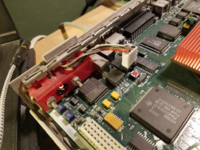
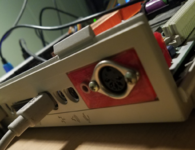
On my 475, I have MacSD audio and logic board audio mixed into a separate jack on the rear.

Top tip on PatchBay. But that isn't needed for OMS is it?

It's not. If you run the OMS setup again, trash any OMS settings/prefs file beforehand.
 
How do you do that? What parts do I need? Photo?

I added a 4-pin header as shown in the photo. The logic board audio passes through 1K resistors to meet MacSD audio at the rear 3.5mm jack.

You can also feed the logic board audio into MacSD's CD Audio In header.

The DIN jack is for external MIDI devices.
 

Attachments

  • 1744081956583.png
    1744081956583.png
    1.4 MB · Views: 13
  • 1744082038009.png
    1744082038009.png
    1.2 MB · Views: 11
Back
Top