• Hello MLAers! We've re-enabled auto-approval for accounts. If you are still waiting on account approval, please check this thread for more information.

Macintosh SE/30 replace processor MC68030RC16B to MC68030RC30C

I got it: XC is not a guaranteed fail - that was mere speculation.

Still don't know the difference between XC and MC, or why they changed over, but I'm no longer concerned with that at this point.

I'm concerned about fixing the issue of the bus walk and the strange results. I found something with the Y3 crystal, but I'll post that in my SE/30 thread. Thanks.
 
I should have the new MC68030RC33B CPU shortly, I'll follow up when it arrives.

If in fact my XC is bad, what would have killed it?

Why would Apple switch to the MC68030RC16B, if the XC was good enough? What's the actual difference?

They switched because Motorola stops making early access labeled parts once the part goes into full production. There were no more XCs to buy.

The difference is chip-specific. Could be nothing at all, just a paperwork thing. In some cases Moto moved to a smaller process node when they went to full production. I re-stress: there is no known systemic reason why this should be an issue. And it's not just 680x0 CPUs that have this labeling phenomenon.
 
Am I still overthinking this, or is there another answer as to why my particular CPU is not 'walking the bus'?
If you replace the chip and it is still not working, then sterner investigations are called for. Do you have an oscilloscope?

One of the most annoying 68000 issues I ever had to debug was a pirate clone of the Robocop arcade game board. (DECO, 68000 based). I eventually traced down the issue to a spot of cat pee on the board that had eaten a via that brought _DTACK to the CPU.
 
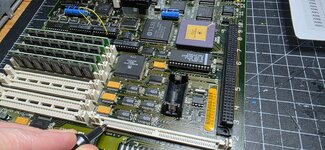
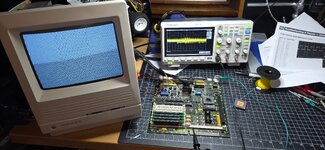
I do have a scope, it is showing me that the Address lines of the XC chip are missing between A2-A31, many of them.

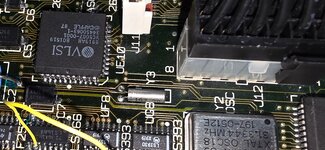
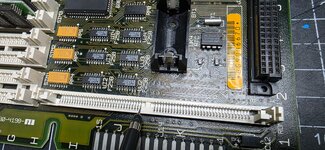
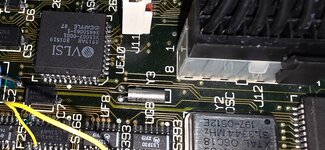
The most concerning thing at the moment is Xtal Y3, it was near UE10 that was damaged by a leaking cap and Y3 also looks to be damaged.
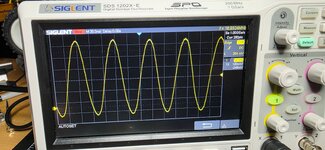
20251226_031731.jpg

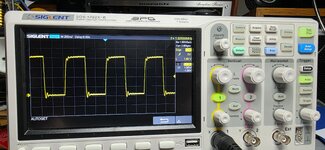
Leg farthest from UE10 - normal:
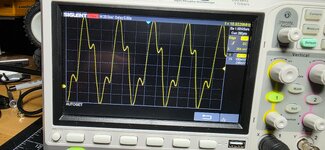
20251226_031850.jpg

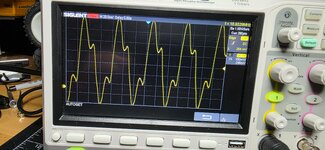
Leg closest to UE10 - this can't be right:
20251226_031916.jpg

The MC chip should be here Monday but it Looks like I need to get another Y3 to test with as well.
 
I do have a scope, it is showing me that the Address lines of the XC chip are missing between A2-A31, many of them.

The most concerning thing at the moment is Xtal Y3, it was near UE10 that was damaged by a leaking cap and Y3 also looks to be damaged.
View attachment 93644

Leg farthest from UE10 - normal:
View attachment 93648

Leg closest to UE10 - this can't be right:
View attachment 93647

The MC chip should be here Monday but it Looks like I need to get another Y3 to test with as well.
To back up what others have said, there's no intrinsic issues/lifespan concerns with XC parts. It's also extremely unlikely that you've damaged it; I've reverse polaritied and mis-rotated 68030s and still haven't killed one yet. Unless the ceramic is cracked/pins detached the CPU is likely fine.

If you lack continuity between the CPU/CPU socket and other chips on one or more address lines the machine will definitely not work.

Lack of bus walking can be a bunch of things. RESET problems, clock problems, issues with GLUE, but by far and away trace damage and shorted traces are most likely.
 
Last edited:
Thanks for the reply. I was able to get square waves on all of the ROM Address lines at this point, with the XC chip, it is walking the bus now but intermittently. It will need to be reset on occasion to get the square waves working.

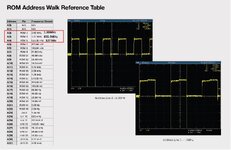
The speed values aren't lining up to the Simasima Repair Guide - found here:

The Guide has outlined the signal speed and wave forms that are expected to be found at the ROM Address lines A2 - A31 but the speeds are off.

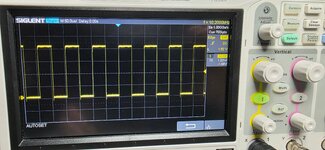
For example I don't get 2.62 MHz at A2 Pin4 of the ROM slot, I get the value a line below it, or half that value at 1.30 MHz:
SSRG ROM.jpg
Example: A2, Pin4
20251226_163546.jpg

Should measure 2.62 MHz, actually returns the value below it in the guide, at 1.30 MHz:
20251226_163553.jpg

Every line A2-A7 is that way.

When I get to A8, or Pin31 of the ROM slot:
20251226_163611.jpg

- the speed should be 40.96 kHz, but it measures the Guide value two lines below A8, which would be A10 or 10.20 kHz:
20251226_163616.jpg


I understand the XC CPU is working now and walking the bus, but the speed values do not line up with the guide and sometimes I need to Reset the board to get the square waves to show up again or the wave forms all look like this:
20251223_181202.jpg

I have no other way to test these components, so I have to depend on the Guide to be accurate.
 
I do have a scope, it is showing me that the Address lines of the XC chip are missing between A2-A31, many of them.

The most concerning thing at the moment is Xtal Y3, it was near UE10 that was damaged by a leaking cap and Y3 also looks to be damaged.
View attachment 93644

Leg farthest from UE10 - normal:
View attachment 93648

Leg closest to UE10 - this can't be right:
View attachment 93647

The MC chip should be here Monday but it Looks like I need to get another Y3 to test with as well.
Y3 is the RTC 32.768kHz oscillator and won't affect anything startup related. It also does not look damaged to me.

That circuit is difficult to probe because the scope adds capacitive loading to the oscillator. But regardless, it is not part of your startup problems, I'd bet dollarpoundbucks on that. UE10 is a different story,
Thanks for the reply. I was able to get square waves on all of the ROM Address lines at this point, with the XC chip, it is walking the bus now but intermittently. It will need to be reset on occasion to get the square waves working.

The speed values aren't lining up to the Simasima Repair Guide - found here:

The Guide has outlined the signal speed and wave forms that are expected to be found at the ROM Address lines A2 - A31 but the speeds are off.

For example I don't get 2.62 MHz at A2 Pin4 of the ROM slot, I get the value a line below it, or half that value at 1.30 MHz:
View attachment 93654
Example: A2, Pin4
View attachment 93655

Should measure 2.62 MHz, actually returns the value below it in the guide, at 1.30 MHz:
View attachment 93656

Every line A2-A7 is that way.

When I get to A8, or Pin31 of the ROM slot:
View attachment 93657

- the speed should be 40.96 kHz, but it measures the Guide value two lines below A8, which would be A10 or 10.20 kHz:
View attachment 93658


I understand the XC CPU is working now and walking the bus, but the speed values do not line up with the guide and sometimes I need to Reset the board to get the square waves to show up again or the wave forms all look like this:
View attachment 93659

I have no other way to test these components, so I have to depend on the Guide to be accurate.
The thing about bibles is, they are only useful up to a point.
A long long LONG LONG LONG time ago I started to write a troubleshooting and hacking guide for the Amiga 500. https://aminet.net/package/docs/hard/500hacks

Jeepers that is some old crap there and I am embarrassed to read it now.

The tldr is - a book can only take you so far. Ignore the frequencies you're supposed to see on address lines. That's voodoo, basically. Sure that may be what you'd see on a fully executing machine but you DON'T HAVE THAT.
 
Looks like that guide is wrong. I measure 1.3mhz on A2 and it should be /2 for each address bit from there.
Thank you so much for looking in to that, that gives me the confirmation I was hoping for.

There seems to be other errors in the Guide, which I'm also very thankful for but I'd like to help them revise the errors to improve the accuracy for everyone using it, myself included :)

Y3 is the RTC 32.768kHz oscillator and won't affect anything startup related. It also does not look damaged to me.

That circuit is difficult to probe because the scope adds capacitive loading to the oscillator. But regardless, it is not part of your startup problems, I'd bet dollarpoundbucks on that. UE10 is a different story,

The thing about bibles is, they are only useful up to a point.
A long long LONG LONG LONG time ago I started to write a troubleshooting and hacking guide for the Amiga 500. https://aminet.net/package/docs/hard/500hacks

Jeepers that is some old crap there and I am embarrassed to read it now.

The tldr is - a book can only take you so far. Ignore the frequencies you're supposed to see on address lines. That's voodoo, basically. Sure that may be what you'd see on a fully executing machine but you DON'T HAVE THAT.
Just a small correction, Y1 is the 32 kHz Xtal, and was only put there to demonstrate that both legs of Y1 have an identical wave form.

Y3 is the 16 MHz Xtal:20251226_031731.jpg

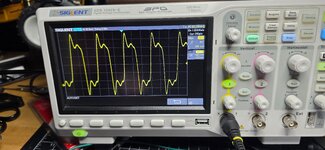
-and one of the legs has a strange waveform. I've been informed that this could be ringing due to my long scope lead and am looking in to resolving the issue to make sure I've got this measured correctly.
20251226_031916.jpg

Thanks for the replies!
 
UE10 Clocks.jpg
I am seeing the correct 15.667 MHz at UE10 Pin14.

But at Y3, Pin 24 and 25, I'm only able to see Pin 24 has a wave form now, Pin 25 has no solid wave form and the speed is varying. Not sure why Y3 is behaving this way, this is backwards from yesterday, where I was seeing Pin 25 correctly and not Pin 24.

If someone else could measure both Y3 connections and let me know what I should be seeing, that would be extremely helpful.
 
Yes, that's correct, Pin 14 is unaffected.

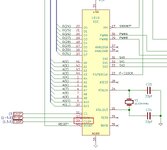
UE10 Pin 24 and 25 are Xtal in and Xtal out, which are the legs of Y3 if you look at the schematic above.

What does make a difference in the wave form, is the physical switch on the probe, with a setting of either 1x or 10x; thanks to JDW at tinkerdifferent.com for cluing me in on this.

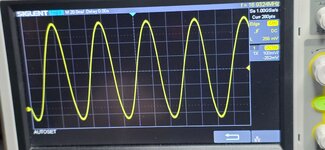
To make sure I'm demonstrating exactly what I'm seeing here: with the physical probe set to 10X, the Y3 pin farthest from UE10, or UE10 Pin 25, shows the correct wave form:
20251227_004155.jpg

But with the probe on 10X, UE10 Pin 24, the Y3 leg closest to UE10, has the distorted wave again:
20251227_004306.jpg


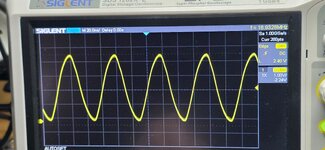
If I switch the physical setting on the probe itself to 1x, and measure the Y3 leg closest to UE10, or Pin 24, I get a correct looking wave:
20251227_002947.jpg

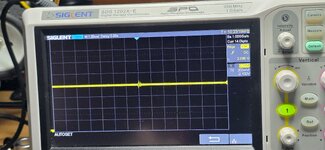
But then the Y3 leg farthest from UE10, or Pin 25 shows a flat wave with varying speed:
20251227_003022.jpg

The screen shows 1x no matter what the switch is set to on the physical probe, either 1x or 10x. Will figure out my scope better and get back to this when I can get the 10x setting to show on the screen and not just the switch on the probe.
 
Yes, that's correct, Pin 14 is unaffected.

UE10 Pin 24 and 25 are Xtal in and Xtal out, which are the legs of Y3 if you look at the schematic above.

What does make a difference in the wave form, is the physical switch on the probe, with a setting of either 1x or 10x; thanks to JDW at tinkerdifferent.com for cluing me in on this.

To make sure I'm demonstrating exactly what I'm seeing here: with the physical probe set to 10X, the Y3 pin farthest from UE10, or UE10 Pin 25, shows the correct wave form:
View attachment 93667

But with the probe on 10X, UE10 Pin 24, the Y3 leg closest to UE10, has the distorted wave again:
View attachment 93668


If I switch the physical setting on the probe itself to 1x, and measure the Y3 leg closest to UE10, or Pin 24, I get a correct looking wave:
View attachment 93669

But then the Y3 leg farthest from UE10, or Pin 25 shows a flat wave with varying speed:
View attachment 93670

The screen shows 1x no matter what the switch is set to on the physical probe, either 1x or 10x. Will figure out my scope better and get back to this when I can get the 10x setting to show on the screen and not just the switch on the probe.
@GreenBar0n - it's worth approaching thing with logic really. You seem to be getting distracted by looking for a problem by measuring random things. With Y3 - there don't seem to be any obvious symptoms that it is faulty. The pin 15 clock is easier to measure, present and derived from the Y3 clock, so that tells us Y3 works (caveats aside). The signal out from crystals is weak and hard to read, so you're making something more challenging than needed... Plus, I believe you usually measure a crystal across its two pins, not with reference to ground. The fact that you get a signal on one pin - it's working. The other pin must be lightly tied to a DC voltage through the chip and so isn't reading anything/ much but... That's not (to my understanding) how you would measure it.

I'm not very good at providing support because I get frustrated easily so I'm really not a good person to be guiding you, but at a high level -
Take a step back. You're getting lost in the weeds and spending days troubleshooting non-existant issues.
You're assuming issues, without symptoms and trying to prove them, and not fully listening to people's suggestions. People won't suggest the answer first time, but possibilities, or ask questions to try and understand the symptoms.
Try to avoid leading questions. Asking "This part is broken how do I replace it" can be misleading. Sometimes it is better to ask "I have this symptom - what might be causing it"). We all do it, but it can lead discussion in the wrong direction.
Issues are almost always to do with corrosion damage to traces, or bad contact at SMD chip pads. Using a good phone camera to take high resolution photos around the sound chip area often identifies issues. Breaks can be tiny, my SE/30 had a hairline break between a pad and the trace that was really hard to spot.
To narrow down the problem, consider the symptoms and what might cause them - develop a hypothesis - work out how you might test that hypothesis (if Y3 is faulty, there would be no stable clock on pin 14)... Test it, and then move on to the next hypothesis.

Ultimately - did I see you say you'd been working on this for over a year? Really consider sending it to Amiga of Rochester - the board doesn't look far from working, and they don't charge huge amounts. Value your time. It is more fun to play with / develop on / upgrade a working machine. It will continue to keep you on your toes in the future I have no doubt.

I'm going to extract myself from the thread because remote troubleshooting is the reason I previously quit this forum. Anyone who has the ability to remotely troubleshoot someone else's computer for days on end is more of a saint than I am.
 
I'm working from this guide step by step:

That's what I'm following and still have questions.

I've done everything you've asked, UE10 Pin 14 is solid, yet I get no chime and simasima, after a year of working on it and leaving it alone. Not a year straight.

I will fix this myself one way or the other, not interested in sending this board off, where's the fun in that.

Take care and thanks.
 
Just downloaded it and that guide is utterly amazing - but it focuses on scope which frankly is beyond a lot of amateur troubleshooters (I've got one, and should learn, but am yet to find a need). Take a step back, as Phipli has kindly noted, trace out signals, check for further broken traces and corrosion under ICs. Focus on one forum, a single thread even, and avoid red herrings :) We are trying to help.
 
Thanks! I have a brand new Reloaded V5 board here, I'm trying to figure out what components may have been affected by the cap leaking; this is why I am asking about Y3, it was very close to UE10 which has had all of the traces toned out and is confirmed to be working, yet still no chime.

I have clock signals that are intermittent and sometimes missing entirely until Reset is pushed. I really need to establish what may have been damaged before moving all of the components over to a new board.

I'm also trying to help improve the Simasima guide from a new users perspective. I have found a couple of errors already, such as the UB11 Pin6 VSNS line that does not drop to 0V when S1 is pressed, where the Guide says it should.

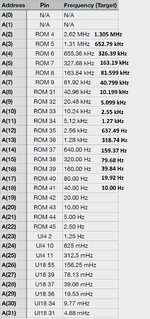
Also found the CPU 'walk the bus' clock signals are off in the Guide:
Walk the Bus speeds.jpg
My scope has a hard time displaying signals below 10Hz. A26 - A31 show a chip called U18, that's supposed to be UI18 the Glue Chip.

Trying to contribute something to the effort of this guide and giveback. Being able to trust this guide implicitly could help other would be troubleshooters, like myself.

The Y1 Xtal does allow you to measure each leg with reference to ground and produces perfect wave forms on both legs at 32 kJz. I had asked if Y3 was the same because it's 16 MHz, since no one confirmed this, I'm left to speculate.

A genuine Apple TechStep will be here today, and I have working SE/30 on the way to reference against. Will now have a way to answer my own questions, without upsetting anyone and will be sure to follow up when these problems are solved.
 
View attachment 93666
I am seeing the correct 15.667 MHz at UE10 Pin14.

But at Y3, Pin 24 and 25, I'm only able to see Pin 24 has a wave form now, Pin 25 has no solid wave form and the speed is varying. Not sure why Y3 is behaving this way, this is backwards from yesterday, where I was seeing Pin 25 correctly and not Pin 24.

If someone else could measure both Y3 connections and let me know what I should be seeing, that would be extremely helpful.
Probing the pins of a driven xtal circuit is always a bit problematic. See those 33pF load caps on the xtal? The scope probe can add as much as 15pF to that, which could be significant. But I would expect to see something stable on XTALOUT since it's the drive pin.
 
Trying to contribute something to the effort of this guide and giveback. Being able to trust this guide implicitly could help other would be troubleshooters, like myself.

Again, bibles only go so far. You can't trust a guide implicitly because there are an essentiallu infinite number of potential failure modes in any device of moderate complexity. There is not and will never be a complete troubleshooting flowchart that gives you an exact answer - that's not how fixing machines works. The bibles are a guide, not the non plus ultra. They give you hints where to look, but in order to fix something you need to understand how the block diagram fits together, how the components work, and how the designers maybe (mis)used those components.

I am sensing a thing here so I will also bow out for now.
 
What's unpredictable are the components and traces that are rotted from electrolytic fluid and the corrosive vapors that accompany them, from the leaking caps found on an SE/30.

Clock signals, Reset signals and voltages should all be repeatable from unit to unit, if there's nothing actually wrong with their sub-systems.

Manuals and schematics are necessary to document known-good behavior of working units, so that one may locate an issue with a troubled unit when it deviates from the norm. This is why the troubleshooting guide is a worthy effort.

I've had more posts here trying to tell me the XC CPU's are not the problem, or that I'm doing it wrong, than I've had posts trying to assist with where the actual trouble is - Got it.

I'm sensing things here too and am done posting in this thread. I have a separate thread here and will follow up when I have found the issues with my particular SE/30.
 
Back
Top