• Hello MLAers! We've re-enabled auto-approval for accounts. If you are still waiting on account approval, please check this thread for more information.

Macintosh Plus System 6 Disks, SCSI Hard drive setup, and transferring software/programs.

Some links for generating floppy disks:

https://www.hardwaresecrets.com/how-to-generate-floppy-disks-for-old-macintosh-computers/

https://www.classic-computers.org.nz/blog/2011-12-29-disk-from-images-mac.htm

http://www.emulators.com/explorer.htm

http://fletcherpenney.net/2018/02/reading_old_mac_floppy_disks

http://lowendmac.com/2007/making-floppies-and-cds-for-older-macs-using-modern-macs-windows-and-linux-pcs/

http://siber-sonic.com/mac/newmillfloppy.html

http://lowendmac.com/2016/floppy-disk-compatibility-and-incompatibility-in-the-mac-world/

I use a SE/30 (with an internal SCSI2SD) and an extern 800 KB disk drive to produce floppy disks for 400/800kb drives. The SE/30 has a network card and can download software from the internet. 

Before I had the network card, I used HFVExplorer under Windows to produce 1,4MB disk with my old Windows PC. They could be read by the SE/30 and then copied to the external 800kb drive.

Old disk drives should be cleaned and lubricated! But some drives do not work even after that...

 
Last edited by a moderator:
Some links for generating floppy disks:

https://www.hardwaresecrets.com/how-to-generate-floppy-disks-for-old-macintosh-computers/

https://www.classic-computers.org.nz/blog/2011-12-29-disk-from-images-mac.htm

http://www.emulators.com/explorer.htm

http://fletcherpenney.net/2018/02/reading_old_mac_floppy_disks

http://lowendmac.com/2007/making-floppies-and-cds-for-older-macs-using-modern-macs-windows-and-linux-pcs/

http://siber-sonic.com/mac/newmillfloppy.html

http://lowendmac.com/2016/floppy-disk-compatibility-and-incompatibility-in-the-mac-world/

I use a SE/30 (with an internal SCSI2SD) and an extern 800 KB disk drive to produce floppy disks for 400/800kb drives. The SE/30 has a network card and can download software from the internet. 

Before I had the network card, I used HFVExplorer under Windows to produce 1,4MB disk with my old Windows PC. They could be read by the SE/30 and then copied to the external 800kb drive.

Old disk drives should be cleaned and lubricated! But some drives do not work even after that...
Thanks for the links, but both of the drives have been lubricated very well. 

 
Would re-writing a non-functional floppy with the original data be a good fix? Because a system disk I have says “Macintosh Sustem Tools Version 6.0.3” and it’s currently the only disk not working. Recently,

my Mac Plus’s screen started to be flaky and now is dark. Iirr I heat up the solder joints on the flyback till they melt, then let them settle again.

 
Would re-writing a non-functional floppy with the original data be a good fix? 
It might.   I have had success in the past rewriting an image onto a disk that developed an error.  I am sure it is fine but I am on the paranoid side so I usually make a backup to use and not rely on the rewritten disk.

 
Last edited by a moderator:
Meh, the internal drive is giving me too much trouble. I’m probably going to get another and store the one I have now. I’ve had luck with Herb’s Mac Stuff, all of it works well.

Anyone want a tan Mac Kensington System Saver? I’m trying to get a grey one.

 
Hello again!

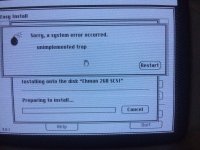
I just got my Floppy Emu in the mail today and am trying to do afresh System 6.0.8 install but I’ve run into a problem. When I get to the installation program I try to install but I get this error message:

image.jpg

Anyone know what the error means?

Jack

 
I posted this on another thread but I'm posting it here as well. 

I've got another issue with my HD, This error message pops up when i try to install 6.0.8 via FloppyEmu:

IMG_1452[1].JPG

 
Back
Top