
-
 Hello Guest! We're hosting a challenge to welcome vintage Intel macs to the MLA during the month of July! See this thread for more information.
 -
We've made some quality of life improvements to the Trading Post. More info here.
You are using an out of date browser. It may not display this or other websites correctly.
You should upgrade or use an alternative browser.
You should upgrade or use an alternative browser.
Macintosh Plus Internal Hard Drive *Mod*
- Thread starter uniserver
- Start date




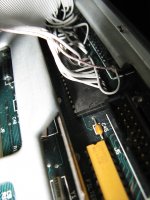
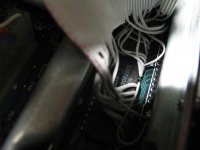
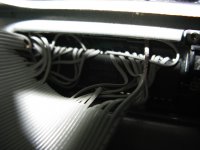
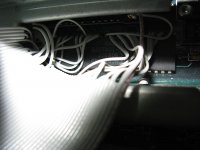


and, hes got a logical ground too 

A machine pin socket's legs aren't flexible, the thin legs of a standard socket might work better. I've used 3 or four level wire wrap sockets spread across the legs of a 28 pin EPROM as a ghetto chip clip to read their contents, but there's ZERO room for soldering much of anything down in SCSI Controller Valley on the Plus MoBo.
When I get a Plus up and running, I'm going to de-solder the controller, install machine pin/socket strips, test the controller in them and THEN figure out the best way to do the adaptation.
The notion of a PCB that shifts the SCSI controller closer to the ground bar and leaves room for . . .
GAAAAA!!!!!!!!!!!!!!!
 How the heck do you misplace something the size of a Mac Plus motherboard while you're having fun-n-games time? :-/
When I get a Plus up and running, I'm going to de-solder the controller, install machine pin/socket strips, test the controller in them and THEN figure out the best way to do the adaptation.
The notion of a PCB that shifts the SCSI controller closer to the ground bar and leaves room for . . .
GAAAAA!!!!!!!!!!!!!!!
HA! Found the little bugger, left it in the huge tooltray/KBD drawer underneath the workbench where 21" CRTs go into semi-retirement. All I did was to sit down utterly perplexed as to what to do next in the IIfx DeclROM Swap Diaries and there it sat, totally out of sight from above . . .
. . . whatever! :
Looks like if we displace the SCSI Controller IC just a smidge, there will be plenty of space for a 25x2 header row and the SCSI cable to nestle right over it. I'll have to look at the trace adaptation for the board, but I think we can keep all the signal paths the same length on a two sided Seeed board with a jumper wire or three if necessary.
Heck, it might be best to dispense with the MoBo socketing altogether. Build the adapter card so that the header pins that nail it to the MoBo are soldered on from the top side first, then solder the Controller and the header pins from the bottom side and install the whole thing thereafter, soldering the upside down header pins inserted into the Controller's thru-holes from the bottom of the MoBo just like re-installing the controller IC.
That'd make life muuuuch easier for this conversion, the hack will be much lower profile than going with sockets and rugged as hell.
Who's up for their first PCB layout? This is a great starter project and we can all proof the layout before the project goes to Seeed.
. . . whatever! :
Looks like if we displace the SCSI Controller IC just a smidge, there will be plenty of space for a 25x2 header row and the SCSI cable to nestle right over it. I'll have to look at the trace adaptation for the board, but I think we can keep all the signal paths the same length on a two sided Seeed board with a jumper wire or three if necessary.
Heck, it might be best to dispense with the MoBo socketing altogether. Build the adapter card so that the header pins that nail it to the MoBo are soldered on from the top side first, then solder the Controller and the header pins from the bottom side and install the whole thing thereafter, soldering the upside down header pins inserted into the Controller's thru-holes from the bottom of the MoBo just like re-installing the controller IC.
That'd make life muuuuch easier for this conversion, the hack will be much lower profile than going with sockets and rugged as hell.
Who's up for their first PCB layout? This is a great starter project and we can all proof the layout before the project goes to Seeed.
There's a thought, relocate the SCSI chip to the daughterboard with the header and install a DIP socket on the MB. My initial thought was going off the installation method of the accelerator that's in my plus. You'll need a good desoldering rig to safely remove the SCSI chip from the multilayer motherboard without ripping out any of the through-hole plating.
No socket on the mobo, just the header pins soldered to the bottom of the adapter PCB. Less vertical displacement and more reliability designed into the hack that way.
Plating in thru holes isn't usually an issue, they wind up replated when the substitute pin is installed.
Plating in thru holes isn't usually an issue, they wind up replated when the substitute pin is installed.
That isn't my experience. I've seen boards damaged beyond reasonable repair when someone pulls a chip out too aggressively and rips the plating out of the via. These are not only double sided but multi-layer PCBs, in other words there are traces on the inside layers and many of the pin holes also serve as vias to connect traces on one layer to traces on another. If you rip the plating out of a hole, there is nothing in there for solder to stick to, it doesn't wet fiberglass. With a double sided PCB you can often solder the pin on both sides, but if you damage one that connects to an inner layer you're pretty much screwed unless you have a schematic or x-ray the board to see where the inner trace goes.
If vertical space is critical, then yes, header pins soldered to the board are fine, but good quality machined-pin sockets are very reliable and make it easy to install and remove things without risking damage. It's been a while since I've been inside a Plus so I don't recall just how tight everything is.
If vertical space is critical, then yes, header pins soldered to the board are fine, but good quality machined-pin sockets are very reliable and make it easy to install and remove things without risking damage. It's been a while since I've been inside a Plus so I don't recall just how tight everything is.
HRMMM . . . I think multilayer boards are about the only kind on which I've ever done this kind of re-work. Everyone's mileage does vary.
I'm a big fan of machine pin sockets as well, but height, width and breadth for the SCSI cable's IDC female are all pushed right up to the limit, otherwise soldering the wires directly to the Controller's legs wouldn't be a difficult task. I don't think there will be room for a shrouded header, but I'm hoping to prove that wrong.
Using the adapter board without the cable header is another option, it might even be a tad more elegant, now that I think about it. Do the conversion on the PCB and solder the Cable directly into matching thru-holes in the adapter. That'd leave lots of vertical room for Machine pin socket rows on the MoBo. The bottom mounted square headers work just fine with them. Have you seen the round machine pin header row equivalent of a standard square header strip? I've only seen them as precision, high reliability sockets.
I'm a big fan of machine pin sockets as well, but height, width and breadth for the SCSI cable's IDC female are all pushed right up to the limit, otherwise soldering the wires directly to the Controller's legs wouldn't be a difficult task. I don't think there will be room for a shrouded header, but I'm hoping to prove that wrong.
Using the adapter board without the cable header is another option, it might even be a tad more elegant, now that I think about it. Do the conversion on the PCB and solder the Cable directly into matching thru-holes in the adapter. That'd leave lots of vertical room for Machine pin socket rows on the MoBo. The bottom mounted square headers work just fine with them. Have you seen the round machine pin header row equivalent of a standard square header strip? I've only seen them as precision, high reliability sockets.
I dont have access to one, and that would be awesome if i did as that would take a shitload of the guesswork out of my BGA remounts/Reflows.
I might have to build one, You can just about get anything to produce xrays given the right amount of voltage. Problem is, sensing xray and turning that into a usable picture.
I might have to build one, You can just about get anything to produce xrays given the right amount of voltage. Problem is, sensing xray and turning that into a usable picture.
Film? :lol:
ROFL yea right. For todays use, you would have to have some kind of xray capable CCD or CMOS camera style sensor. I know they make them as ive seen portable xray viewers/machines.
Digital x-ray sensors are available, a friend's veterinarian clinic has one but IIRC it cost about $60K and while very convenient, the image quality is not as good as can be achieved on film. Film is inexpensive enough and can be found on ebay, as well as intensifier cassettes and other equipment. I am *not* suggesting doing this at home though. It can/has been done and I know of several people who have done it, see http://www.uzzors2k.4hv.org/index.php?page=coolidgexray but x-rays are gamma radiation, genuine penetrating ionizing radiation, seriously dangerous stuff, no joke. You can get in serious trouble for potentially exposing people to radiation, either intentionally or by accident. It would be much easier to pick up an old dental unit on ebay than to try to build something out of a bare tube, but it's much easier, safer and more legal to just date somebody who works in a clinic and get them to x-ray stuff for you

I have worked a little bit with x-ray machines to look at solder joints.... a co-worker said he almost got for free several years ago something about the size of a small dorm fridge that used something like Polaroid film. A basic unit like that would make a nice addition to a garage lab.
If someone were wanting to set up something like this (after researching the safety and legal considerations) the easiest would be to get a used dental system on ebay, I've seen the old 70s era systems go for a few hundred bucks, the heads containing the tube and transformer(s) often under $100. Bare heads meant for adjustable output systems typically need around 60V for rated output, if you connect one of those straight to 120V it will wreck something. Mount the head in the top of a lead-lined cabinet with a door interlock switch and a place in the bottom to stick the film cassette. Mammography cassettes and film will provide the sharpest image of any intensified system while general radiography stuff will result in lower exposure times. With something small like a dental system, you would need to use an intensifier cassette as exposing film directly would take numerous exposure cycles while letting the tube cool in between. The film used needs to match the cassette for best results, some are blue-sensitive and some are green-sensitive. I've also heard of people using standard B&W photographic paper but that stuff is getting expensive. Again, I am NOT suggesting anyone actually do this, I cannot stress enough the safety aspect.
Similar threads
- Replies
- 8
- Views
- 642

- Replies
- 4
- Views
- 644


- Replies
- 13
- Views
- 3K


- Replies
- 3
- Views
- 385
