• Hello MLAers! We've re-enabled auto-approval for accounts. If you are still waiting on account approval, please check this thread for more information.

Macintosh IIfx with ProNitron 80.21 V1.5

petteri

6502
Just got a home delivery of two items.

Apple Multiple Scan 15 AV. This screen is ready for recycling bin - the pedestal has missing bits and the image is really pale. The brightness knob has no effect and the longer the display is on the paler the screen becomes.
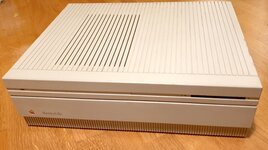
20221116_195030.jpg
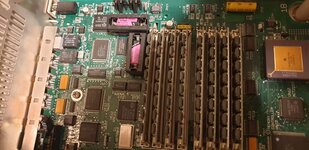
But the IIfx was the reason for the purchase. I got some photos before hand and everything looked clean inside. But I was told the machine doesn't start up. The display adapter was also rather unusual and took a while to identify it. Luckily there was a sticker floating around stating "ProNitron 80.21 V1.5" and one of the chip of the display adapter has the same logo with "V8" text.
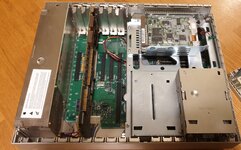
20221116_195400.jpg
All the Memory slots are populated and if I read the chips correctly I have 4x4MB and 4x1MB, both 70ns. 20MB isn't massive amount but something to get started with.
20221116_195827.jpg

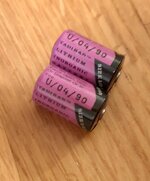
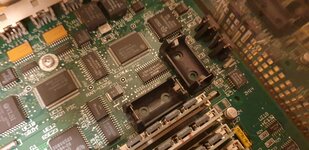
Unfortunately swapping two 1990 dated Tadiran batteries didn't bring IIfx back alive. The other battery was totally empty but other one gave healthy readings on multimeter. I replaced both just in case.
20221116_200742.jpg
In any case, no battery leaks or big pools of cap goo anywhere so I am quite optimistic about my latest purchase. I think I have to replace C24 and C9 in any case.
20221116_200748.jpg
 
Last edited:
Update: Jump starting gives me a happy mac chime. No video though, have to find out whether my display is able to handle the Formac ProNitron resolution.
 
ProNitron 80.21 should mean it’s 1152x864@78 if I remember correctly. You’ll need a good multisync screen that will sync to this quite odd resolution and refresh rate.
The cards output is fixed and can’t be changed easily.
 
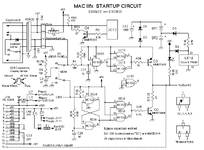
I removed the old C9 and C24 with new tantalum ones. But no soft start. There is no voltage going to the white line of the PSU connector when I press the start button. If I jump start the computer it is possible to use the power button behind to turn off.

I assume I have to go through the soft start circuit and check the traces even though there wasn't anything visible.
 
I had a similar startup circuit issue: mine was due to some trace rot from the leaky caps in the upper right near the power circuit:


Look for similar issues near and under the parts in that area.
 
Yep, common issue on the II, IIx and IIfx is broken traces or component failure in the startup circuit.

1668717137540.gif
 
Thanks! At least R4 - C23 was not ok. I tried to jump it but that alone didn't fix. Actually the R4 - via seems to be fine, the trace is gone somewhere else.
 
Late night update... my first attempt with R4 - C23 jump was not successful but I tried again with a different setup and it worked!
 
While I am sourcing a "normal" display adapter I checked the HD on my Beige G3. It actually works and it is 250 MB Quantum ProDrive LPS. Based on the files not much has been done with the computer since late 1990s. It has System 7.1 and it served as a plotter print server of a small architect company (which still exists!).
 
I soldered a wire to connect R4-C23 and the soft start works perfectly now. It seems the trace on the backside was the only one corroded. I don't really understand how just a single trace got damaged...

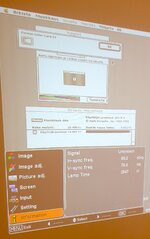
Anyways, I got an idea to check the frequency range of my old Sanyo PLV-Z4 projector and it was actually able to sync to Formac. On the attached image IIfx booted from the original HD.

20221122_193033.jpg
 
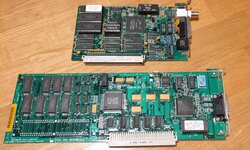
Bought Asante-MC3NB and Macintosh Display Card 8•24 820-0600-A 8*24 from a local Macintosh collector. 8•24 is not accelerated but it works with my LCD screens. I actually had one earlier but I sold it with a IIcx.

20221127_170040.jpg
 
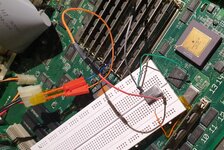
I bought some cheap 100MHz crystal oscillators from eBay and set up a rather sketchy looking test. The idea is the same as in MicroMac Speedy or NewerTech VSO ( https://68kmla.org/bb/index.php?threads/micromac-speedy-for-iifx.42709/ ) but instead of variable frequency I used fixed 100 MHz. I hooked my 100MHz to override the original 80MHz by grounding pin 1. This is a control/disable pin on the original oscillator.

20221217_174135.jpg

The important bit here is to make sure the output pin of the 100MHz oscillator is not shorting to the original oscillator's case.

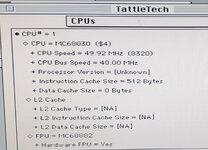
I wasn't having high hopes but it actually works. TattleTech reports CPU frequency fine:

20221217_170553.jpg

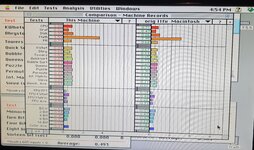
And the performance is improved as well.

20221217_165855.jpg

I also experimented with some filters on PhotoShop 3 and it seemed to be stable with an open case. If I manage to source suitable miniature probes/hooks I might create a bit more proper version including heat sinks.
 
Back
Top