• Hello MLAers! We've re-enabled auto-approval for accounts. If you are still waiting on account approval, please check this thread for more information.

Macintosh 128k: Mac Plus ROMs

Hello everyone  :)

Uni finished his RAM job on my 128k Board. So now I have a fully functioning 128k!!

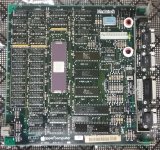
The board I have is a very early one, it has the ceramic package: (pic taken before Re-RAM)
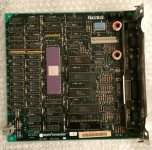
Board.png

As you can see, it has early ROMs as well, Version A, which is odd, because the computer was made on the 44th week of 1984 which makes it a late original Macintosh (not rebadged). I didn't know original ROMs made it this far into production!

Anyway...

I want to buy a HD20 for it. I know these were not supposed to work with the 128k but they work if you install 128k (as opposed to 64k) ROMs from a Mac Plus. But what version should I use? 

IIRC, Version A is buggy

Version B "should" be okay

Version C: aren't they too late to work properly on a 128k Mac?

Theoretically all ROMs should work with the 128k. But feedback would be appreciated!

 
Last edited by a moderator:

FYI, that board is not early and on par with the week 44 based on individual chip dates. I can see a few are week 31 in 1984. The ceramic 68000s are rather common around that time, in fact they seem more prevalent on the 512ks. Not sure why. I have a few examples. The ROMs are probably not original. The first batch of ROMs had no -A on them, that was done a few weeks into production. Then -A which I think is the same as the priors. Then came -B for the updated eject mechanism in the 400k drive. I forget when that happened, maybe around week 20 or so? I would have to look that up. So if the drive is the updated version, those ROMs may not like it. But I actually have NO clue what the issue will be. I never tested it out. There is a model difference in the drive so its easy to ID.

Keep in mind you have a memory ceiling of 128k still. Its not that the 128k does not support the HD20 per say, its that there is not enough RAM to load the drive from floppy. As for having it it ROM, maybe that does work. I cant recall but I do know people have put Plus ROMs in a 128k, effectively making a 128ke model. So my guess it that it would work? But maybe those boards have been upgraded with more RAM.

 
Yeah Unity is pretty much right on, pretty much with the 128ke, booting the hd20 init, weather with plus ROMs or with the floppy init, it will no longer have enough RAM to run paint. However write, and other games and little apps and such like Missile Command my favorite does still work.

 
yeah I was kinda hoping it would work with the 128k as it would with the 512k only slower. Too Bad.

But will FloppyEMU work in HD20 mode on a stock 128k? I guess not for the reasons above: RAM.

I'm going to order one today anyway.

What's the point of having a 128ke apart for the 800k floppy support since HD20 isn't gonna work properly?

Then -A which I think is the same as the priors. Then came -B for the updated eject mechanism in the 400k drive.
Odd. I was certain nobody messed with this Mac before I did. Those screws were really tight and were 100% black (when you take the back out you have to damage the paint at least a little bit). Plus it was really hard getting the bucket off. Now it's a lot easier but I've taken it apart at least 10 times now. 

However the drive is a OA-D34V-22. So theoretically it should not work with those ROMs?

There's only one way to find out... It shouldn't damage the drive if the incorrect ROMs are present, right?

 
Last edited by a moderator:
"There were two basic types of disk drives:

  1. Early Sony model OA-D34V.
  2. Later Sony models OA-D34V-02 or OA-D34V-22. These models had a new insert/eject mechanism. July 1984?"
So if that is right, around Juky or Week 28 was when the updated drive was being used.

https://68kmla.org/forums/index.php?/topic/10866-what-revision-of-the-logic-board-in-a-macintosh-128k/

(last post from above link) My understanding is that it specifically addresses a revised stepper motor in the Sony 400K drives. There were two basic types of disk drives: Early Sony model OA-D34V (shipped with ROM version 342-0220/0221-A).

Later Sony models OA-D34V-02 or OA-D34V-22. These models had a new insert/eject mechanism (shipped with ROM version 342-0220/0221-B, these drives were incompatible with ROM version A).

Apple even has a word on this ROM difference:

https://support.apple.com/kb/TA34190?locale=en_US&viewlocale=en_US#

400K Drive Problem/Cure: Fails to Read/Write or MacTest


PROBLEM DESCRIPTION: When running MacTest with a 400K drive
the test says that the drive has failed.

CAUSE: Possible incompatability between the drive and the boot
ROM on the Macintosh. There are two revisions of stepper motors for
the Macintosh 400K drive.

One of them, is compatible with any rev of ROM on the Macintosh.

The other is not compatible with revision A. It is only compatible
with revisions B or later.
 

less


This article has been archived and is no longer updated by Apple.

CURE:

1. Remove the drive case and examine the drive mechanism.
Locate the label on the drive's stepper motor. If the label is
circular and on the flat end of the stepper motor facing the rear
of the drive, then the stepper motor is compatible with any rev of
Macintosh boot ROM and if the drive fails MacTest, it should be
replaced .

2. If the label is square and on the curved part of the stepper
motor, then you need to check the ROM in the Macintosh to make
sure it they are revision B or later. A square labelled stepper motor
is not compatible with revision A ROM in the Macintosh. If the
customer's Macintosh has revision A ROM installed, install revision B
ROM to make it compatible with the disk drive.


If this cure does not solve the problem, go to the Technical
Procedures to obtain a general troubleshooting procedure for this
product.


Last Modified: Feb 19, 2012
 
I believe the Floppy Emu in HD20 mode does work with a Mac 128K that has the Mac Plus ROMs installed. I'm not 100% certain since I don't have a Mac 128K myself. But as Uniserver mentioned, you may run into trouble running applications on a so-called Mac 128Ke, since there's slightly less free RAM available. I'd say try it and see! Swapping ROM chips on the logic board is easy. Thank Woz for making everything socketed instead of soldered down.

 
Yeah I'll definitely give that a go! I will use my Plus' ROMs and we'll see.

If the label is
circular and on the flat end of the stepper motor facing the rear
of the drive, then the stepper motor is compatible with any rev of
Macintosh boot ROM
I don't remember if my 400k drive has that sticker. My external 400k drive is also from September 1984 so it "should" be the same as the internal one.

 
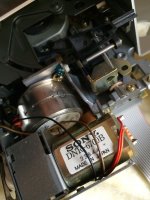
I had a look at the drives today.

One is a SONY. It's the internal drive. It has the round sticker. Good.

IMG_2918-min.jpg

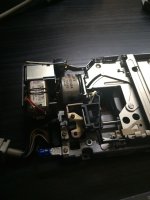
The other one is an ASTEC "September 1984". That's the external drive.

IMG_2917-min.jpg

So that last one won't work, then. It has that square sticker. Damn. I bought this one separately. There is no way to tell which one's which from the exterior.

How did this work in the 80s?

Someone who bought one of the first Macs (Version A ROMs) without an external drive and who later wanted one must have ran into this incompatibility problem. How did Apple deal with this back then? Did they replace the ROMs on the machine?

So I'll need a pair of ROMs. Either 64k, Version B or 128k, Version A or B. 

We'll see if HD20 emu mode works well on the 128k. If it does then I'll replace mines with the 128k ones. If it doesn't then maybe I'll buy Version B ROMs.

------------

Anyway, September '84 is a special month for Macs, introduction of the Fat Mac and all.

But it seems that drives made around that period were completely different one to another. Some might have worked with your early Mac while some others may not...

 
Im not sure how they handled it, but its possible the compatibility is unique to the internal drive. Remember the Mac can tell the difference between internal and external, like an SE can tell between upper and lower. So there must be some slight difference in  setup between the two. So maybe that has something to do with it, something unique to the internal drive. But I am only speculating.

 
The Mac can tell the difference between upper, lower, and external floppy drives because they have different drive numbers, and are enabled using different pins on the logic board connector. But as far as the drives themselves go, they're identical.

When they talk about a stepper motor being "compatible" with a version of the ROM, I would assume they're talking about how quickly it can step between tracks. If the drive doesn't signal that a step has completed within a few milliseconds of when it begins, the floppy routines in the ROM return with an error. There's a unique error code for "can't step", as I recall. I would guess that Apple switched to a new kind of stepper motor that was slightly slower, so the ROM routines had to be tweaked to allow for a greater step delay before reporting an error. If you used one of those drives with the original ROM, it might still "mostly work" but with a higher likelihood of spurious disk errors.

 
Ok I got my 128k board in the mail today. I'm glad that it works although my mouse doesn't.

I think the mouse is to blame because I never tried it on any computer before. Got it in a box full of stuff. Was pretty dirty but I cleaned it well.

Anyway, I was able to test my external drive with the Version A ROMs and IT WORKS! I tried many disk accesses and ejects and it never failed.

So even if you have a later revision external drive, it will work with your early Mac ROMs. 

I don't think it will work on an internal one though. But I haven't tried.

 
I tried with another mouse and it works, sort of.

The Mac itself is good, thanks Uni for that! But the ROMs aren't. I tried my original Tour Disks and they don't work. They give me a error <7 every time like my Plus did before.

It depends on the ROM revision. It did the same on Mini vMac until I found a correct ROM. So I need a pair of Rev B or C 64k ROMs.

BTW, I did some further testing with the external drive. It reads, writes and ejects properly but holding the mouse button at startup doesn't work with the external drive. Again, ROM conflict.

 
Back
Top