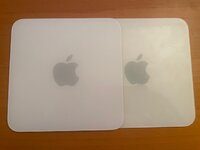
I've been working on cleaning and upgrading a 1.42 GHz G4 Mac Mini (A1103) to make a OS 9 and 10.4 system.
We know the retrobright method doesn't work on Macs like the G4 Mini and eMac because the (formerly) white plastic is behind a clear acrylic layer and can't be touched by whatever version of hydrogen peroxide concoction you use.
The lid on my Mini wasn't extremely yellow but it was still noticeable. I was surprised to come across this page by someone who swapped a lid from a newer Intel Mini (A1283) that seems to be less prone to yellowing. I picked up the same model off eBay and there was a huge difference in the color! A bit of plastic polish to take scratches out of the acrylic and I had a nearly new looking lid!
As I was working on the rest of the Mini I realized that the cutouts for the AirPort Extreme and Bluetooth antenna in the A1283 lid would not fit the antennas on my G4. The person who created the page with the lid swap must not have had AP and BT on their G4.
Since I didn't have anything to do with the yellowed lid from the G4, I used a heat gun on it and tried to separate the acrylic from the white plastic. It worked but I caused some damage with the spatula I was using separate the two layers. It turns out the white you see through the acrylic is not from the white plastic, but from a sticker that is sandwiched between the layers. I scraped part of it off when I was separating the two pieces.
I could try to cut out sections of the white plastic on the A1283 lid but I might slice the white sticker and have the cuts show through the acrylic.
I also through about separating the two layers of plastic and combining the A1283 acrylic with the A1103 white plastic. I'd prefer not to go the heat gun route again. I was thinking time in a hot water bath would be less likely to warp any plastic but it could completely damage the sticker between the two layers.
Has any one else tried this? Suggestions?
I have a few more parts Minis on the way to experiment.
Finding out the yellowed surface under the acrylic did give me an idea for a future project - remove all the sticker/paper on the underside of the acrylic, apply an Apple sticker, paint your desired color, and reassemble.
We know the retrobright method doesn't work on Macs like the G4 Mini and eMac because the (formerly) white plastic is behind a clear acrylic layer and can't be touched by whatever version of hydrogen peroxide concoction you use.
The lid on my Mini wasn't extremely yellow but it was still noticeable. I was surprised to come across this page by someone who swapped a lid from a newer Intel Mini (A1283) that seems to be less prone to yellowing. I picked up the same model off eBay and there was a huge difference in the color! A bit of plastic polish to take scratches out of the acrylic and I had a nearly new looking lid!
As I was working on the rest of the Mini I realized that the cutouts for the AirPort Extreme and Bluetooth antenna in the A1283 lid would not fit the antennas on my G4. The person who created the page with the lid swap must not have had AP and BT on their G4.
Since I didn't have anything to do with the yellowed lid from the G4, I used a heat gun on it and tried to separate the acrylic from the white plastic. It worked but I caused some damage with the spatula I was using separate the two layers. It turns out the white you see through the acrylic is not from the white plastic, but from a sticker that is sandwiched between the layers. I scraped part of it off when I was separating the two pieces.
I could try to cut out sections of the white plastic on the A1283 lid but I might slice the white sticker and have the cuts show through the acrylic.
I also through about separating the two layers of plastic and combining the A1283 acrylic with the A1103 white plastic. I'd prefer not to go the heat gun route again. I was thinking time in a hot water bath would be less likely to warp any plastic but it could completely damage the sticker between the two layers.
Has any one else tried this? Suggestions?
I have a few more parts Minis on the way to experiment.
Finding out the yellowed surface under the acrylic did give me an idea for a future project - remove all the sticker/paper on the underside of the acrylic, apply an Apple sticker, paint your desired color, and reassemble.