• Hello MLAers! We've re-enabled auto-approval for accounts. If you are still waiting on account approval, please check this thread for more information.

LaserWriter IIg - Dreaded “Error 50” / 2 Blinking Red Lights

Zhinü

6502
During VCFW I picked up a LaserWriter IIg for free. When I first got it, I had the dual flashing paper jam and paper out lights, indicating that one problem that every Canon SX printer has, the “Error 50.” Naturally, I pulled the AC power supply board out and replaced the 22uf cap, along with the 100uf cap in there too. I haven’t replaced the Triac.

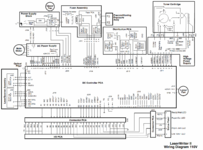
However, even after reassembly, I still get the same error. Furthermore, I seem to have picked up a new problem, namely that the 24V power doesn’t work. I don’t know if said power issues were happening before or after the recap.

The upper fan (which runs on 24V) is not running, however the lower fan (which also runs on 24V?) is running. However, they may be different voltage rails. I still need to test if there’s 24V going to the fuser, and/or the upper fan.

Any advice on what to do? My current next step according to Laserjet II/III repair is to replace the DC assembly, but I wanna check in and make sure it’s not something really stupid.
 

Attachments

  • IMG_6958.png
    IMG_6958.png
    1.8 MB · Views: 18
Sooooo, interesting news.

The toner tests at 24V perfectly fine. However, the upper fan has 19V on the ground and 24V on power! I don’t know how this would happen, considering that there isn’t even a source of 19V anywhere on the board.
 
Sooooo, interesting news.

The toner tests at 24V perfectly fine. However, the upper fan has 19V on the ground and 24V on power! I don’t know how this would happen, considering that there isn’t even a source of 19V anywhere on the board.
I'm gonna bet ground isn't connected to the fan, and you're meter is just reading the 24V divided through the fan
 
Sooooo, interesting news.

The toner tests at 24V perfectly fine. However, the upper fan has 19V on the ground and 24V on power! I don’t know how this would happen, considering that there isn’t even a source of 19V anywhere on the board.
Turns out that’s probably just fan control. Back to square one. I have the 24V, I replaced the caps people say to replace. I haven’t replaced the Triac. Is there anything else that could possibly be wrong?
 
Back when I did this on my LWII, I did replace the triac (Q6015L5TP) along with the cap, and that fixed it for me.

The actual meaning of Error 50 is the fuser has failed to reach the temperature. More often than not, this is because of failed voltage reaching it, but it _could_ actually be the fuser going/gone bad. I'm a little hazy on the details now, but I think I checked my fuser lamp for continuity before servicing the PSU. Perhaps have a look at that?
 
Back when I did this on my LWII, I did replace the triac (Q6015L5TP) along with the cap, and that fixed it for me.

The actual meaning of Error 50 is the fuser has failed to reach the temperature. More often than not, this is because of failed voltage reaching it, but it _could_ actually be the fuser going/gone bad. I'm a little hazy on the details now, but I think I checked my fuser lamp for continuity before servicing the PSU. Perhaps have a look at that?
If the lamp connections is the connector on the fuser that has 120V going through it, I have continuity through it. The same port on the other side also produces 120V (afaik, tested without fuser in place). I don’t see the lamp on the fuser though, even when in a dark place with the main lid opened. I don’t know if you can see the lamp through the wiper section on the fuser or not.
 
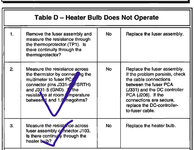
Just follow the tests in the service manual for the fuser. If it passes the continuity tests and resistance readings, it should be fine.
 
Just follow the tests in the service manual for the fuser. If it passes the continuity tests and resistance readings, it should be fine.
I can’t find the TP1 mentioned here in the service manual. I took apart the fuser and I did find something that could be it but I can’t confirm.
 

Attachments

  • IMG_6991.jpeg
    IMG_6991.jpeg
    377.8 KB · Views: 15
Triac replaced and… no dice. I think the fuser is just bad in some way. I got both 24V and also 120V, so there’s gotta be something wrong with the fuser.
 

Attachments

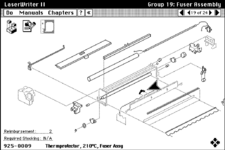
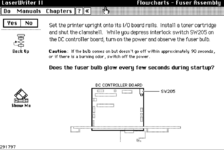
I had a look at the Apple Service Source May 1993 (which is available to run in a browser the wonderful Archive.org Hypercard Stacks), and found (attached as images):
  1. a diagram that points out where the thermoprotector is located
  2. another troubleshooting step that involves inspecting the fuser lamp during power up and seeing if it lights up
I'd actually recommend running the stack yourself (use Firefox, latest chrome doesn't work), and going through its interactive troubleshooting steps - they are brilliant and I used them to help repair my LWII and LWPlus.

For finding a replacement fuser, are the fusers specific to the mains voltage? I think I may have a spare fuser here, but it may be 240v, and the shipping to you may not make much sense.
 

Attachments

  • Screenshot 2024-08-19 at 13.30.48.png
    Screenshot 2024-08-19 at 13.30.48.png
    57.9 KB · Views: 9
  • Screenshot 2024-08-19 at 13.28.20.png
    Screenshot 2024-08-19 at 13.28.20.png
    44.8 KB · Views: 10
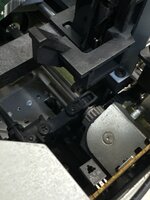
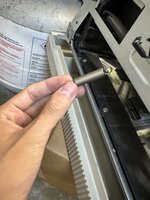
Replacement fuser came in and that did the trick! Now onto two new problems. Number one, paper doesn’t feed in and it throws a paper jam. One of the rollers doesn’t seem to spin even though the gear does (first photo, gray gear). The other problem is that while removing the paper tray it got stuck, and when I got it unstuck, it spit out a spring.

When I eventually managed to get paper through (feeding it far enough in that another set of rollers grabbed it), the paper was mostly blank on the other side. There’s some faint lines across it but nothing more.
 

Attachments

  • image.jpg
    image.jpg
    1.2 MB · Views: 4
  • IMG_7238.jpeg
    IMG_7238.jpeg
    1.1 MB · Views: 5
So it’s supposedly working fine as it should. However, once it starts up, it goes, runs the paper roller gears (but doesn’t actually latch it to spin the rollers), runs for about 10 seconds, stops; waits 30 seconds, and then repeats. It won’t print anything on the paper from what I can tell; and the light is solid green.
 
I think the controller board is faulty. Sucks cause it’s a IIg, but I’ll have to have someone look over it (already recapped it), and in the meanwhile look for a similar replacement.
 
So it’s supposedly working fine as it should. However, once it starts up, it goes, runs the paper roller gears (but doesn’t actually latch it to spin the rollers), runs for about 10 seconds, stops; waits 30 seconds, and then repeats. It won’t print anything on the paper from what I can tell; and the light is solid green.
That sounds like the correct power up procedure from my memory - it will spin but not latch.

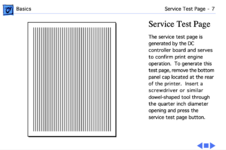
If you look in the service manual, there is a way to get it to print a "Service Test Page" - that will work regardless of the condition of the controller board. I’d recommend you try that, so you can see if the paper is feeding properly, or if there are things that need fixed there. I've attached a screenshot from the manual that describes this.

I can also get my LWII out and record a video of the correct power up procedure if that would help.

I have a couple of spare IINT boards I’d be willing to sell. I think I also have a spare IIg (which I re-capped last year) - it’s either a IIg or a IIf - but I'd need to decide if I want to sell it or keep as a spare.
 

Attachments

  • Screenshot 2024-08-25 at 02.59.33.png
    Screenshot 2024-08-25 at 02.59.33.png
    173.8 KB · Views: 6
Back
Top