
-
 Hello Guest! We're hosting a challenge to welcome vintage Intel macs to the MLA during the month of July! See this thread for more information.
 -
We've made some quality of life improvements to the Trading Post. More info here.
You are using an out of date browser. It may not display this or other websites correctly.
You should upgrade or use an alternative browser.
You should upgrade or use an alternative browser.
Laserwriter 4/600 PS with streaks all over printed page.
- Thread starter fergycool
- Start date

Does this have any common parts with yours? Might be worth grabbing if it does. https://www.ebay.co.uk/itm/365385817057



Oh and according to that

Thanks but it's more stubborness rather than dedicationI hate printers but I do admire your dedication to fixing your 4/600 PS. Hope you manage to get it working properly!
I don't think so but I could be wrong. It is a much more recent printer so I guess it's got a different print engine inside.Does this have any common parts with yours? Might be worth grabbing if it does. https://www.ebay.co.uk/itm/365385817057
I've found that as I work on LaserWriters, I end up needing to take them apart and reassemble so often that I slowly stop needing to refer to the service manual every step. I try and still do so, because missing a step could be bad, but I could probably take apart a LWII to get to the paper pickup roller in my sleep by this point!
I know exactly what you mean. Only issue is that I am now a bit complacent and my little jar of screws seems to have more and more screws after each stripdown. I'm just forgetting to put them all back.I've found that as I work on LaserWriters, I end up needing to take them apart and reassemble so often that I slowly stop needing to refer to the service manual every step. I try and still do so, because missing a step could be bad, but I could probably take apart a LWII to get to the paper pickup roller in my sleep by this point!
Just thought I just update this thread with where I ended up!
After that fifth rebuild it still misfed. Turns out that if you do not replace that foam with something non-conductive then the metal lever get's magnetised for a very brief period and sticks long enough to cause the misfeed. Another strip down and covered the levers (of both solenoids) with nicely cut insulation tape solved that problem.
But then we still had the issue of the wiper blade. My hot/cold water fix was unfortunately only temporary. I repeated it but had the same issue. A search for new wiper blades was not fruitful. But then I found a source that remanufactured the cartridges and gave a guarantee! Even though it cost more than I paid for the printer I thought it was worth it…and it was! A few days later it arrived. Initially massive disappointment as every print I did was blurred and smeared. I went to shake the toner cartridge and realised there was a packing sheet I'd missed.
Now it's very sharp and crisp!
The only issues are:
- It's very slow! I wish I could find a memory upgrade which is proprietary (boo hiss!).
- Every now and again it says the paper is out when it isn't. Pulling the tray and pushing back in fixes that!
After all that I think I am satisfied. Plus it's getting great usage at the moment with #MARCHintosh and #globaltalk.
After that fifth rebuild it still misfed. Turns out that if you do not replace that foam with something non-conductive then the metal lever get's magnetised for a very brief period and sticks long enough to cause the misfeed. Another strip down and covered the levers (of both solenoids) with nicely cut insulation tape solved that problem.
But then we still had the issue of the wiper blade. My hot/cold water fix was unfortunately only temporary. I repeated it but had the same issue. A search for new wiper blades was not fruitful. But then I found a source that remanufactured the cartridges and gave a guarantee! Even though it cost more than I paid for the printer I thought it was worth it…and it was! A few days later it arrived. Initially massive disappointment as every print I did was blurred and smeared. I went to shake the toner cartridge and realised there was a packing sheet I'd missed.
Now it's very sharp and crisp!
The only issues are:
- It's very slow! I wish I could find a memory upgrade which is proprietary (boo hiss!).
- Every now and again it says the paper is out when it isn't. Pulling the tray and pushing back in fixes that!
After all that I think I am satisfied. Plus it's getting great usage at the moment with #MARCHintosh and #globaltalk.
Attachments
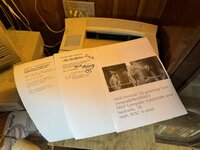


Can you share a link?But then I found a source that remanufactured the cartridges and gave a guarantee!
Now it's very sharp and crisp!

It's a German company https://duston.de/ but I bought via Amazon as I've been stung a few times recently with custom duties (I'm live in the UK and have French family so I regularly curse Brexit).



The additional RAM (to 6MB) does speed up the 4/600, but not to the point of it being fast by anyone’s standards today. A print server helps if spooling, as it releases the machine from which you are printing. The printer then gets there eventually.
Oddly enough, for years I found the 4/600 gave less errors when printing complex PDFs and such than other, much more powerful LaserWriters. The LW8500, for instance, often threw errors, but not the 4/600.
Oddly enough, for years I found the 4/600 gave less errors when printing complex PDFs and such than other, much more powerful LaserWriters. The LW8500, for instance, often threw errors, but not the 4/600.

Actually, come to think of it, what the 6MB RAM really helps with in the case of the 4/600 is that for things like PDFs and photos, etc.,, there are no more out of memory errors. In practice, that is more important than speed sometimes.
I was printing to mine, via a print server, a localtalk to ethertalk bridge, and a hack to the OS (I added a text file to the printer definitions in OSX, just taken from System 7 as I recall) from Mavericks up to a few years ago. Currently it is sitting in my basement, awaiting completion of an outbuilding that will, among other things, house my collection of old gear, whereupon I expect it can be put to constructive use again. I always thought the 4/600 was a great printer because it was on all the time, made no noise, and drew almost no power when idle. Slow, yes, but also steady.
I was printing to mine, via a print server, a localtalk to ethertalk bridge, and a hack to the OS (I added a text file to the printer definitions in OSX, just taken from System 7 as I recall) from Mavericks up to a few years ago. Currently it is sitting in my basement, awaiting completion of an outbuilding that will, among other things, house my collection of old gear, whereupon I expect it can be put to constructive use again. I always thought the 4/600 was a great printer because it was on all the time, made no noise, and drew almost no power when idle. Slow, yes, but also steady.
As I've said before, I'm surprised Apple equipped a 600dpi PostScript printer with only 2MB of RAM. The 4MP came with 6MB stock with 2xSIMM sockets to add up to 16MB more. They are very versatile printers, one reason why my 4MP is still on my desk... albeit a paperweight at the moment since it needs toner.
As I've said before, I'm surprised Apple equipped a 600dpi PostScript printer with only 2MB of RAM. The 4MP came with 6MB stock with 2xSIMM sockets to add up to 16MB more. They are very versatile printers, one reason why my 4MP is still on my desk... albeit a paperweight at the moment since it needs toner.
Apple apparently used Adobe tech to be able ship it with only 2MB of RAM, I guess HP didn't like this approach for their competing product. Apple cost savings, to get them the profit margin they wanted?
From the Apple LaserWriter 4/600 PS Developer note:
The LaserWriter 4/600 PS printer has improved imaging capabilities and supports 600-dpi (dots per inch) resolution.
Using Adobe Memory Booster Technology (AMBT) it accomplishes this with only 2 MB of DRAM.
The LaserWriter 4/600 PS printer incorporates Adobe Memory Booster Technology (AMBT), which reduces significantly the amount of printer DRAM needed to render and print 600-dpi pages. Using AMBT, the printer with 2 MB of DRAM can print complex pages that usually require 6 MB of DRAM.
The AMBT software accomplishes this using a combination of on-the-fly band rendering and prerendered band compression. The normal compression algorithm is lossless and does not cause any degradation in print quality. Compression of prerendered bands may slow output, but this type of compression is used only on bands that cannot be rendered in real time while the page is moving through the print engine.
If a page contains too many bands that must be prerendered in this way, the page data may not fit in the available memory, since compressed bands occupy more memory space. In this case, AMBT reverts to a lossy compression algorithm for the entire page, to maximize the probability that it can be printed. The lossy compression algorithm renders the page at 600 dpi, intelligently downsizes the image to obtain a compressed representation, and upsamples it to 600 dpi just as it is being printed.
AMBT also uses techniques to print pages for which the display list is too large to fit in the available DRAM space. In this case, throughput of pages is significantly decreased.
If you install the 4 MB DRAM expansion card to bring the total DRAM capacity to 6 MB, a full-size 600-dpi bitmap buffer is allocated for letter and A4 pages. In this case, AMBT is essentially disabled, and maximum performance achieved. However, AMBT is still required when legal-size pages are printed, to store a compressed page image, and to leave enough DRAM for the display list and general virtual memory.
The standard configuration of the LaserWriter 4/600 PS printer comes with 2 MB of DRAM mounted on the printer’s controller (main circuit board). The printer also accommodates a 4 MB DRAM expansion card that brings DRAM capacity up to 6 MB. The amount of DRAM installed significantly changes the printer’s performance as well as the quality of the output.
The standard configuration of the LaserWriter 4/600 PS printer comes with 2 MB of DRAM mounted on the printer’s controller (main circuit board). The printer also accommodates a 4 MB DRAM expansion card that brings DRAM capacity up to 6 MB. The amount of DRAM installed significantly changes the printer’s performance as well as the quality of the output.
Thanks for all that information everybody. All very interesting!
I need to find some complicated PDFs to print then. So far I've not seen any errors myself, but I've only been printing simple text files and images direct from Photoshop. The printer is now available on #Globaltalk (my zone is scotgate). Plenty of complicated stuff has been printed to it including the #MARCHintosh Daily News which was six pages of text and images. Only two prints produced errors.
I need to find some complicated PDFs to print then. So far I've not seen any errors myself, but I've only been printing simple text files and images direct from Photoshop. The printer is now available on #Globaltalk (my zone is scotgate). Plenty of complicated stuff has been printed to it including the #MARCHintosh Daily News which was six pages of text and images. Only two prints produced errors.
From the error I guessed this was a network issue instead of the actual printer! But I do not really know.An error occurred whilst processing this printout
Error:timeout
Command:timeout
Stack:
Similar threads


- Replies
- 5
- Views
- 2K


