


Hi,
I have a vintage LaCie 40 MB Pocket Drive (a SCSI drive — not to be confused with the more modern FireWire LaCie PocketDrive, without a space between “Pocket” and “Drive”), with all necessary connectors, which seems to work with an old Macintosh Classic I have. However, the connectors have tiny toggle switches on the connectors, whose function I don’t understand. Here’s a picture:
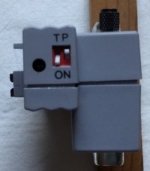
The switches move vertically. The T and O supposedly relate to the left switch, the P and N to the right switch.
Would the T and O relate in any way to whether the SCSI chain terminates (T) there or continues further? But what about the P and N? Would anyone have information on these switches — or even (prayer!) a copy of the original manual? I’ve been unable to find information on this drive on the Internet, except for an old Macworld ad from 1992:
Macworld, August 1992, p. 36
https://archive.org/details/Macworld_9208_August_1992
In particular, no information seems to be available on the LaCie site, nor at www.noappleis2old4us.com
Thanks in advance for any help on this.
florr
I have a vintage LaCie 40 MB Pocket Drive (a SCSI drive — not to be confused with the more modern FireWire LaCie PocketDrive, without a space between “Pocket” and “Drive”), with all necessary connectors, which seems to work with an old Macintosh Classic I have. However, the connectors have tiny toggle switches on the connectors, whose function I don’t understand. Here’s a picture:
The switches move vertically. The T and O supposedly relate to the left switch, the P and N to the right switch.
Would the T and O relate in any way to whether the SCSI chain terminates (T) there or continues further? But what about the P and N? Would anyone have information on these switches — or even (prayer!) a copy of the original manual? I’ve been unable to find information on this drive on the Internet, except for an old Macworld ad from 1992:
Macworld, August 1992, p. 36
https://archive.org/details/Macworld_9208_August_1992
In particular, no information seems to be available on the LaCie site, nor at www.noappleis2old4us.com
Thanks in advance for any help on this.
florr








