Follow along with the video below to see how to install our site as a web app on your home screen.
Note: This feature may not be available in some browsers.
Hello MLAers! We've re-enabled auto-approval for accounts. If you are still waiting on account approval, please check this thread for more information.
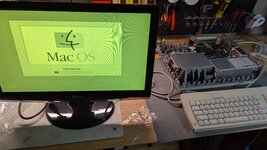
Funny, I let it boot up, and now it's almost normal. Except that it seems to fade back and forth, and now it's green again. Set to 110010. Will try some more.
I was using a Twin Turbo Graphics card with a VGA display, and it did this, there was a Sync on Green toggle in software, that fixed it. A similar thing.
I could be wrong, but you're using on board video from a IIsi, it's going to output a sync signal on green. Unless your LCD supports sync on green, you'll have some issues. It's possible the green tint is due to that sync signal riding on the green channel and causing the LCD to confuse it with the green signal. You should check what your LCDs support, not all support sync on green.
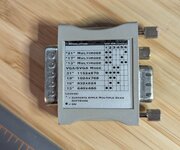
Hmm, are these open source? I find it daunting to order from the states, with exchange, duty, shipping. Before you know it, I've spent $100 on an adapter.
I use a Sony Trinitron 17” CRT through a VGA switchbox to all my headless classic Macs, one of which is a IIsi. The thing can handle any resolution and refresh rate I throw at it.
This site uses cookies to help personalise content, tailor your experience and to keep you logged in if you register.
By continuing to use this site, you are consenting to our use of cookies.