• Hello MLAers! We've re-enabled auto-approval for accounts. If you are still waiting on account approval, please check this thread for more information.

Installing a Two-Page Monochrome Video Card

Jamieson

6502
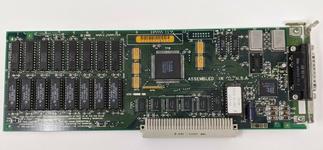
I've just picked up an Apple Two-Page Monochrome Video Card and installed it into a spare slot in my IIci. This is the first version of the card with a 13W3 output connector. No signs of life on the attached monitor. Do I need to install a driver for this card?

I have one monitor on the built in video and that is working properly. But TattleTech does not report anything about this NuBus card, nor do I see any mention of another screen or display in any of the control panels. I'm on 7.5.5.

2pagemono.png
 
Is your nubus slot tested and known good? I think it was that model that has some part go bad near the port that kills it...
 
Thanks for the reminder. I just re-read that thread and will take another look at chip UH1. It's next to C16 which I noticed was leaking prior to recapping the main board.
 
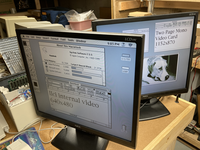
I found and repaired two corroded traces on the main board that ran near the leaker C16. Now the system detects the video card under TattleTech. The LCD monitor that is attched to the video card syncs and shows gray background at 1152x870 @ 75Hz.

However under control panel Monitors I only see one display, the 640x480 IIci internal onboard video.

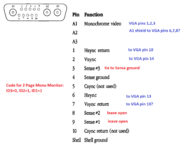
My guess is that the 13W3-to-HD15/VGA adapter I'm using is probably not handling the "ID" or "SENSE" lines correctly (there are no DIP swiches here), and the video card thinks there is no monitor attached. Any suggestions?
 
Glad that fixed it.

As for the card, you are trying this with a modern day LCD? I'm pretty sure nobody has found a way to use these two page cards with modern LCDs really... I might have read someone may have got it going with a monitor that had a wide range of resolutions, since that's an odd one? Or maybe in theory...
 
I'm planning on using it with an NEC LCD19V, which is 1280x1024 native. The manual says it supports 1152x870 @ 75Hz, but I can tell it's stretching things to fill the entire screen.
 
Hmmm.... My radius xk nubus card displays a radius logo on the bottom left of the screen when first turning on. Do those two page cards do that too?

Otherwise I'd guess you're on the right track. You've got a gray screen, so that's halfway there.
 
I think I bought the wrong 13W3 to HD15 adapter.... mine has a Sun logo on it, and it's putting the sync pulses on strange pins. But after some kludging with the ID3, ID2, and ID1 lines, the OS recognises the video card and thinks there is a two page mono monitor connected. The video card is generating video (on the "red" channel only, no sync pulse added), /HSYNC, /VSYNC, and /CSYNC.
 
Last edited:
The RAMDAC chip used on this board, BT454, has three output DACs in it, and the card does in fact drive all three outputs to produce a grayscale image on a color monitor. This is with all three ID bits pulled low, to select the "Apple 21 color monitor" at 1152x870 @ 75Hz. The RAMDAC chip adds SYNC information to the green output, which shifts the signal up. My LCD doesn't deal with this properly and everything has a dark green tint. Using the service menu on the LCD I can adjust the green offset level to compensate so it looks OK. The LCD I'm using is 1280x1024 native and it is stretching the 1152x870 image to fill the screen. Doesn't look that great. If the monitor has a 1:1 mode with stretching disabled that would be ideal and leave a ~1cm black border all around, a small price to pay for much better sharpness. But so far I've not found any way to disable the stretching feature in the monitor user menu or factory service menu.
 
Back
Top