• Hello MLAers! We've re-enabled auto-approval for accounts. If you are still waiting on account approval, please check this thread for more information.

Max Displays on A Quadra

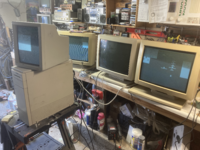
I am curious if anyone has documentation on how may displays you can connect to a Quadra 950 at one time. I currently have 2 Nubus Cards that support normal video modes (Apple 8-24 and SuperMac Something Something) and a Radisu Full Page Display card.

When I plug in monitors to BOTH NUBUS cards the onboard video port seems to stop giving out a readable signal to my monitors. I haven't added any additional video ram. Each display works on its own using the internal port and both cards will work separately.

Any idea what could be causing this or what rules System 7.1 might have about external displays? Please help me connect a dumb number of Two Page Monochrome monitors to a single machine.

1746485644928.png
 
Might be a weak power supply or something, because architecturally the Q950 can absolutely drive 4 monitors (3 NuBus cards and the internal display). I just tried it emulated in MAME with 3 RasterOps cards plus the internal display and it booted.
 
I haven't recapped the PSU but I only have 1 drive in there. I am curious of the source for this info and how I can know the power requirementes of a Nubus card.

1746488181917.png
 
Might be a weak power supply or something, because architecturally the Q950 can absolutely drive 4 monitors (3 NuBus cards and the internal display). I just tried it emulated in MAME with 3 RasterOps cards plus the internal display and it booted.
If you can make a NuBus card that supports more than one display, then I don't see why you couldn't get like a dozen displays working. Did any NuBus cards support more than one display?

With PCI, you can connect any number of PCI graphics cards and get like 14 displays. Only tested with emulation using DingusPPC. DingusPPC can also emulate a NuBus PowerPC Mac but NuBus supports a limited number of slots (6 max maybe) so a NuBus graphics controller that can support more than one display would be required.
 
When I plug in monitors to BOTH NUBUS cards the onboard video port seems to stop giving out a readable signal to my monitors. I haven't added any additional video ram. Each display works on its own using the internal port and both cards will work separately.

yes, this does not sound right. Does the monitor attached to the internal video appear in the Monitors control panel?
 
If you can make a NuBus card that supports more than one display, then I don't see why you couldn't get like a dozen displays working. Did any NuBus cards support more than one display?
I'm not aware of any NuBus cards that supported multiple monitors, even for mirroring. Multiple monitors on one card was rare for PCI and AGP, it was only a standard feature on PCI Express. Even multiple PCI cards each driving one monitor wasn't well supported on PCs prior to Windows 2000, although it always worked on PCI Macs of course.
 
Ok so I have done some more research (moving cards around, different monitors etc) and it seems to be something with how the Apple branded cards detect displays.

I have one official apple cable for these Two Page Displays with the 13W3 connectors and built 2 others using this awesome project - https://github.com/warmech/apple-13w3-display-connector-adapter

In my testing at least, it turns out that the internal video port and the Macintosh Video Card I have don't like these adapters. I was able to get 3 working today by plugging in a custom adapter to my supermac card, official apple cable to the Apple Nubus card and then using the Mac Sync-inator to simulate the two page mono display connected to a VGA screen on the internal video port. This worked and got me 3 displays in the monitor control panel.

I then unplugged the LCD and used the custom adapter to connect to internal video. TADA I have 3 Two Page Displays going at once.

So it doesn't seem like something that isn't supported by the hardware or a problem with the cables themselves, but something with how the Apple Display Cards/Internal Video sense the monitors. If I trick them I can get what I am looking for. I wonder what it is looking for and not finding? I believe I have configured the dips correctly on the adapters.
 
I'm not aware of any NuBus cards that supported multiple monitors, even for mirroring. Multiple monitors on one card was rare for PCI and AGP, it was only a standard feature on PCI Express. Even multiple PCI cards each driving one monitor wasn't well supported on PCs prior to Windows 2000, although it always worked on PCI Macs of course.
I have a PCI video card for PC (Permedia based I think so Win2K era) that supported 4 VGA monitors but needed a special cable. Very specialized stuff back then.

While you can stick multiple cards into a IIfx for example I never even tried more than 2 monitors and even that was just to do it.
 
I'm not aware of any NuBus cards that supported multiple monitors, even for mirroring. Multiple monitors on one card was rare for PCI and AGP, it was only a standard feature on PCI Express. Even multiple PCI cards each driving one monitor wasn't well supported on PCs prior to Windows 2000, although it always worked on PCI Macs of course.
ATI PCI cards (Radeon 7000 and later) and Nvidia PCI cards (5200 and later) supported two displays.
I'm working on emulating a PCI card that can support any number of displays. Then I'll try porting it to NuBus if possible.
 
ATI PCI cards (Radeon 7000 and later) and Nvidia PCI cards (5200 and later) supported two displays.
I'm working on emulating a PCI card that can support any number of displays. Then I'll try porting it to NuBus if possible.
Ooh! Virtual video wall with DingusPPC ahead!
 
Back
Top