• Hello MLAers! We've re-enabled auto-approval for accounts. If you are still waiting on account approval, please check this thread for more information.

iBook G3 Clamshell vinegar syndrome

mac27

6502
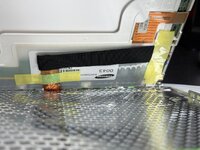
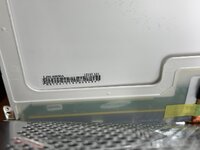
Well, the dreaded day has finally arrived. Pulled out my beloved Key Lime to find the beginnings of vinegar syndrome. It's really hard to show on camera, but there's a clear oblate-shaped zone of diagonally-oriented lines and discoloration visible when the LCD is on. At present there is only a single, very small (~1cm) raised bump on the panel, which is shown in the second photo. So it's just starting out but very clearly vinegar syndrome, unfortunately. I checked my other five Clamshells and so far this is the only one afflicted.
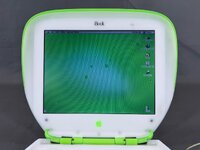
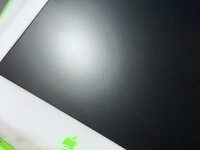
IMG_0954.jpeg IMG_0958.jpeg

For the time I've had it (about four years now), this machine has been stored in a cool, dry, smoke-free area with little temperature fluctuation but I obviously have no idea what its previous life was like. To be clear I'm not upset about this, as I've known for many years that this is an inevitable issue that comes with the territory and WILL happen eventually to these old LCDs.

I have a fleet of six of these that I know I'll need to address now. I have NO interest in doing the tedious task of polarizer layer replacement on all of them, but I will do it if I absolutely must. So I'm wondering - what is the latest on (modern) panel replacements and so on? I've read that this panel might work, but it's not clear. Anyone done this recently and willing to share a source or other info? Or if polarizer replacement is the only viable option, advice on that? Cheers.
 

Attachments

  • IMG_0954.jpeg
    IMG_0954.jpeg
    4.9 MB · Views: 0
  • IMG_0958.jpeg
    IMG_0958.jpeg
    2 MB · Views: 14
Last edited:
Certainly on the original Clamshells, the Samsung LCD part number is LT121SU-123 and the LG LP121SA. I think they're the same for the FireWire models, but regardless you need to open your machine and check which you have (Samsung or LG), since the cables are different

Edit: The panel you link to, the LTN121X1, is a 1024x768 panel which is what you want if you have a Samsung panel and want to do the XGA mod. The part numbers I have put above match the original 800x600 panels
 
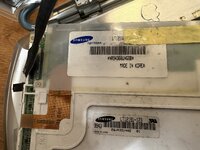
Thanks, this is helpful. So mine is a Samsung panel but does not appear to match any of these, I see a label of LJ96-00030A and a 121SU121. I presume the number below the barcode is the serial no. Are either of these numbers the part number I need to look for?

IMG_0961.jpeg IMG_0960.jpeg
 
I think your model number is 121SU121, which I suppose could be just a slight variant from (LT)121SU-123… mine has the model number on a couple of different labels, though, so maybe you have another sticker with the model number on it as well.

The first “121” is referring to the screen size, I believe, as in 12.1”

Edit: under the yellow tape in your first picture I see “LT121SU-…..” - if you peel up the tape you can probably see the complete model number
 

Attachments

  • IMG_6581.jpeg
    IMG_6581.jpeg
    2.1 MB · Views: 12
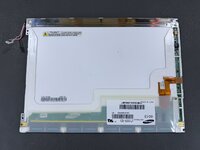
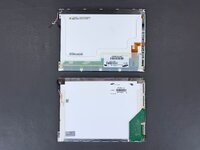
The replacement panel arrived today, was actually pretty quick (only about 2.5 weeks to get here).

IMG_1029.jpeg
Original panel (top), new panel (bottom)

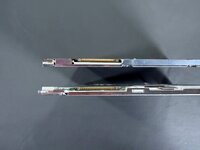
I went to install it and the only significant difficulty was the fact that the display connector was upside-down on the new panel. The connector is directional and has two small tabs on the top/bottom so it can only go in one way. This was really hard to photograph but I managed to capture it somewhat:

IMG_1035.jpeg
So to address that, I had to remove some of the black sheathing around the flat bundle of display cables inside the iBook's display housing so that I had enough play to be able to flip them around and connect the connector properly. Other than that, the installation went smoothly.

Turned on the iBook, and ... nothing. No image, no signs of life.

So I reinstalled the original panel, and ... nothing. No image, no signs of life. (This was obviously working fine before, apart from the vinegar syndrome).

I did notice that I forgot to attach the ground cable that splits off the display cable when I installed the new panel beforehand, but I can't imagine that would have damaged anything?

So uh, I am at a bit of a loss here. Obviously something has been damaged somehow. I took it back apart again and inspected every component (panels, cables, inverter board, connectors) for any signs of damage and don't see anything. No obvious missed connections, broken wires, burn marks, etc.

Both of these displays are labeled LT121SU-123, and there are some obvious differences in the construction but I can't imagine it can be that much. Did flipping that connector around seriously fry something? Or leaving the ground loop disconnected? *sigh*
 
If they're both the same panel, the pins are probably in the same order, and the connector needed to be different. By installing it backwards, it's possible that you damaged the new panel, and you almost certainly made the 3.3V supply to that fail by shorting it - which is likely why you get nothing with the old panel.

It is typically fused on most laptops, but I haven't poked at a toilet seat iBook in a good while, nor do I have any of mine with me to check and give you pointers.
 
Ok. Thanks for the info. Figured something of that nature. To make sure I'm communicating clearly - I didn't install the connector backwards, per se, I just installed it the only way that it would physically fit. Which seemed like it was specifically designed so as to NOT cause any issues, lol.

Anyways, they are both allegedly the same panel, except this connector being flipped around. So then one wonders, what would the solution to this problem be? I'm kinda at a loss ... if anyone can offer guidance.

And the other question, what would have been damaged inside the iBook itself when this occurred? Everything else still seems to work normally, so is it just the display cable? I'm willing to replace whatever is needed, even if it's the motherboard.
 
1764876164422.png
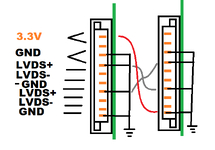
Excuse the crudeness of the drawing - this is the best way I can visually explain this. Even though that connector is different on the newer panel, and it happens to match 180deg off, the positions in which the wires go probably didn't change. This is an oversimplification of what a display connector typically is because I can't be bothered drawing the full thing properly.

When you twisted the cable around so that it fit the connector, what probably happened is that some grounds still matched up in the flipped position, represented there by the two gray lines in the middle. 3.3V ended up where a ground should be, and with that, the machine is trying to power the panel but sending 3.3V straight into a short circuit.

What the layperson fix is: fixing/replacing the motherboard, replacing the panel with a compatible one that has the connector in the correct orientation. Basically a new powerbook.
 

Attachments

  • 1764876387937.png
    1764876387937.png
    17.9 KB · Views: 6
View attachment 93032
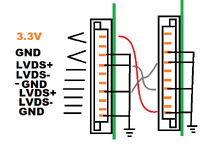
Excuse the crudeness of the drawing - this is the best way I can visually explain this. Even though that connector is different on the newer panel, and it happens to match 180deg off, the positions in which the wires go probably didn't change. This is an oversimplification of what a display connector typically is because I can't be bothered drawing the full thing properly.

When you twisted the cable around so that it fit the connector, what probably happened is that some grounds still matched up in the flipped position, represented there by the two gray lines in the middle. 3.3V ended up where a ground should be, and with that, the machine is trying to power the panel but sending 3.3V straight into a short circuit.

What the layperson fix is: fixing/replacing the motherboard, replacing the panel with a compatible one that has the connector in the correct orientation. Basically a new powerbook.
Thanks very much for this diagram.

I find it absolutely bizarre, and incredibly frustrating, that any manufacturer would produce panels with the *exact same model identifier* but with this one connector flipped the /opposite direction/. WTF? Thereby causing the machine to literally become permanently damaged just by connecting it. That just seems absurdly ridiculous to me.

Anyways, I'll be on the lookout for a new motherboard. And will be MUCH more careful when trying to find yet another replacement display panel. What a fail.
 
Thanks very much for this diagram.

I find it absolutely bizarre, and incredibly frustrating, that any manufacturer would produce panels with the *exact same model identifier* but with this one connector flipped the /opposite direction/. WTF? Thereby causing the machine to literally become permanently damaged just by connecting it. That just seems absurdly ridiculous to me.

Anyways, I'll be on the lookout for a new motherboard. And will be MUCH more careful when trying to find yet another replacement display panel. What a fail.
Yikes, I bought my replacement Samsung panel from this same eBay seller, although a different listing. Mine was a little more expensive and looked exactly like the original display from my iBook. It worked great when I installed it (although I did initially have some issues with the display turning pinkish).

It’s strange that they apparently sell both the correct panel and one with the connector flipped. Not sure I’ll risk buying from them again in the future.

So sorry that this happened to you and I hope that you can get your iBook up and running again soon.
 
Would you be willing to link the one you purchased? I don't see anything else labeled as LT121SU-123 for sale by this seller.

Sent them a note about this, we'll see what they say. What a mess
 
Would you be willing to link the one you purchased? I don't see anything else labeled as LT121SU-123 for sale by this seller.

Sent them a note about this, we'll see what they say. What a mess
Ok, so I went and looked and the seller I bought mine from isn’t the same seller you used… but has a near identical name and the exact same image with a slightly different watermark. I bought from appw6532, and you bought from appw6532_64. Not sure if it’s the same person/company behind both or one is imitating the other. This is all so weird.

Here’s the link to the listing I used: https://ebay.us/m/NqYRqr
 
Looking at this listing side-by-side with the one I purchased, they appear to be identical. The date/time stamps on the photos are even the same. So it's bizarre you received one that worked and I didn't!

So yeah I'm not gonna be buying another one of those, for obvious reasons. What a disappointment. I'll have to hold off until someone can actually forward a source that's reliable and tested-working with THIS machine.

But thanks for sending either way!
 
So I've been going back and forth with the seller, and they have suggested that I snip off the plastic clips on the cable's side of the connector (thereby making it non-directional) and hook it up.

Does anyone see any problem with that approach (@GRudolf94 ?) I can't see why it wouldn't work ... but I also said this before frying the board. Lol.

Obviously the panel still won't work until I get a replacement mobo, but maybe this could make the panel work.
 
That stinks!

I may have a 366 MHz iBook motherboard somewhere, but the connector for the display backlight is broken with a torn up trace or two.

I suppose if that could be repaired, it could work (it was fine otherwise, and I could see normal things when I shined a flashlight at the display).

This reminds me of the time back in 2015 when I bought myself a 15" 2012 MacBook Pro (to upgrade from my 2009 MBP), but I wanted the antiglare (matte) high resolution display (the one I got had the standard display, which in retrospect I should've just kept). I also wanted the fastest CPU option – 2.7 GHz – which made finding used examples with both rather hard (I could find 2.7 GHz models with the standard display all day long). So I came up with the "bright" idea of buying a standard-res 2.7 GHz MBP and then buying a HiRes display as an upgrade and install it myself.

It didn't go well. The HiRes display I bought had lines in it, and while I was trying to wiggle the connector to see if I could make them go away, I heard a little zap and saw a puff of smoke.

I fried the MBP's onboard video port!

It otherwise worked fine, so I used it with an external monitor for awhile until I eventually got it fixed (it was too new for replacement logic boards to be easy and cheap to find. Especially one with the 2.7 GHz option).

I managed to get my money's worth out of it, but it was never quite right, and I eventually had to retire it because it was just getting too flaky (getting a mug of hot tea spilled on it didn't help).

This was also a costly endeavor: the MBP itself was $1,500, the HiRes display was about $200, and I found a shop in Fremont, CA that repaired it for I think another $1,000 or so. Basically, I had to buy the stupid thing twice.

All because of the display!

I posted a thread on here back then with all the gory details, if you care to take a look.

c
 
Thanks; yeah if it's also damaged probably wouldn't be of use. I think I have a lead on a mobo from someone on Reddit but still TBD.

I don't actually see any visible damage on this board and I also definitely wouldn't have the skills to repair it anyways, so a replacement is just gonna make the most sense in this case. Even if I have to wait a while to find one.

Sounds like you had a similar experience! Compatibility is often an illusion... That sucks.
 
So I've been going back and forth with the seller, and they have suggested that I snip off the plastic clips on the cable's side of the connector (thereby making it non-directional) and hook it up.

Does anyone see any problem with that approach (@GRudolf94 ?) I can't see why it wouldn't work ... but I also said this before frying the board. Lol.

Obviously the panel still won't work until I get a replacement mobo, but maybe this could make the panel work.
That should work. Your board should be fixable, too, although that'll require component-level rework, obviously.
 
Great, will try that once the replacement mobo arrives. I'll obviously be hanging on to the original mobo and will try to have it fixed up sometime in the future.
 
Well, the replacement motherboard fell through so this project is unable to proceed until I can find one. If anyone has a spare 366 MHz FireWire iBook G3 clamshell motherboard, please do let me know. A 466 MHz board would also work, as would a parts machine at a reasonable price.
 
Back
Top