• Hello MLAers! We've re-enabled auto-approval for accounts. If you are still waiting on account approval, please check this thread for more information.

PB 190cs LCD restoring

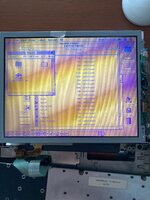
Hi everyone, I'm trying to restoring a vinegar syndrome victim: a PB 190cs LCD display. After various readings and videos i decided to replace the polarizing films on the LCD of a PB190cs. So I tried with 2 films from Aliexpress with angles of 135° for the back and 45° for the front. I read somewhere that does not matter the angle values but the fact the difference in angles must be 90°.

After a looot of work, I've been able to replace both films but so far the result has been terrible: the image is clear but colors are toned to yellow and blue. It is darker also seems like the light from the LED panel has been significantly reduced compared to before where apart from the vinegar problem the display was ok.

What could be the problem? Wrong angles maybe? I suspect original Angles where 0° bottom and 90° top.

Thanks for any suggestions.
 

Attachments

  • IMG_2169.jpg
    IMG_2169.jpg
    751.9 KB · Views: 24
Have you tried rotating the polarizing films in various directions during use - does the image improve that way? The film on top you could have loose and rotate around with you looking through it.
 
Have you tried rotating the polarizing films in various directions during use - does the image improve that way? The film on top you could have loose and rotate around with you looking through it.
Yes, I've done several rotation trials before and I'm afraid this is the best result :rolleyes:
 
For a cheaper option look out for larger size films made available for Gameboy DMG restorations, I must admit I got nowhere with the expensive STN film with restoring an IBM Thinkpad - just all white.
 
@3lectr1cPPC @Byrd thanks for the suggestions, I didn't know anything about FSTN films.
Before to waste more money, I did an interesting test: in the photo you see a PB190 LCD where I removed the original front and back films.
Then I inserted a test area at the top right with with a piece of the films I purchased while at the top left a test area with piece of original films, the very ones I had previously removed, of course reinserted respecting the original orientation.

As you can see there is not much difference, colors are barely visible but both are yellow!🤯

Why? This is a mystery to me. What do you think about it?
 

Attachments

  • IMG_2165.jpg
    IMG_2165.jpg
    2.6 MB · Views: 12
FSTN film, to my knowledge, is just TFT film with an extra retardant layer in it. This layer in my experience does not come up with the main film and requires significant mechanical removal to get rid of. (It does always get damaged by the vinegar syndrome so you have to replace it). For this reason, film removal is much easier on a TFT panel compared to a DSTN panel like yours.
That’s all to say - your piece of the original film is likely missing that extra layer, so it looks the same as your new TFT film.
 
FSTN film, to my knowledge, is just TFT film with an extra retardant layer in it. This layer in my experience does not come up with the main film and requires significant mechanical removal to get rid of. (It does always get damaged by the vinegar syndrome so you have to replace it). For this reason, film removal is much easier on a TFT panel compared to a DSTN panel like yours.
That’s all to say - your piece of the original film is likely missing that extra layer, so it looks the same as your new TFT film.

Now it's clear to me, obviously when removing the old film I eliminated everything including the extra layer and this explains why they now they look the same. Ok at this point all that remains is to get FSTN film and try. I appreciated your help, thank you very much!
 
The problem does extend to grayscale and black/white displays as well - on those the image will appear too green (or otherwise have incorrect colors) and the contrast adjustment won't work correctly.
 
Back
Top