• Hello MLAers! We've re-enabled auto-approval for accounts. If you are still waiting on account approval, please check this thread for more information.

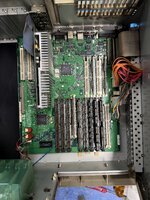
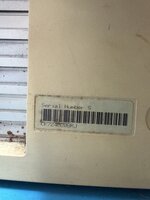
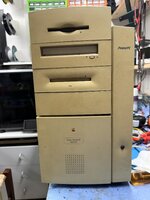
I got a Power PC 8600/200

I was given a Power PC 8600/200.
'm not really passionate about these kinds of machines; they are heavy, the plastic is brittle, they are large and with a questionable design (they are ugly).
I did not power it up. I could dissassble it, clean brush, replace caps (even if they look ok), check the PSU, bench test it, maybe a retrobright and then seiiing it.
If it does not work, I could save the ZIP drive (USB, IDE, SCSI??), the floppy for my beloved LCIII, RAM ... I did not check yet the specs. The HD is still there.

Is there any value in this thing? What would you guys do?


IMG_1777.JPG

IMG_1780.JPG


IMG_FB965159-82DD-452C-8DE4-8772CB4EEAF0.JPEG

View attachment IMG_1781.JPG
 
Last edited:
If you are not passionate about it, it makes sense to get a good overview of its condition, maybe recap the logic board, and then pass/sell it on to someone who will appreciate it more. Remember that not everyone who wants an 8600 knows how to recap, so the next owner might appreciate it!

My experience of macs from this period (5500/6500/etc.) is that the caps are in the early stages of leaking.

Also you can put BeOS on there 😀
 
It’s a nice machine. I had one for several years. I‘m not sure if this floppy drive will fit in an LCIII.
 
Mine is booted with Jaguar Server on a FireWire drive with a helper app. What’s good about Jag Server is that classic Mac OS networking can connect to it. Makes a great file server and has space for an archive.
 
So I put a generic pci FireWire card in my pm 8600. I added a 250 GB external HDD via an enclosure I’ve had for a while which has FireWire and USB. Booted in Mac OS 9.1, running Xpostfacto its possible to boot Mac OS X 10.2.8 or Mac OS X 10.2.8 Server with a helper drive such as a partition on the internal HDD. Once configured within Mac OS 9.1, on reboot the Power Macintosh 8600 will start out booting from the internal HDD helper partition which doesn’t need to be very big. Then at some point during boot it will continue from the 10.2.8 partition on the FireWire drive. Then it will be fully booted from the FireWire drive. On the FireWire drive, I’ve setup a software archive on several 2 GB partitions on the ATA drive that is in the FireWire enclosure classified by topic. Then those partitions are shared via AppleTalk using 10.2.8 Server to several compact and LC Macs via AppleTalk.
All of this is because 10.2.8 Server can join an AppleTalk zone and will allow Macs with Classic networking to connect to its shares.
You can skip the need for a helper drive if you can install Jag Server and what you want to have on it onto a large enough scsi or scsi emulated drive. The helper partition is optional but is needed for booting from anything on the pci bus because I haven’t found a way to boot from any pci connected device on this Mac. Perhaps it’s the generic FW card. You’ll still need Xpostfacto on a partition running Mac OS 9.1 to run the 10.2.8 Installer or 10.2.8 Server installer and Xpostfacto is also the boot loader.
It has (25) 2 gigabyte partitions for archiving of classic installers and things.
This in conjunction with AppleTalk Internet Router on my Performa 400 creating zones and offering LocalTalk support via PhoneNet and Apple Remote access is a classic Mac internal network with large storage which provides full access to classics Macs without the need but also supporting AppleTalk over TCP/IP which requires OpenTransport and ANS 3.7.4 iirc which some Macs do not support because of memory limitations among other reasons. A Macintosh running SSW 6.0.8 can connect to its shares.
 
Last edited:
For full automation of new downloads from the internet via a Modern Mac or iPhone to the Jag server I’ve setup folder actions on a Mac Mini running 10.6.8. The modern mac downloads something from the Macintosh garden or anywhere upon user request. it will save to a special folder on the 10.6.8 Mac mini in a folder designed by user at time of download. The folder action running on this special folder upon receiving new items will run and will copy the unexpanded download onto the 10.2.8 server archive into the shared partition with the same share name as the folder name of the folder it was downloaded to on the 10.6.8 Mac Mini. Then it’s deleted off the 10.6.8 share. Works flawlessly
 
Last edited:
The 8600 is also a great machine for capturing and even editing old analog videos. It has A/V connectors in the back and if you attach a VCR or camcorder to it, you have a great machine for digitizing your old tapes. I do this on my 9500 (with a dedicated PCI card as it doesn't have the A/V inputs) and it works perfectly. I live in France and it is the best setup I have found to correctly read and encode SECAM tapes (popular format in France at the time)

You can also upgrade this machine quite a lot and it was the last Mac to run System 7. So you can easily make it the ultimate System 7 Mac running those old CG software at full speed! You can find more info at system7today (select 8600/9600 in the list).

I personally see great value in those high end pre-G3 Macs.
 
I’d advise using the HDST Integrity app by Intech on the Firewire drive to check for data corruption issues. Back when Firewire PCI cards came out, I lost about 5% of my data to corruption on my 8600/200’s Firewire hard drive. HDST Speedtools as the Firewire driver allows for certain settings to be changed that, while slowing the data transfer to some degree, puts a stop to data corruption.
 
Back
Top