I recently got the laserjet for cheap to satisfy all my vintage printing needs.
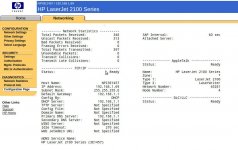
It worked perfectly for my windows 3.1/95 machines ( via the parallel port/ the installed Jetdirect 620n ethernet card) ,my OS 8/9 vintage mac ( via the localtalk/serial port) and even by Linux mint PC (via the ethernet port)
However while I can print from those windows machines when the laserjet was connected to my home network via the ethernet port, those OS 8/9 macs could never see the printer.
I have installed the mac driver from hp
https://support.hp.com/us-en/drivers/selfservice/hp-laserjet-2100-printer-series/25469
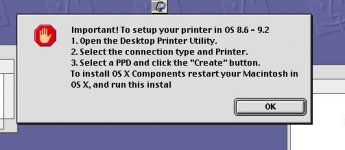
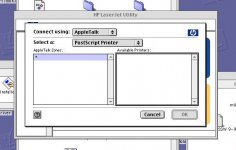
After driver installation, I followed the instruction and try to create the PPD file for the printer with the hp printer utility but it couldn't see any printer connected via Appletalk
even though I had make sure the Apple laserwriter 8 extension was there and the Appletalk set to be active over the mac ethernet port through the Appletalk control panel
After some googling, I tried to set the laserjet as an IP printer with OS 9's desktop printing utility. But it still didn't work after entering the IP address of the printer.
Though I can print with direct connection, I very much hope I can make it work as the ultimate vintage network printer for my home network
It worked perfectly for my windows 3.1/95 machines ( via the parallel port/ the installed Jetdirect 620n ethernet card) ,my OS 8/9 vintage mac ( via the localtalk/serial port) and even by Linux mint PC (via the ethernet port)
However while I can print from those windows machines when the laserjet was connected to my home network via the ethernet port, those OS 8/9 macs could never see the printer.
I have installed the mac driver from hp
https://support.hp.com/us-en/drivers/selfservice/hp-laserjet-2100-printer-series/25469
After driver installation, I followed the instruction and try to create the PPD file for the printer with the hp printer utility but it couldn't see any printer connected via Appletalk
even though I had make sure the Apple laserwriter 8 extension was there and the Appletalk set to be active over the mac ethernet port through the Appletalk control panel
After some googling, I tried to set the laserjet as an IP printer with OS 9's desktop printing utility. But it still didn't work after entering the IP address of the printer.
Though I can print with direct connection, I very much hope I can make it work as the ultimate vintage network printer for my home network