• Hello MLAers! We've re-enabled auto-approval for accounts. If you are still waiting on account approval, please check this thread for more information.

Hp laserjet 2100tn via ethernet

I recently got the laserjet for cheap to satisfy all my vintage printing needs.

It worked perfectly for my windows 3.1/95 machines ( via the parallel port/ the installed Jetdirect 620n ethernet card) ,my OS 8/9 vintage mac ( via the localtalk/serial port) and even by Linux mint PC (via the ethernet port)

However while I can print from those windows machines when the laserjet was connected to my home network via the ethernet port, those OS 8/9 macs could never see the printer.

I have installed the mac driver from hp

https://support.hp.com/us-en/drivers/selfservice/hp-laserjet-2100-printer-series/25469

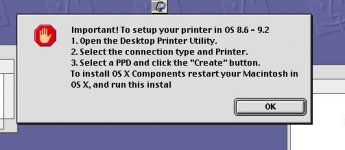
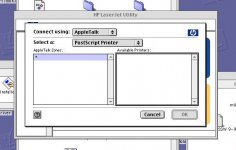
After driver installation, I followed the instruction and try to create the PPD file for the printer with the hp printer utility but it couldn't see any printer connected via Appletalk

even though I had make sure the Apple laserwriter 8 extension was there and the Appletalk set to be active over the mac ethernet port through the Appletalk control panel

After some googling, I tried to set the laserjet as an IP printer with OS 9's desktop printing utility. But it still didn't work after entering the IP address of the printer.

Though I can print with direct connection, I very much hope I can make it work as the ultimate vintage network printer for my home network


 
There is another JetDirect (610?) which has a serial port on it and which supports AppleTalk. this might help.

As far as I know, the generic laser printer driver is from Adobe and the laser printer must support PostScript.

Can it be that your printer only supports PCL?

 
There is another JetDirect (610?) which has a serial port on it and which supports AppleTalk. this might help.

As far as I know, the generic laser printer driver is from Adobe and the laser printer must support PostScript.

Can it be that your printer only supports PCL?
Thanks for your advice. But the 2100tn was a postscript printer and it did support Appletalk.

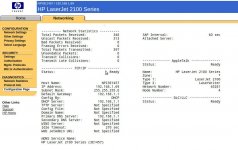
It has its own mac serial/localtalk port apart from the parallel port and the slot for the Jetdirect cart. My 620n Jetdirect card has only one single RJ-45 ethernet and it functioned as expected, printing from Windows / linux machines on the network. In fact the configuration page from the printer has clearly stated the Appletalk network was ready and indicated the printer IP address assigned

 
There is also a driver here [1] but i suspect it's the one you already have. There should be a HP Laserjet 2100 driver present in the Chooser and you should choose that rather than the LaserWriter 8 driver.

[1] https://support.hp.com/gb-en/drivers/selfservice/hp-laserjet-2100-printer-series/25469/model/14918

 
Make sure AppleTalk is enabled on the JetDirect card via its web interface (just punch in the printer's IP into a web browser). Someone might have turned it off.

 
Make sure AppleTalk is enabled on the JetDirect card via its web interface (just punch in the printer's IP into a web browser). Someone might have turned it off.
Almost forget there is a web interface, thanks

But the configuration page stated clearly  Appletalk is ready... X(

lasappt.jpg

 
I have a LaserJet 2100tn on my home network.     I am able to print to it from my System 8 and 9 Macintoshes.   The Macs and the LaserJet are all on my Ethernet network.   Nothing is on LocalTalk at this time.     I just use the LaserWriter 8 extension and create a printer with the PPD, IIRC.   Actually, it's been so long since I set it up, I really don't remember the details.

Is your setup all ethernet?  Or are the Macs on LocalTalk through some kind of LocalTalk to Ethernet bridge?

I have the 10/100 version of the JetDirect card. 

 
I have a LaserJet 2100tn on my home network.     I am able to print to it from my System 8 and 9 Macintoshes.   The Macs and the LaserJet are all on my Ethernet network.   Nothing is on LocalTalk at this time.     I just use the LaserWriter 8 extension and create a printer with the PPD, IIRC.   Actually, it's been so long since I set it up, I really don't remember the details.

Is your setup all ethernet?  Or are the Macs on LocalTalk through some kind of LocalTalk to Ethernet bridge?

I have the 10/100 version of the JetDirect card. 
Yeah, all etherent connections via built in/add-on Nubus ethernet card

my JetDirect card works as expected for printing from my linux box/Windows machines. But for the few powermac (9600/8100) I've tried, the hp printer program couldn't see the laserjet and thus not allowed me to create the PPD file.

So nothing to pick in the Chooser windows

Appletalk is set via its control panel to be active via the ethernet port before the driver installation. And  LaserWriter 8 extension has been loaded

1.The messagbox reminding me to launch the HP printer utility to create the PPD after the driver installation

2. Empty Appletalk zone *, no laserjet

I have tried direct connection via the localtalk port to the laserjet and I remembered i can see the laserjet in the HP printing utility program to create the PPD file, which allowed  me to pick the Laser 2100 via the Chooser

lj1.jpg

lj2.jpg

 
Go to "Network Settings" and then the Appletalk tab in the JetDirect web interface and check if its indeed on. Regarding protocols, The JetDirect supports Appletalk printing over native DDP, not TCP/IP, so any Mac (or Apple IIgs!) running Appletalk should see if it its connected to the same network. On the Mac side I've had trouble with Appletalk working correctly and fixed most all the problems with a PRAM zap.

 
I tested out printing to both my network printers from System 8.6 this weekend, the HP LJ2100TN and a Kyocera EcoPro 270N and the only problem I had was that at first AppleTalk wasn't pointed at my ethernet adapter.   I must have reset PRAM at some point.   After that the PPD based LW8 printers I had on my desktop worked fine and both printers show up in the Chooser, when I just click on LW8.  

Do you have the latest LW driver?  It think that LW8 was an update package at some point.  Wasn't it?

 
Back
Top