• Hello MLAers! We've re-enabled auto-approval for accounts. If you are still waiting on account approval, please check this thread for more information.

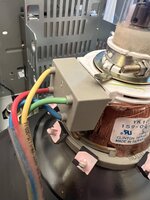
How do I access the solder points on the CRT?

Everything has been properly discharged. (x3)

Not sure how I'm supposed to get this gray cap off to get to the solder points?

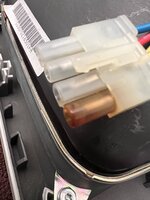
As you can see pin one has that burn issue.

Thanks for any help.
 

Attachments

  • 5F1E37E3-BC8E-464D-B98F-769C5529365F.jpeg
    5F1E37E3-BC8E-464D-B98F-769C5529365F.jpeg
    1.2 MB · Views: 34
  • 1AAD7EB6-63EF-4F07-9C90-7139DD662F3C.jpeg
    1AAD7EB6-63EF-4F07-9C90-7139DD662F3C.jpeg
    1.2 MB · Views: 33
Remove with this special tool or a similar tool.
molex 11-03-0006
Digikey order number WM9930-ND

But it's cheaper to process it with a new housing.
Header
molex 19-09-1049
Digikey order number WM1606-ND

Climp Terminal
molex 02-09-1102
Digikey order number WM1101CT-ND
 
Obviously make sure you reflow the sweep board, that burning is caused by excess heat in a cold joint. So usually both ends of the plug need to be replaced. I see this all the time :(

Also you can cut the wires to transplant a new plug. Just make sure you solder the wires cleanly and I advice two layers of shrink tube over the soldering. Back in the day I had to fix a few that way that were purposely cut.
 
Back
Top