• Hello MLAers! We've re-enabled auto-approval for accounts. If you are still waiting on account approval, please check this thread for more information.

High ho, Quicksilver!

Bunsen

Admin-Witchfinder-General
68040
Advertised as:

800MHz G4 tower with 512MB RAM and 40GB hard drive (self install)

17" Apple LCD

Turned out to be:

Dual CPU 1GHz, 512MB, 80GB self-install Seagate Barracuda

17" Apple Studio Display (ADC LCD)

Geforce 4MX ADC/VGA

Apple Pro Keyboard, Apple Pro Mouse.

Two of the above: AU$30 each (~US$27)

}:) Yyyyyyyeeeahhhh baby :rambo:

 
Cheers, compadre.

You got two of those for 27$?!
AU$30 each (~US$27)
But yeah, who's complaining? }:)

One's going to replace the DP533 DA as a PCI hosting music/video workstation; the CPU, LCD, and possibly video card from the other are probably destined for the Cube.

Kinda makes the DP500 I just picked up for it a little redundant :p

 
Well, I'm not sure I wanna tackle the mods needed to run the 133MHz bus DP1GHz on the 100MHz bus of the Cube. So the DP500 might yet end up in there instead.

By the way, picked that up from tangaishi on ebay for $35, shipped. They still have a couple, I think.

So yeah, I paid more for a DP500 processor than I did for an entire DP1Ghz system.

 
The real problem with a QS CPU in a cube isn't the buss speed, it's making it fit physically. If you figure that out, post pictures. I have a QS dual 867 CPU that I'd like to use in a cube. Buss speed is easy, since the multiplier resistor locations are posted on xlr8yourmac.com. The dual 500 is an easy CPU upgrade. Lay the coil on its side and drill holes in the heat spreader plate so it can rotate 90° to hit both chips.

 
Thanks H3NRY. I'll probably wait on the QS CPU upgrade till I transfer the Cube logic into a CC or SE- there should be plenty of room to work with then.

 
So the HD in the Cube fell over and died, forcing me to upgrade to my new silver tower of G4 awesome. I picked up a 200GB Seagate HD from a friend, made three partitions (X, 9 and general storage) and some unassigned space (for Linux and swap), and installed 10.4, auto updated to 10.4.11, and maxed the RAM to 1.5GB (i found an extra 512MB stick when I cleaned my room XD) They both came with a Pioneer DVR-104 DVD-RW, which I think was OEM.

It's amazing. I can actually do all this stuff on the web I've been putting aside till "later", like watch streaming video without skipping, Skype, Bittorrent, etc. This is the biggest performance jump in my main machine since I went from a 66 MHz PowerMac 6100 to a 300MHz Beige G3 back in 2000.

After the glorious silence of the Cube though, it's like having a vacuum cleaner for a companion. I might want to upgrade to a silent fan.

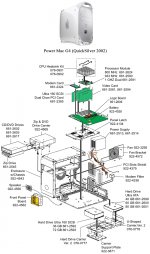
I was a bit mystified by the daughterboard between the Airport slot and the PCI slots. A quick search and this handy exploded diagram (attached) tells me it's a modem card. Which reminds me, I have a Stealth Serial Port for G4 kickng around somewhere :rambo:

Other potential upgrades in this machine's future:

  • Orinoco Wavelan out of a dead APBS
  • RAID - ATA, SATA, or Firewire (readable in OS 9 and *nix preferably but not essential)
  • USB 2.0
  • Apple 23" Cinema Display (if I can find a cheap LCD for the busted one I have here)
  • Video capture card
  • Audio DSP card
  • Firewire multichannel audio I/O
  • Front ports (if I can work out how to get the second optical bay door to open and close)
  • Maybe this


And, I know I've been a CRT holdout/LCD hater, but man these are nice displays :D

Quicksilver exploded.jpg

 
  • Orinoco Wavelan out of a dead APBS
I tried the same in my sawtooth and MDD - one problem you'll consistently run into is the fact that the black plastic antenna is too long for the case to close. I popped one of my cards over investigating whether or not it could be simply lopped off but there is, unfortunately, circuitry in there.

 
Yeah, I tried that, too. The WaveLAN card can be sort-of forced to fit in a clamshell iBook; and fits with some fiddling in a gumdrop iMac, but not in a PowerMac.

 
So does the WaveLAN card "just work"? You don't need to modify the card at all, other than making it fit in the case?

I wonder - would a PCMCIA format, AirPort Extreme compatible 802.11g card work in that slot and give you Extreme speeds? That is, some PCMCIA card that works in a PowerBook's PC card slot with unmodified AirPort Extreme drivers as if it were a real AirPort Extreme card.

 
Well, when I use the WaveLAN card in my iMac G3, PowerBook G3, iBook, and Power Mac G4, OS 9 drivers detect it as true-blue AirPort. I seem to remember OS X had some issues, but I haven't tried it on an OS X machine recently. (The AirPort card essentially *IS* an AirPort card; as bunsen mentioned, the original "UFO" AirPort base stations actually contain a WaveLAN card inside! That's where one of my WaveLAN cards came from.)

I don't know about Extreme-compatible ones. I wasn't even aware that there were Extreme-driver-compatible PCMCIA (not mini-PCI) cards. The sticking point I can see is that the AirPort slot is not a CardBus slot, but just a plain old fashioned PCMCIA slot; and I would imagine that all Extreme-compatible cards are CardBus. (PCMCIA is based on the old ISA standard, CardBus allows the same pins to transmit PCI instead of ISA, for CardBus cards. While the CardBus slot is backward-compatible, so the slot detects which type of card you have and sets itself to the proper mode; CardBus cards tend not to be backward compatible, only using the newer PCI interface.)

 
I doubt it - the AirPort slot is only a 16 bit PCMCIA slot - 802.11g cards require a 32 bit (CardBus) slot.

 
Okay, this is getting silly

I just went to the tip to offload a dozen crappy CRTs, and on the back of the pallet was:

A Quicksilver 733

A 23" Apple Cinema Display

A DR Bott DVIator

A polite word to the trashman, and away

:rambo: }:) :lol: 8-o 8-)

Testing to follow

 
Back
Top