• Hello MLAers! We've re-enabled auto-approval for accounts. If you are still waiting on account approval, please check this thread for more information.

Help with Classic II

LaPorta

68LC040
Hi everyone,

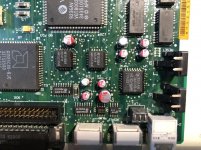
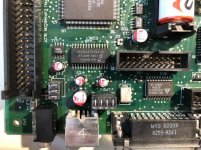
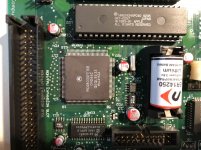
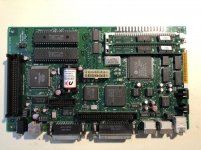
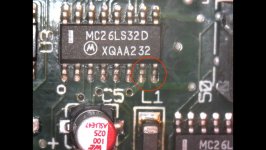
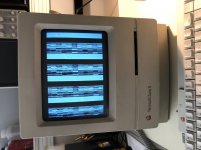
I obtained this Classic II a few days ago, and just finished re-capping it. It made a funny picture with no startup sound at all prior to the recap. It still does the same now. There was no battery explosion, just cap goo that I cleaned. It’s possible that there is an eaten trace somewhere, but I can’t see anywhere that is terribly damaged. The traces under the caps looked just fine. I’ll include board photos and how the screen looks. I can’t decide if it is a funky checkerboard pattern or not. In addition, it has two RAM sticks inserted. Also, the RAM jumper is not installed...if I recall, that is done with max RAM, correct?332C5CEB-9A6E-483C-AC57-9FE9649F1356.jpeg
3D7CCE35-5AC8-4AF5-BCC0-1787BC6A92BD.jpeg

E1947510-F3ED-47C6-8359-73220C057D73.jpeg

B56902BC-13B0-408B-8CE4-2A67BA36FBFF.jpeg

E0A7B4B0-E6D5-44ED-9190-92BEEFD27BB6.jpeg

 
Nice job on that recap!  It looks nice and clean, and I really dig the way solid polymer caps look on these boards  8-)

Do you have access to a working Classic or Classic II that you could try this motherboard in?  It’d be good to rule out the analog board.

No idea about the RAM jumper.

 
I do have a working Classic, I could try that out, that was my next step. Thank you as well: this was the first time that I used paste and hot air to mount the caps. It was a huge help, especially in the tight areas between connectors. I've melted some before with the iron.

 
Check the voltages at the floppy port, must be 5 and 12 V. If the 5V is lower than 4.7V the classic may not boot.

If it does not chime, then there can be a problem with the ROM. Reseat and clean ROM and RAM.

 
Voltages are just a hair low, not too far out of spec. I suspect due to the addition of the extra RAM and no adjustment in the past. Pulled and reseated the ROMs, no difference. The pins are all squeaky clean, no corrosion or cap goo under the slots.

 
Been checking traces. I see there is continuity between two neighboring pins of U3. Not sure if this is because they are shorted, or they simply are in circuit somehow. I have no other Classic II to test against, and no schematic. The circled pins are the ones showing continuity. Can anyone test theirs or knows if they are supposed to be? Also, any Classic II schematics out there?

U3.jpg

 
This is turning into a self-help post...I got the BOmarc schematics, and it looks like U3 is a serial chip anyway...don't think this would cause this issue.

 
Update: tried this in a known-good Classic: same thing. Found one not-so-great via that I patched up...same. I'm grasping at straws here. Looking all over in the vicinity of the caps to no avail. What's next, removing all the surface mount chips nearby and looking there?

 
The U10 is most of the time the culprit. 

Egret

contamination is an issue, i will removed it clean underneath, and put it back. 

 
Looking at the schematic and what the Egret does, I came to thinking that might be the case. That’s a hefty chip there, and I don’t think i have exactly the right hot air nozzle size. Any experience taking it up using desolder braid and an iron?

 
Not a chance. 

You will end up with a nasty job at least. 

Hot air is the way to go, i see goo under the chip. 

 
I figured. Is there a good way to get it off without the exact right nozzle? Or do you know the number of the right one to use? Putting it back is no problem.

 
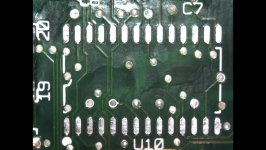
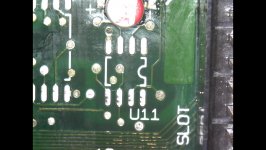
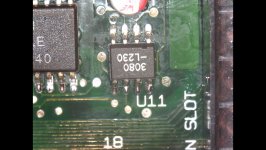
At Bibilit's suggestion, I removed the EGRET U10, and U11 being nearby. Neither Seemed to have much happening underneath, though I cleaned the area well. Here are the photos of underneath. I hope I don't have to take off the 030...

U10.jpg

U11.jpg

 
Last edited by a moderator:
Replaced both chips after cleaning their legs as well. Not a bad hot air solder job for the second time ever putting chips back, I don't think. Unfortunately, the same resulting issue remains :(. Oh well...maybe there is something under the 030...unless theres any other ideas.
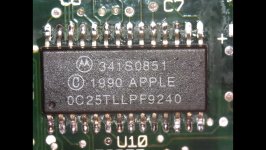
U10 Rep.jpg

U11 Rep.jpg

 
Are you sure the pins on both edges of the upper side of the Egret are attached correctly?

It looks like there is no solder on the pads.

 
Yes, actually...sorry, there was crazy reflection. Thank you for your input, Bolle. I am still getting the hang of this hot air work.

The good thing is I did manage to get it to start. I noticed there was more gunk than I previously saw under RAM chips U13 and U14, I removed those, cleaned up, desoldered, and the machine started with no issue at all. Looks like this thing has 7.6 on it, and the extra RAM brings it to 10 MB, so not too shabby. Internal HD still works.

There is no sound, but I suspect that is due to some sort of sound chip issue similar to the RAM issue. I will look over that area with scrutiny soon (U4 is first on my list, since it, too, sits in that cluster of caps).

 
Last edited by a moderator:
Thank you everyone for helping guide me more in the right direction. Every day I learn something new from the members here!

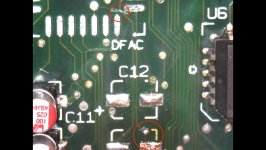
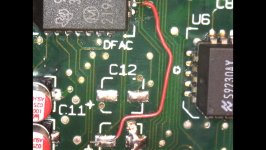
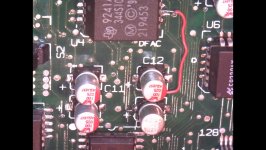
I removed the DFAC chip, and there was gunk under there. The other thing I finally noticed was that there were two traces that were cut: both doing from the DFAC to capacitor C15. In the first photo, I circled the two areas that were broken. The upper I may have inadvertently done while removing the ship, but the second I am not sure how I happened:

Broken.jpg

I then patched the lower with some of my adhesive copper strip cut to size, and the upper one with a wire after the chip was reseated:

Patch.jpg

And the final is seen below. The final result: rewarded with crisp, clear sound! Thank you again, everyone!

Final.jpg

 
Back
Top