• Hello MLAers! We've re-enabled auto-approval for accounts. If you are still waiting on account approval, please check this thread for more information.

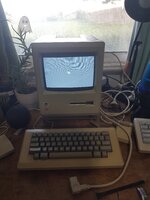
HELP - 512K won't power up

I’m also awake at a silly hour. Seems Mac fanatics are always up at weird hours to help each other out.

I’d start with the basics - when you say you power it on and nothing, do you mean no display and no chime? Make sure the brightness is turned up. Your board likely needs multiple solder joints reflowing, in particular the yoke connector and logic board power ones. High temperatures in the compacts without a fan cause the analog board to overheat and hence the solder joints to crack.

Analog boards carry high voltages that can kill you - please make sure you discharge the CRT before working on it and don’t poke around there with it powered on unless you really know what you are doing.
 
I’m also awake at a silly hour. Seems Mac fanatics are always up at weird hours to help each other out.

I’d start with the basics - when you say you power it on and nothing, do you mean no display and no chime? Make sure the brightness is turned up. Your board likely needs multiple solder joints reflowing, in particular the yoke connector and logic board power ones. High temperatures in the compacts without a fan cause the analog board to overheat and hence the solder joints to crack.

Analog boards carry high voltages that can kill you - please make sure you discharge the CRT before jerking in it and don’t poke around there with it powered on unless you really know what you are doing.

Yes that's true. Being in Australia means everyone in the US is asleep during the day here, making things hard for us. I appreciate the help though.

Symptoms:
No display
No chimes
No ticking or anything

I'll reflow stuff too, as removing the connectors the first time I took things apart probably cracked the already-weak joints. I always discharge my CRTs before working on them, so I'm okay there.

Do you know of any safety measures you use? I am not allowed to keep working until I am an expert on high voltage safety.
 
Do you know of any safety measures you use?
Honestly, all I’ve ever done when working with analog boards is discharge the CRT. I’ve never taken any other measures. Like @Phipli said, discharging capacitors is a sensible measure as you can get a whack from those although I never have.

If you need to poke around with it powered on for doing screen adjustments for example, then wear thick rubber gloves and keep one hand behind your back. Have someone else with you.

Analog boards are a power supply with some video circuitry on the same board. So all the same rules apply as when working on a power supply. I don’t touch stuff I don’t need to, and I defer to whatever guidance I can when I don’t understand something.

I am definitely not an expert in this area, I’ve probably recapped/repaired about 15 analog boards but I don’t think that makes me an expert.
 
Honestly, all I’ve ever done when working with analog boards is discharge the CRT. I’ve never taken any other measures. Like @Phipli said, discharging capacitors is a sensible measure as you can get a whack from those although I never have.

If you need to poke around with it powered on for doing screen adjustments for example, then wear thick rubber gloves and keep one hand behind your back. Have someone else with you.

Analog boards are a power supply with some video circuitry on the same board. So all the same rules apply as when working on a power supply. I don’t touch stuff I don’t need to, and I defer to whatever guidance I can when I don’t understand something.

I am definitely not an expert in this area, I’ve probably recapped/repaired about 15 analog boards but I don’t think that makes me an expert.
Thank you, I'll take these ideas onboard.
Do you have any clue what could be the issue? Once my parents are home I will try reflowing and maybe looking for cracked solder joints.
 
Okay I'm back (my parents have returned and my sister is now on standby in my bedroom as I'm working).
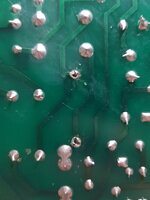
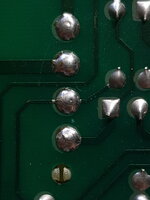
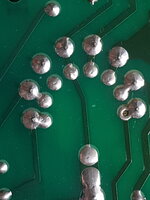
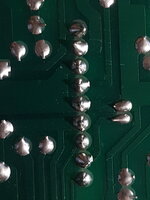
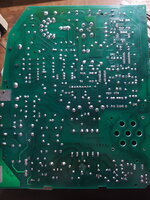
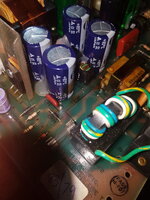
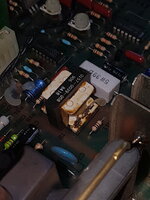
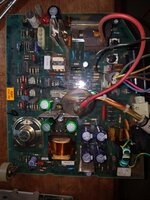
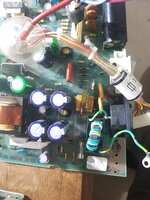
I've attached some photos. The yoke power connector solder looks cracked (to me at least), but aside from that I can't see anything out of the ordinary.

Let me know what you guys think!

P.S According to a table of flybacks, the one in my 512K appears to be a bleeder variant! That explains the lack of a pop when discharging the CRT.
 

Attachments

  • C37 Removed.jpg
    C37 Removed.jpg
    1.3 MB · Views: 19
  • Yoke solder joints.jpg
    Yoke solder joints.jpg
    1.1 MB · Views: 12
  • Flyback (Bleeder type).jpg
    Flyback (Bleeder type).jpg
    1.1 MB · Views: 11
  • Logic board.jpg
    Logic board.jpg
    1.1 MB · Views: 12
  • AB.jpg
    AB.jpg
    1.8 MB · Views: 10
  • C37 (ground zero).jpg
    C37 (ground zero).jpg
    1.7 MB · Views: 10
  • Whatever this thing is.jpg
    Whatever this thing is.jpg
    1 MB · Views: 9
  • AB top.jpg
    AB top.jpg
    1.7 MB · Views: 8
  • C37 area.jpg
    C37 area.jpg
    1.5 MB · Views: 13
Start with the basics that have been mentioned in almost every thread concerning these machines. After reflowing/adding fresh solder to the joints on all connectors and heavy components, check the voltages at the external floppy connector. Check that the fuse isn't blown.

X2/Y2 class RIFA caps are not required for operation on any of these systems.

Regarding safety: the large caps after the bridge rectifier are the ones on the analog board that will give you a nasty bite, but they ought to discharge by themselves in under an hour (and that's being generous). If you unplugged the Mac right after it was shut off, and you had that plastic sheet removed, they're in an area of the board that you easily could've touched and gotten zapped.

Best thing I know to do, as unhelpful as it may sound, is to constantly mentally take note of where your hands are. Also have the Mac oriented on your desk/workbench such that you won't have to reach around it or move it around *at all*. If you need to take measurements, have a list ready of what you need to do, switch the Mac on, go through the motions, and switch it off, again constantly keeping track of where your hands/probes are.

Whenever possible, try to have one hand in your pocket, especially when doing screen adjustments like joshc mentioned.
 
Okay update!

Thank you AwkwardPotato for your information.

I decided as a last ditch attempt to put the C37 RIFA capacitor back in, and voila! It works again 😁
I'm unsure why this is the case, but I just thought maybe that's why.
Since the capacitor isn't needed, I won't replace it now, I'll just leave it in until I place another order with Element14 (still waiting for those damn capacitors for my SE's PSU!).

Thank you so much everyone for your help. It's amazing to see how the vintage Mac community comes together to help others!
 

Attachments

  • 20221120_175535.jpg
    20221120_175535.jpg
    1.6 MB · Views: 16
Glad to see it's working again but there's likely still a bad solder joint somewhere waiting to rear its head again. That or something wasn't connected properly the first time you were testing it. Would be a good idea to go through and add some new solder to all the joints on parts that are heavy and/or get hot (not just connectors and flyback, but also the switching transistor(s) in the power supply, switching transformer, rectifiers, etc).
 
Glad to see it's working again but there's likely still a bad solder joint somewhere waiting to rear its head again. That or something wasn't connected properly the first time you were testing it. Would be a good idea to go through and add some new solder to all the joints on parts that are heavy and/or get hot (not just connectors and flyback, but also the switching transistor(s) in the power supply, switching transformer, rectifiers, etc).

I'll do that when I replace the RIFA. I checked the flyback and the solder looked okay but I will still add more solder to it. Do I remove the old and add new or add more to the old?
 
You could do either. Removing the old and adding new would take longer but look cleaner. Adding just a little more to the old also adds the flux from the new solder to the joint (necessary to fix a cold joint). Applying liquid flux and then reflowing the joints with the soldering iron would have the same effect.
 
You could do either. Removing the old and adding new would take longer but look cleaner. Adding just a little more to the old also adds the flux from the new solder to the joint (necessary to fix a cold joint). Applying liquid flux and then reflowing the joints with the soldering iron would have the same effect.
Okay thanks.
 
Just to update: I still haven't replaced it because I am lazy and didn't place the order. Will do someday.
Still working and rock solid, not sure why it caused a fuss, but I guess it was required to connect AC power to the board? Who knows.

Either way no other problems with the mac :D
 
Replace the RIFAs. They are cracked and at the end of their life. They blow up and release quite a nasty smelling smoke when they go.
 
Replace the RIFAs. They are cracked and at the end of their life. They blow up and release quite a nasty smelling smoke when they go.
That was the only one. C33 and C36 are ceramic, and the big guy is blown, so no harm keeping it in there.
 
A few posts back joshc mentioned precautions to take if you are making adjustments to the CRT. Adding to that, only use plastic tools to make adjustments, never metal. Sets of plastic TV adjustment screwdrivers are cheap.
 
Back
Top