• Hello MLAers! We've re-enabled auto-approval for accounts. If you are still waiting on account approval, please check this thread for more information.

HD SCSI for PowerMac 7600

Max is @max1zzz on these fora.
Send him a private message (PM) and ask him.
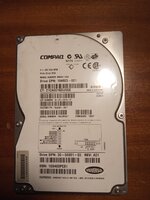
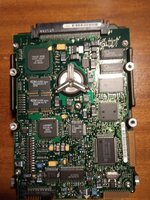
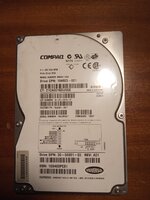
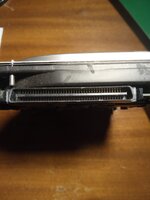
Okay, I'll contact him if plan A doesn't work. I tell you news. I attach HD photos that I bought.

If you look at the label, it includes the text LVD/SE. So this HD will allow me to terminate the SCSI chain? Should it have a jumper to activate it or is it already activated by default?

I will appreciate instructions on how I should configure the HD, my intention is to install OS7.6 and OS8 on it, in two partitions.

Since I have already bought the HD and the adapter, I will try first, otherwise I will contact MAX.
 

Attachments

  • IMG-20231206-WA0009.jpg
    IMG-20231206-WA0009.jpg
    87.8 KB · Views: 5
  • IMG-20231206-WA0010.jpg
    IMG-20231206-WA0010.jpg
    150.4 KB · Views: 5
  • IMG-20231206-WA0011.jpg
    IMG-20231206-WA0011.jpg
    286.5 KB · Views: 5
So this HD will allow me to terminate the SCSI chain?
No, SE stands for Single Ended. It doesn't mean the disk has built in termination but is to do with how the data signals are sent electrically. Early SCSI was all SE, and a newer disk with SE means it is backwards compatible in that specific sense.
Should it have a jumper to activate it or is it already activated by default?
SE usually needs a jumper fitting to enable, but you'll want to grab the manual for the hard disk if it doesn't say on the label.
I will appreciate instructions on how I should configure the HD, my intention is to install OS7.6 and OS8 on it, in two partitions.
It varies depending on the disk sorry. The manual will help you. You'll want your disk terminated, and to set a scsi ID (on the adapter). The adapter will come with instructions, be warned the last one of those I bought came with a jumper shorting the LED output so you MUST check the jumpers before powering it up.
 
No, SE stands for Single Ended. It doesn't mean the disk has built in termination but is to do with how the data signals are sent electrically. Early SCSI was all SE, and a newer disk with SE means it is backwards compatible in that specific sense.

SE usually needs a jumper fitting to enable, but you'll want to grab the manual for the hard disk if it doesn't say on the label.

It varies depending on the disk sorry. The manual will help you. You'll want your disk terminated, and to set a scsi ID (on the adapter). The adapter will come with instructions, be warned the last one of those I bought came with a jumper shorting the LED output so you MUST check the jumpers before powering it up.
Okay, thank you very much.

When I have the material I will carry out tests and tell you my results, although I am afraid I will have to buy the MAX adapter...

Do you have photos of this adapter?

:)
 
Hello, today I received the adapter. I have start with BlueSCSI 7.6 Install CD Image.

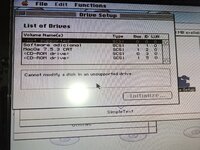
Well, it seems that it doesn't work, it recognizes the bus and the ID, but it gives me this message. Is it because of the termination?

What is "force single ended" option in the hard drive? it makes the same result, not supported.

I'm going to have to buy the good adapter.

IMG_20240102_131813.jpg
IMG-20231206-WA0010.jpg
 
Hello, today I received the adapter. Well, it seems that it doesn't work, it recognizes the bus and the ID, but it gives me this message. Is it because of the termination?

What is "force single ended" option in the hard drive? it makes the same result, not supported.

I'm going to have to buy the good adapter.

View attachment 67440
View attachment 67442
Not supported is fine, use the cracked version of the formatting tool... Give me a sec, I'll find a link.
 
Not supported is fine, use the cracked version of the formatting tool... Give me a sec, I'll find a link.

Find attached or for info:


Attachments

Thank you! I'm going to try it and tell you!

P.S. Is it possible that on the 7600 the termination is in the CDROM unit?
 
Possibly, but if it is it will only be terminating 8 of the data lines on the disk. The disk or adapter needs to be terminating the rest.
This drive may be one of the exceptions of wide disks working with only narrow termination applied. If it's showing up, and works reliably after formatting, it pretty much confirms that. A handful of U160 drives, and very few U320 drives, can work without the full bus terminated. Why some do and some don't, I really can't tell.

I have Seagate 2.5" U320 Savvios (IBM eServer branded) that work with the el cheapo adapter on a narrow terminated bus, for example.
 
This drive may be one of the exceptions of wide disks working with only narrow termination applied. If it's showing up, and works reliably after formatting, it pretty much confirms that. A handful of U160 drives, and very few U320 drives, can work without the full bus terminated. Why some do and some don't, I really can't tell.

I have Seagate 2.5" U320 Savvios (IBM eServer branded) that work with the el cheapo adapter on a narrow terminated bus, for example.
Yes, that's what I was saying, in that case the disk would be terminating the rest of the bus, or just not care. What I was saying was that the CD isn't the reason the setup is working as it is only terminating some of the bus.
 
Hi, let me revive this post. Shortly after those attempts, the PM7600 stopped booting. When I press the button, the LED lights up, but no chime, no image, or anything. If I press the button again, it immediately shuts off. It's been sitting idle for a long time waiting to recap the PSU, because I haven't changed anything since the last time it booted up.

Today I recap the PSU, but after installing it, I get the same result: no chime, no image, no boot.

Checking the RAM modules, I saw a single slot at the top, and when I checked its label, I see it says SIMM ROM. Does this model need a SIMM ROM? And if so, how did I get it working until then?

7600 ROM SIMM.jpg
 
I could be wrong but as far as I recall the 7xxx-9xxx series or therefore somehow had a rom slot as much as the rom was already actively onboard itself, the slot itself probably is some troubleshooting leftover that was retained in production for some apparent reason (on the other hand the 6xxx series did very much need a rom simm, again afaik!)
 
it shouldn't need a ROM SIMM unless you're missing these
1744235163416.png

moreover... it booted fine before, did it not? you wouldn't have got that far if it require a ROM SIMM.
 
thanks @finkmac I was sure I recall the rom slot being always empty under normal conditions (even then I only just now remembered something else, is this still the same story for the few nubus/pds-not-pci board in the same number range?)
 
Back
Top