

-
 Hello Guest! We're hosting a challenge to welcome vintage Intel macs to the MLA during the month of July! See this thread for more information.
 -
We've made some quality of life improvements to the Trading Post. More info here.
You are using an out of date browser. It may not display this or other websites correctly.
You should upgrade or use an alternative browser.
You should upgrade or use an alternative browser.
Guess the NuBus card
- Thread starter slomacuser
- Start date

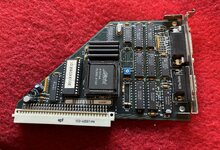
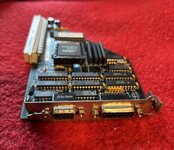




Looks like.Some kind of Black and white video card.
Is there anything written on the back @slomacuser?


I note a telltale MICRO CONV custom IC, which @finkmac observed on a different board on this thread.

As said on fb, I would say that it is a NuBUS version of Memory Plus video cards as it ressemble to my MODAM SE PDS one :
Post in thread 'LC slot card. What is it?'
https://68kmla.org/bb/threads/lc-slot-card-what-is-it.24210/post-563346
EDIT: sorry, same link as @stepleton ’s
Post in thread 'LC slot card. What is it?'
https://68kmla.org/bb/threads/lc-slot-card-what-is-it.24210/post-563346
EDIT: sorry, same link as @stepleton ’s
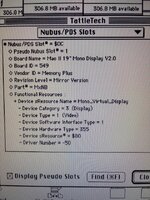
Glad to know  I’m almost jealous now
If you need drivers, you can try the one I backed up on the garden
I’m almost jealous now If you need drivers, you can try the one I backed up on the garden
So if I connect it to standard apple monitor would it work?
Maybe, hence the DA-15 connector if I’m not wrong.
About the driver, it seems to manage 15 and 21" but not 19.
About the driver, it seems to manage 15 and 21" but not 19.
Well it does not work with apple 13” monitor. Anyway If any interested in this card I can sell it, I do not need it as I have supermac ones…

Yeah, it is probably fixed timings for a specific 19" monitor. You might have better luck with a late model multisync CRT or very flexible LCD (some ViewSonics and HPs will work with just about any signal).Well it does not work with apple 13” monitor. Anyway If any interested in this card I can sell it, I do not need it as I have supermac ones…
Does it show the monitor resolution in TattleTech or Monitors?
Also, as said @finkmac you should dump the ROM to extend this collection and enhance these tools:

In order to flesh out device support in my DeclROM parser (ROM Fiend: A DeclROM, Extended DeclROM, and System ROM parser), I'm interested in testing and validating any and all DeclROMs you have!
For testing I've already collected quite a few, but I'm interested in unique versions not already posted on these forums, or any unique cards you might have.
I think it might be interesting to create a database of cards, scraped from the DeclROM data. But first we need the ROMs!
What I've tested and validated so far (including a few homebrew ROMs):
For testing I've already collected quite a few, but I'm interested in unique versions not already posted on these forums, or any unique cards you might have.
I think it might be interesting to create a database of cards, scraped from the DeclROM data. But first we need the ROMs!
What I've tested and validated so far (including a few homebrew ROMs):
Code:
./Audio/Digidesign/Audiomedia...- eharmon
- Replies: 67
- Forum: Peripherals
well then I need a guide for dummies as I am not familiar with extracting ROMsAlso, as said @finkmac you should dump the ROM to extend this collection and enhance these tools:
In order to flesh out device support in my DeclROM parser (ROM Fiend: A DeclROM, Extended DeclROM, and System ROM parser), I'm interested in testing and validating any and all DeclROMs you have!
For testing I've already collected quite a few, but I'm interested in unique versions not already posted on these forums, or any unique cards you might have.
I think it might be interesting to create a database of cards, scraped from the DeclROM data. But first we need the ROMs!
What I've tested and validated so far (including a few homebrew ROMs):
Code:./Audio/Digidesign/Audiomedia...
- eharmon
- Replies: 67
- Forum: Peripherals

Try SlotsGrab or SlotsMem from https://github.com/joevt/SlotsDumpwell then I need a guide for dummies as I am not familiar with extracting ROMs
They create a file or files in the same directory as the app so maybe rename them after they are created so you know where or when they came from.
So I go to Releases and downloaded the ZIP, I opened on Basilisk and there is no classic app? I have to compile it? I do not have programmers tools...Try SlotsGrab or SlotsMem from https://github.com/joevt/SlotsDump
They create a file or files in the same directory as the app so maybe rename them after they are created so you know where or when they came from.
The zip opens on modern macOS, then you transfer it to your old Mac.So I go to Releases and downloaded the ZIP, I opened on Basilisk and there is no classic app? I have to compile it? I do not have programmers tools...
I ended up with one of these in an SE/30. Obviously a video card, but what mysteries does it contain? Anyone got any context? :-D It is particularly annoying/intriguing that the identifiers have been sanded off the big ICs.
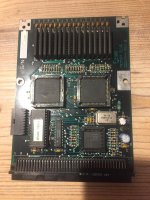
Looking for this card elsewhere, I found only two mentions of it online at all (though I may be missing something). Someone here had one with the board marked the same but with the ROM marked differently:
 68kmla.org
Someone over here had one with a ROM marked the...
Looking for this card elsewhere, I found only two mentions of it online at all (though I may be missing something). Someone here had one with the board marked the same but with the ROM marked differently:
Macintosh SE Accelerator PDS Add-on Cards
Hi Everyone I have two add-on cards for the Macintosh SE and/or SE/30 that I hope to get a bit of help identifying. I had confirmed they worked when I removed them from the original machines a long time ago but I did not record the information and I no longer have a machine to use at this...
68kmla.org
Someone over here had one with a ROM marked the...
- cheesestraws
- Replies: 26
- Forum: Peripherals
Ok, here are bins.
Similar threads


- Replies
- 35
- Views
- 1K
